
-
×InformationNeed Windows 11 help?Check documents on compatibility, FAQs, upgrade information and available fixes.
Windows 11 Support Center. -
-
×InformationNeed Windows 11 help?Check documents on compatibility, FAQs, upgrade information and available fixes.
Windows 11 Support Center. -
- HP Community
- Gaming
- Gaming Accessories
- Re: HP Reverb Pro - Black/Grey Screen

Create an account on the HP Community to personalize your profile and ask a question
Your account also allows you to connect with HP support faster, access a personal dashboard to manage all of your devices in one place, view warranty information, case status and more.

It has been a while since anyone has replied. Simply ask a new question if you would like to start the discussion again.

12-06-2019 11:23 PM
 HP Recommended
Product: HP Reverb Pro
Operating System: Microsoft Windows 10 (64-bit)
Hi, I purchased the HP Revreb Pro on Black Friday and after 3 hours (or so) I just get a grey screen when the unit switches on. I know I am in the WMR store/home as I can hear the sounds, but the screen displays nothing but grey.
My PC is 9900k/RTX2080/16GB/W10-64Bit 1909
HP Reverb Product Code: 6KP43EA
Actions I have taken to try & resolve the issue:
Updated GPU drivers
Used different USB ports (incl. USB powered hub)
Used different Disaply Port
Un-installed WMR software and started fresh
14 REPLIES 14


12-09-2019 06:02 PM
HP Recommended
@MagusUK Welcome to HP Community!
If you encounter performance issues with your HP Reverb Virtual Reality Headset, please check the following:
-
Make sure your system meets the minimum requirements:
-
Processor: Intel core i5 6th Gen CPU (or better) or AMD FX-4350 4.2Ghz (or better)
-
Graphics solution: NVIDIA GTX 1080 (or better)
-
Memory: 8GB DDR RAM
-
Available Storage: 10 GB
-
USB port: 1 USB 3.0
-
Video port: 1 DisplayPort version 1.3
-
-
Make sure your headset is connected directly to a USB 3.0 port and to a DisplayPort (not using adapters, docks, or converters).
Let me know how that pans out,
If you feel I was helpful, simply click on Accept as Solution to help the community grow,
That said, I will have someone follow-up on this to ensure you've been helped,
Just in case you don't get back to us within 24 - 48hrs, and have a good day, ahead.
Riddle_Decipher
I am an HP Employee
Learning is a journey, not a destination.
Let's keep asking questions and growing together.
12-09-2019 10:20 PM
HP Recommended
My specs were posted above and meet the minimum requirements. I have tried various ports (both USB & DiplayPort). I contacted HP Technical Support yesterday, I was issued an authorization code for a return. Upon receiving it I was told to call the HP sales team and then requested I emailed them the authorization code I was sent by the technical support department. The sales team have arranged for my faulty unit to be picked up on Friday. I do not have an ETA on a new headset. Not really impressed TBH.
12-10-2019 05:06 PM
HP Recommended
@MagusUK I'm glad you've got it sorted by having it replaced on time, don't worry they should contact you and informa about an ETA, also check your email as you may receive updates on it.
that said, To thank us for our effort's to help you, give us a virtual high-five by clicking the 'Thumbs Up' icon below, and have a great day!
Riddle_Decipher
I am an HP Employee
Learning is a journey, not a destination.
Let's keep asking questions and growing together.
12-11-2019 11:24 AM - edited 12-11-2019 11:25 AM
HP Recommended
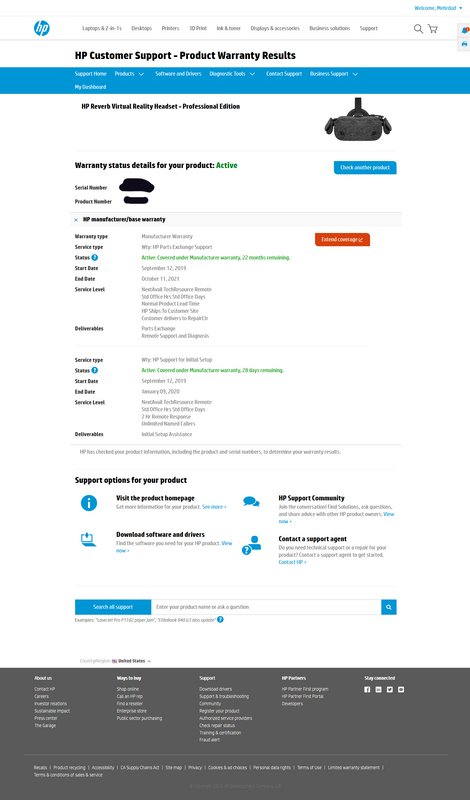
To be honest there is nothing in the support I have received thus far to make me want to give anybody a 'high-five'. Sorry. At the time of logging my technical difficulty with the HP support officer it became apparent to him that there was a mistake in logging the sale date of the HP reverb pro I purchased. For some reason the start date logged on your system was September 12, 2019. My order date is 29/11/19 and my invoice document date is 01/12/19. Because of this discrepancy between the date on your systems and the date actually purchased, I was required to provide proof of the invoice, which I did. Only then was I able to have an authorization code for the return. however, nothing has changed in regard to changing the dates on your system, so I can have the 24-month warranty that is rightfully granted, so instead I have a 22-month warranty and have lost 2-months yet on proof this was not adjusted. SO my next query is how fo I get the correct warranty time frame on the new headset when it arrives?


12-12-2019 06:48 AM
HP Recommended
Have you tried disputing the warranty? Please refer to this document for more information.
Asmita
I am an HP Employee
12-12-2019 01:02 PM
HP Recommended
@MagusUK It appears when you enter the serial number of your device and then, it should be visible at the bottom, the same should help you rectify the warranty status before you can contact the support team and get it replaced.
Riddle_Decipher
I am an HP Employee
Learning is a journey, not a destination.
Let's keep asking questions and growing together.

Be alert for scammers posting fake support phone numbers and/or email addresses on the community.
If you think you have received a fake HP Support message, please report it to us by clicking on "Flag Post".
† The opinions expressed above are the personal opinions of the authors, not of HP. By using this site, you accept the Terms of Use and Rules of Participation.


Didn't find what you were looking for?
Ask the community
† The opinions expressed above are the personal opinions of the authors, not of HP. By using this site, you accept the <a href="https://www8.hp.com/us/en/terms-of-use.html" class="udrlinesmall">Terms of Use</a> and <a href="/t5/custom/page/page-id/hp.rulespage" class="udrlinesmall"> Rules of Participation</a>.