• ×
    Information
    Need Windows 11 help?
    Check documents on compatibility, FAQs, upgrade information and available fixes.
    Windows 11 Support Center.
  • post a message
  • ×
    Information
    Need Windows 11 help?
    Check documents on compatibility, FAQs, upgrade information and available fixes.
    Windows 11 Support Center.
  • post a message
Guidelines
Seize the moment! nominate yourself or a tech enthusiast you admire & join the HP Community Experts!
Archived This topic has been archived. Information and links in this thread may no longer be available or relevant. If you have a question create a new topic by clicking here and select the appropriate board.

HP Recommended
reverb
Microsoft Windows 11

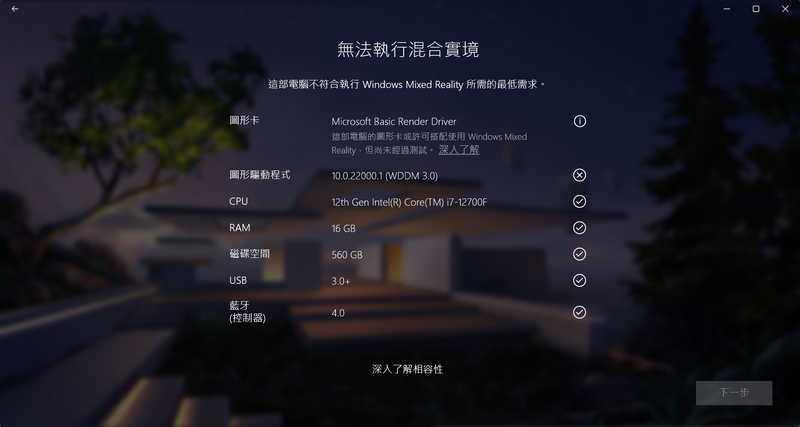
I am using RTX3080 and Win 11, it was said that the graphic drivers WDDM 3.0 didn't meet the requirement when i install the window mixed reality. anyone could help? thx


螢幕擷取畫面 2022-05-23 235844.png

1 REPLY 1
HP Recommended

Hi@paulcc123,


Welcome to the HP Support Community! I'd like to help!


I see you are experiencing issues with the HP Reverb G2 Virtual Reality Headset is not working correctly.  


Check the current version:

Attach the Headset to the Host (PC), and then open Device Manager.

Locate Mixed Reality Devices.

Right-click HP Reverb Virtual Reality Headset G2 or HP Reverb G2 Omnicept, and then click Properties.

Click the Driver tab to check the version.


Update the driver:

Windows Update automatically updates the driver when enabled. To update the driver using Windows Update:

Right-click Start, and then click Settings.

Click Update & Security > Windows Update > Check for updates.

Follow the on-screen instructions to complete the update. 


I have a few recommendations 

  • Windows 11 and high end pc with 3090 card will not have any issues with Reverb G2
  • Mixed Reality Portal is updated via the Microsoft Store app
  • Try reinstall Mixed reality and remove the cables and replace them in the sequence recommended by the manufacturer.
  • Check for Windows updates

Hope this helps! Keep me posted. 


Please click “Accept as Solution” if you feel my post solved your issue, it will help others find the solution.
Click on the YES button to reply that the response was helpful and/or to say “Thank You”.


Have a great day!

Archived This topic has been archived. Information and links in this thread may no longer be available or relevant. If you have a question create a new topic by clicking here and select the appropriate board.
† The opinions expressed above are the personal opinions of the authors, not of HP. By using this site, you accept the <a href="https://www8.hp.com/us/en/terms-of-use.html" class="udrlinesmall">Terms of Use</a> and <a href="/t5/custom/page/page-id/hp.rulespage" class="udrlinesmall"> Rules of Participation</a>.