
-
×InformationNeed Windows 11 help?Check documents on compatibility, FAQs, upgrade information and available fixes.
Windows 11 Support Center. -
-
×InformationNeed Windows 11 help?Check documents on compatibility, FAQs, upgrade information and available fixes.
Windows 11 Support Center. -
- HP Community
- Gaming
- Gaming Desktops
- Re: Change CPU fan?

Create an account on the HP Community to personalize your profile and ask a question
Your account also allows you to connect with HP support faster, access a personal dashboard to manage all of your devices in one place, view warranty information, case status and more.

It has been a while since anyone has replied. Simply ask a new question if you would like to start the discussion again.

07-10-2019 07:01 AM
 HP Recommended
Product: 880-122na
Operating System: Microsoft Windows 10 (64-bit)
Hello everyone. I have a question that hopefully someone can answer. My CPU fan is a bit noisier than I'd like - it seems to cool fine as my CPU never throttles.
Even at it's lowest RPM the fan is audible under my desk, but after 50c it gets noticeably louder (which it frequently does).
I was wondering if anyone swapped out the stock cooler on the CPU for something better/quieter. I'm open to an AIO if there is room and enough power available.
Thanks.
6 REPLIES 6

07-10-2019 11:26 AM - edited 07-10-2019 11:27 AM
HP Recommended
Hello @k2focus
I have not actually replaced an air cooler on those models, but I know others who have said they have installed AIO's on them.
They came preinstalled with a 120mm single fan Asetek cooler (928212-001 cooler and 933410-001 fan) for HP originally. There are some used ones floating around on eBay, but HP does not sell new ones as a spare part.
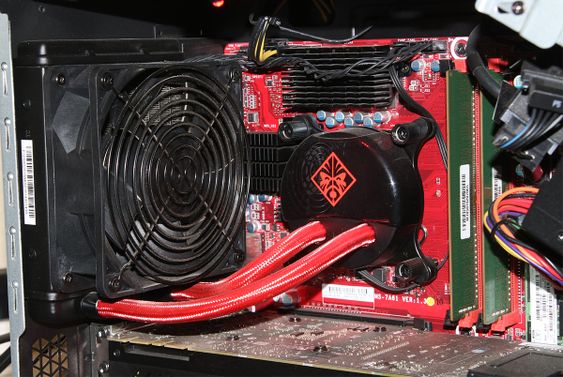
You should be able to use a different brand like Corsair or such. They have to have a back-plate attached to the back side of the motherboard. Its not a fun task because the motherboard has to be completely removed to access the back.
There is no cutout in the case to access it...
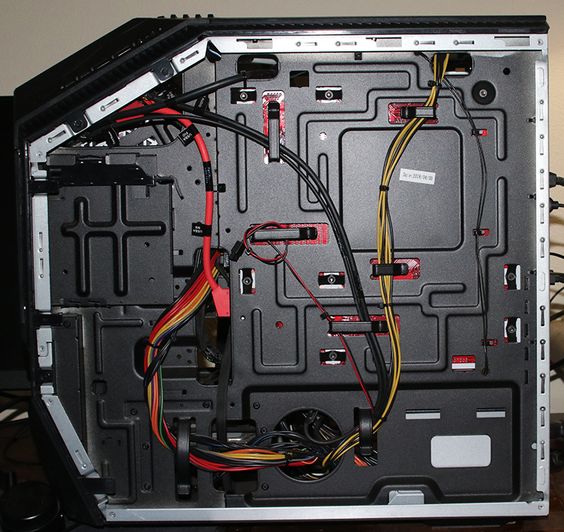
Corsair H80i back-plate on a custom PC...
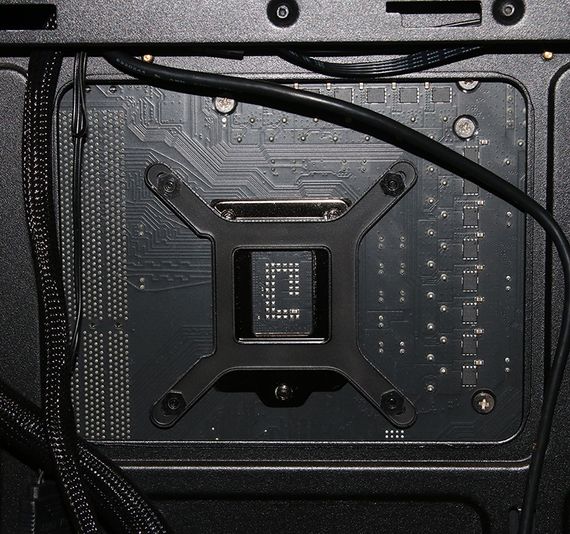
I seem to remember one user claiming to use a dremel to cut out the back plate area for easy access later. That might be a bit extreme for you though. 🙂
The only other thing you might have to deal with is a name brand AIO will probably have longer hoses, where as the Omen cooler has short hoses for a better fit for that specific case.
@Grzwacz have you by chance heard differently on coolers for those?

07-11-2019 08:43 AM - edited 07-11-2019 08:45 AM
HP Recommended
Hi Photoray002,
What you have suggested sounds good.
A 120 mm AIO CPU fan/rad cooling solution from any retail vendor should work.
Many of these AIOs need a USB 2 motherboard header to control pump speed and fan curves using vendor provided software such as CAM or Corsair Link. Some AIOs require a SATA connection to power the pump.
The pump usually has a four pin PWM connector which connects to the MB fan or pump header.
Regards
07-11-2019 08:55 AM
HP Recommended
Thanks. I was a little worried the entire thing would have to come out. I might just live with it then, or maybe when I have a free weekend.
So do you think most stock coolers would fit? I know a lot of prebuilts use proprietary/annoying/non-standard parts.
07-11-2019 08:57 AM
HP Recommended
i definitely have a SATA connection available (i'm using 3 of the 4 HHD bays, and hooked up a cable just in case i need the fourth. I'm not sure if i'd like to give up a USB for it, or is there one unused on the MB? thanks.
07-11-2019 09:09 AM
HP Recommended
Hi K2focus,
Do you have spare SATA power coming from the PSU?
I only see the USB 2.0 card reader header on the motherboard per the image at this (Link). It looks to be a proprietary connector; hard to tell from the image HP provides at the above link.
Photoray002 may have more info on this.
Check the MB for an open USB 2.0 header.
Running a AIO with no way to control CPU pump and fan speed using software will give you a very loud system and defeat the purpose of upgrading CPU cooling with a retail AIO.
Regards
07-11-2019 12:50 PM - edited 07-11-2019 12:56 PM
HP Recommended
If the MFG says it will fit Intel i7 8700 (socket LGA 1151) you are golden.
Edit... there is a header for the Pump and the radiator fan next to each other, so it shouldn't be a problem on theTampa 2 mobo
Corsair software for the i version products (example... H80i AIO) requires a USB 2 header for the software to be usable. that would be the only draw back as there isnt an available USB header for that connection on the inside.

Be alert for scammers posting fake support phone numbers and/or email addresses on the community.
If you think you have received a fake HP Support message, please report it to us by clicking on "Flag Post".
† The opinions expressed above are the personal opinions of the authors, not of HP. By using this site, you accept the Terms of Use and Rules of Participation.


Didn't find what you were looking for?
Ask the community
† The opinions expressed above are the personal opinions of the authors, not of HP. By using this site, you accept the <a href="https://www8.hp.com/us/en/terms-of-use.html" class="udrlinesmall">Terms of Use</a> and <a href="/t5/custom/page/page-id/hp.rulespage" class="udrlinesmall"> Rules of Participation</a>.