-
×InformationNeed Windows 11 help?Check documents on compatibility, FAQs, upgrade information and available fixes.
Windows 11 Support Center. -

-
×InformationNeed Windows 11 help?Check documents on compatibility, FAQs, upgrade information and available fixes.
Windows 11 Support Center. -
- HP Community
- Gaming
- Gaming Notebooks
- Audio isn't working

Create an account on the HP Community to personalize your profile and ask a question
03-17-2020 05:06 PM
When I first got this laptop a couple of years ago the speakers worked fine but recently they stopped playing audio. When I plug in headphones they play audio or when I plug in a USB device to play audio that works too. It's just the speakers not working.
03-20-2020 09:03 AM
@J_mill Welcome to HP Community!
I understand that the laptop internal speakers are not working.
Do not worry. I will try to fix the issue.
I suggest you download and run the HP Support Assistant from this Link: https://www8.hp.com/us/en/campaigns/hpsupportassistant/hpsupport.html?jumpid=va_r602_us/en/any/psg/p...
HPSA will automatically search for all the latest drivers for your Notebook
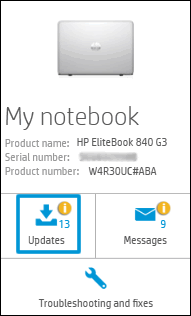
- Click My devices in the top menu, and then click Updates in the My PC or My notebook pane.

- Click Check for updates and messages to scan for new updates.

- Review the list of updates. Updates with a yellow information icon are recommended. Updates with a blue information icon are optional.
- Click the update name for a description, version number, and file size.
- Select the box next to any updates you want to install, and then click Download and install.
Also, ensure Windows is up to date.
Please uninstall the Audio drivers from the device manager and restart the computer and install the drivers.
Please update the BIOS as well.
Keep us posted,
If you would like to thank us for our efforts to help you,
Give us a virtual high-five by clicking the 'Thumbs Up' icon below, followed by clicking on the "Accept as solution" on this post,
Have a great day!