-
×InformationNeed Windows 11 help?Check documents on compatibility, FAQs, upgrade information and available fixes.
Windows 11 Support Center. -
-
×InformationNeed Windows 11 help?Check documents on compatibility, FAQs, upgrade information and available fixes.
Windows 11 Support Center. -

Create an account on the HP Community to personalize your profile and ask a question
10-11-2021 11:48 AM
Hi because the audio of my PC goes down and up by itself even if it is always the same number for example at 50.It happens when I see videos on you tube.Instead with headphones everything normal does not happen
10-11-2021 06:49 PM
Please perform a clean install Audio software/driver, this should help.
(a) Download the following driver and save on your computer,
https://ftp.hp.com/pub/softpaq/sp112001-112500/sp112292.exe
(b) Go to Device Manager, Sound to uninstall sound driver (Realtek) and reboot,
(c) Right click downloaded file and select Run as administrator,
(d) Reboot again.
Regards.
***
**Click the KUDOS thumb up on the left to say 'Thanks'**
Make it easier for other people to find solutions by marking a Reply 'Accept as Solution' if it solves your problem.
10-12-2021 08:34 AM - edited 10-13-2021 11:52 AM
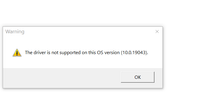
I did as he suggested but nothing has changed. In addition, I forgot to say that it has very low volume and at 50 you can't hear anything. At the end of the installation I got this out