• ×
    Information
    Need Windows 11 help?
    Check documents on compatibility, FAQs, upgrade information and available fixes.
    Windows 11 Support Center.
  • post a message
  • ×
    Information
    Need Windows 11 help?
    Check documents on compatibility, FAQs, upgrade information and available fixes.
    Windows 11 Support Center.
  • post a message
Guidelines
Seize the moment! nominate yourself or a tech enthusiast you admire & join the HP Community Experts!
HP Recommended
HP 14S-CF3056TU i3

Seeking help for the problem that we encounter our unit.  please see attached picture: 

As the unit upon opening BIOS RECOVERY UPDATE.  and it done but cannot restart already.  I would like to ask for help on what to do in this issue and how to fix it.  thank you


HP error.jpg

1 REPLY 1
HP Recommended

@ven3


Welcome to the HP support community.


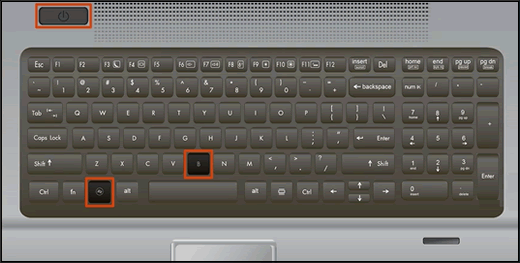
Recover the BIOS using a key press combination
 

  1. Turn off the computer, and then connect the power cord.

  2. Press and hold the Windows key and the B key at the same time, and then press and hold the Power button for 2 to 3 seconds.

    Keyboard highlighting the key presses for BIOS recovery

  3. Release the Power button but continue pressing the Windows and B keys. You might hear a series of beeps.

Refer this HP document for more assistance:- Click here


I hope that helps.

To thank me for my efforts to help you, please mark my post as an accepted solution so that it benefits several others.

Cheers.

Sandytechy20
I am an HP Employee

† The opinions expressed above are the personal opinions of the authors, not of HP. By using this site, you accept the <a href="https://www8.hp.com/us/en/terms-of-use.html" class="udrlinesmall">Terms of Use</a> and <a href="/t5/custom/page/page-id/hp.rulespage" class="udrlinesmall"> Rules of Participation</a>.