
-
×InformationNeed Windows 11 help?Check documents on compatibility, FAQs, upgrade information and available fixes.
Windows 11 Support Center. -
-
×InformationNeed Windows 11 help?Check documents on compatibility, FAQs, upgrade information and available fixes.
Windows 11 Support Center. -
- HP Community
- Gaming
- Gaming Notebooks
- Re: FPS Issue AGAIN!!!!

Create an account on the HP Community to personalize your profile and ask a question
Your account also allows you to connect with HP support faster, access a personal dashboard to manage all of your devices in one place, view warranty information, case status and more.

It has been a while since anyone has replied. Simply ask a new question if you would like to start the discussion again.

07-27-2018 11:25 AM
 HP Recommended
Product: HP OMEN 15
Operating System: Microsoft Windows 10 (64-bit)
So my HP OMEN 15 was having big FPS issues when I play games, like it was going down to 30 fps on games like Fortnite even when plugged in and that's just bad. I posted soemthing for it and did everything they could think of and I thought it was fixed but it's now having problems once again and im not very happy at all. Im so unhappy that im problably never going to buy a laptop from you all again and im problably going to try and get a refund for the $1000 that I payed on this thing and buy me a desktop instead of this piece of junk. So all my complaining aside I want to give you all one more chance to help me fix this problem.
Solved! Go to Solution.
1 ACCEPTED SOLUTION
Accepted Solutions

07-27-2018 10:21 PM
HP Recommended
Some on the Nvidia forum say to stay with 391.35 for the moment.
I would run Guru 3D DDU to uninstall the current driver completely, then install the older one above.
Its not the first time a new driver has caused a slowdown.
This is only my guessing as I have no way of knowing whats happening.
Try this as a troubleshooting procedure.
Let me know how this goes.
10 REPLIES 10
07-27-2018 01:32 PM
HP Recommended
Hello @Garrett_Wils001
Could you tell me what exactly you did last time to fix the low FPS issue?
Looking at your previous posts, you changed Windows settings for performance?
Did this also start giving you low FPS after a Windows update???
Most of the time, that is the issue.
BTW: most of us here are not HP employees. We just volunteer to help.
🧐
07-27-2018 05:59 PM
HP Recommended
I can't exactly remember if I did or not after an update, but that might be the case. If that is the case what would you recommend me to do to fix the issue?
Sorry if If I came off a bit rude, im new to all this so I dont know to much about it so thank you for your help.
07-27-2018 06:20 PM
HP Recommended
Depends on how your system is setup. IF restore points is enabled, you could roll it back prior to the update.
I would try the simple fixes first.
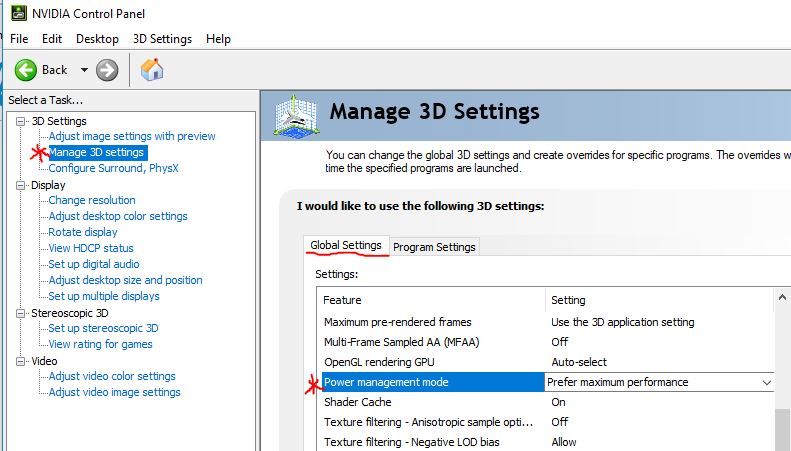
Go into the Nvidia Control Panel and enable Global settings to Maximum performance.
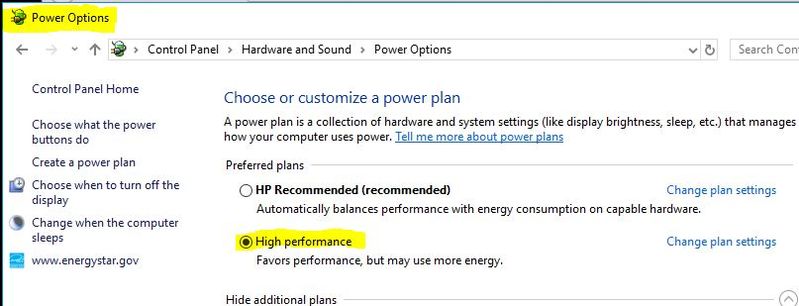
Also go to Windows Power Options and make your system run at High Performance.
07-27-2018 06:23 PM
HP Recommended
IF that dont help, I would clean install the Nvidia Drivers next.
Let me know what happens.
07-27-2018 10:21 PM
HP Recommended
Some on the Nvidia forum say to stay with 391.35 for the moment.
I would run Guru 3D DDU to uninstall the current driver completely, then install the older one above.
Its not the first time a new driver has caused a slowdown.
This is only my guessing as I have no way of knowing whats happening.
Try this as a troubleshooting procedure.
Let me know how this goes.


Be alert for scammers posting fake support phone numbers and/or email addresses on the community.
If you think you have received a fake HP Support message, please report it to us by clicking on "Flag Post".
† The opinions expressed above are the personal opinions of the authors, not of HP. By using this site, you accept the Terms of Use and Rules of Participation.


Didn't find what you were looking for?
Ask the community
† The opinions expressed above are the personal opinions of the authors, not of HP. By using this site, you accept the <a href="https://www8.hp.com/us/en/terms-of-use.html" class="udrlinesmall">Terms of Use</a> and <a href="/t5/custom/page/page-id/hp.rulespage" class="udrlinesmall"> Rules of Participation</a>.