• ×
    Information
    Need Windows 11 help?
    Check documents on compatibility, FAQs, upgrade information and available fixes.
    Windows 11 Support Center.
  • post a message
  • ×
    Information
    Need Windows 11 help?
    Check documents on compatibility, FAQs, upgrade information and available fixes.
    Windows 11 Support Center.
  • post a message
Guidelines
Seize the moment! nominate yourself or a tech enthusiast you admire & join the HP Community Experts!
HP Recommended

@Hailew wrote:

Ok, ill contact them.

Thank you for your help!


The pleasure is mine !

Keep me updated.

Good luck

HP Recommended

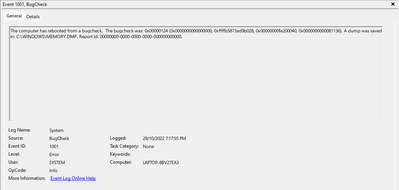
Hello again, I thought that before sending the laptop in for repairs it wouldn't hurt to run some diagnostics again, ran a memory diagnostic test and got these in my event viewer:

Hailew_0-1667120782812.png

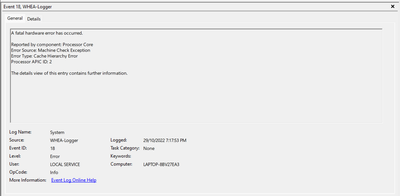
Another error: + details of said error

Hailew_1-1667120820677.png

 ErrorSource3
  ApicId2
  MCABank12
  MciStat0xfe20004000081136
  MciAddr0x20acd7ec0
  MciMisc0x93042001886
  ErrorType9
  TransactionType1
  Participation256
  RequestType3
  MemorIO256
  MemHierarchyLvl2
  Timeout256
  OperationType256
  Channel256
  Length1067
  RawData435045521002FFFFFFFF040001000000020000002B040000151108001D0A16140000000000000000000000000000000000000000000000000000000000000000BDC407CF89B7184EB3C41F732CB57131FE6FF5E89C91C54CBA8865ABE14913BB2953DDC86DEBD801000000000000000000000000000000000000000000000000A0010000C00000000003000001000000ADCC7698B447DB4BB65E16F193C4F3DB0000000000000000000000000000000001000000000000000000000000000000000000000000000060020000800000000003000000000000B0A03EDC44A19747B95B53FA242B6E1D00000000000000000000000000000000010000000000000000000000000000000000000000000000E0020000240100000003000000000000011D1E8AF94257459C33565E5CC3F7E80000000000000000000000000000000001000000000000000000000000000000000000000000000004040000270000000003000000000000A13248C3C302524CA9F19F1D5D7723FC000000000000000000000000000000000300000000000000000000000000000000000000000000007F010000000000000002010100020000D10608000000000000000000000000000000000000000000000000000000000000000000000000000000000000000000000000000000000000000000000000000000000000000000000000000000000000000000000000000000000000000000000000000000000000000000000000000000000000000000000000000000000000000000000000000200000000000000000000000000000000000000000000000000000000000000000000000000000007000000000000000200000000000000D106080000081002BFFBFA7FFFFBEBBF0000000000000000000000000000000000000000000000000000000000000000F50157A5EFE3DE43AC72249B573FAD2C03000000000000009F008D2600000000C07ECD0A020000000000000000000000000000000000000000000000000000000300000001000000B13676DE6EEBD80102000000050000000000000000000000000000000C00000036110800400020FEC07ECD0A0200000086180042300900000000000002000000000000000000000000000000000000000000000000000000000000000000000000000000000000000000000000000000000000000000000000000000000000000000000000000000000000000000000000000000000000000000000000000000000000000000000000000000000000000000000000000000000000000000000000000000000000000000000000000000000000000000000000000000000000000000000000000000000000000000000000000000000000000000000000000000130C000000000000000000000000000000000000000000000000000000010000000000000000000000FF00000000000000000000000000000000000000000000000000

I also figured out that this is not due to overheating as i thought before

could this lead to anything?

HP Recommended

Hello @Hailew 


HP will definitely reinstall the Windows operating system. Do it yourself and see if the problem resolves itself.


(1) Backup < ALL > personal data (documents/pictures/videos etc...) to external <USB hard drive>


(2Please reinstall your operating system !

You need (another Windows computer) to prepare bootable <USB flash drive>

 An unused or empty USB flash drive with at least 32 GB storage capacity is required.


HP Consumer PCs - Using the HP Cloud Recovery Tool in Windows 11 and 10

Take time and follow

https://support.hp.com/us-en/document/ish_4511095-4511141-16

( All Software and drivers from HP are included )


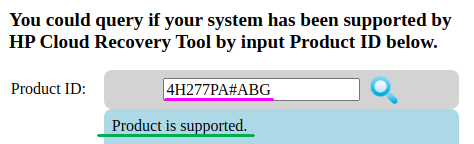
Information: Your product number is supported: 4H277PA#ABG


ub6424_0-1667125707365.png


(3Please report your results

HP Recommended

Is reinstalling Windows the only option left?

Maybe I could send the minidump folder, perhaps it's a certain driver not running as expected

HP Recommended

@Hailew wrote:

Is reinstalling Windows the only option left?

Maybe I could send the minidump folder, perhaps it's a certain driver not running as expected


Hello @Hailew 

Please send minidump at pastebin website.


HP Recommended

I've  only got one file, here it is

https://www.sendbig.com/view-files/?Id=708c27c9-9e26-dd88-a5a4-df1c81ed47ca

(Couldn't upload it to pastebin for some reason)


Recently I've been getting CLOCK_WATCHDOG_TIMEOUT errors, doesn't seem to be overheating though I am not too sure. I'll run some benchmark tests and let you know

HP Recommended

Hello @Hailew 


I checked the dump. It is unclear what triggered this error. The cause could be a temporary hardware error.


(1) Test your hardware Using the HP PC Hardware Diagnostics (UEFI)

--->>> Perform Extensive Tests

https://support.hp.com/us-en/document/ish_2854458-2733239-16

See section <Running HP PC Hardware Diagnostics UEFI tests when Windows doesn't start>


See how it works:

https://www.youtube.com/watch?v=14GKIpGPNRM


(2) Please report your results ( error messages, take pictures )

( if serial number, device id, UUID, System Board CT Number is displayed, please blur )


HP Recommended

I ran the test for a total of 11 hours or so - no errors, everything is in order. I also ran Heavyload for a couple hours, CPU and GPU and RAM were on max usage, temperatures from 70 to 90 °C, no crashes. I ran the test without any external cooling.

HP Recommended

Hello @Hailew 

Thanks for reporting.


Keep me updated if you get another BSOD.


Kind regards

HP Recommended

CLOCK_WATCHDOG_TIMETOUT errors, at least they are shown this time.
I feel like the issue is with the drivers.
Could my device be not compatible with the new drivers?

† The opinions expressed above are the personal opinions of the authors, not of HP. By using this site, you accept the <a href="https://www8.hp.com/us/en/terms-of-use.html" class="udrlinesmall">Terms of Use</a> and <a href="/t5/custom/page/page-id/hp.rulespage" class="udrlinesmall"> Rules of Participation</a>.