-
×InformationNeed Windows 11 help?Check documents on compatibility, FAQs, upgrade information and available fixes.
Windows 11 Support Center. -

-
×InformationNeed Windows 11 help?Check documents on compatibility, FAQs, upgrade information and available fixes.
Windows 11 Support Center. -
- HP Community
- Gaming
- Gaming Notebooks
- HP Cloud Recovery - Default Windows 10 Language comes in Chi...

Create an account on the HP Community to personalize your profile and ask a question
09-26-2021 04:16 AM - edited 09-26-2021 04:43 AM
I tried to factory reset my laptop using the HP Cloud Recovery tool, It did everything right but the default Windows 10 Language came up with Chinese! I tried a lot to change the language from Chinese to English inside Windows 10 after each successful recovery but all the attempts remains unsuccessful. I'm assuming that I failed to change the windows language to English probably because It's coming up with a Chinese Single Language Windows 10!
Is there any way to set the language English at the beginning of the Recovery process so does the default Windows 10 language comes up with English? or any other solution, please?
FYI, I set the system language English in BIOS before starting the recovery process but each time after the successful recovery Windows language becomes Chinese!
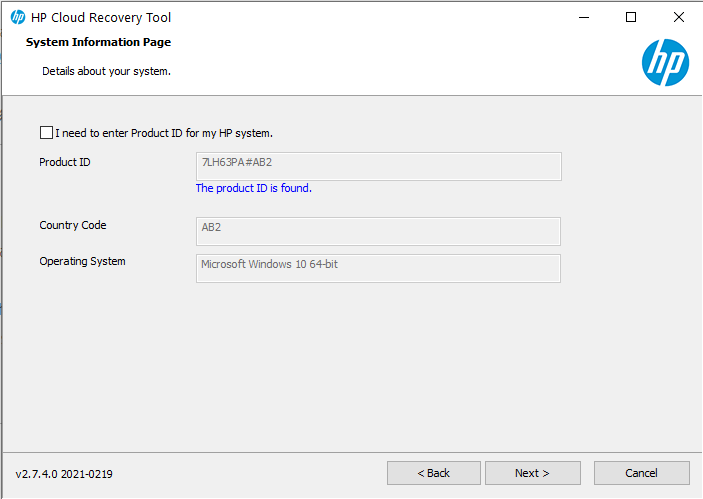
Here is a screenshot of the beginning of recovery process:
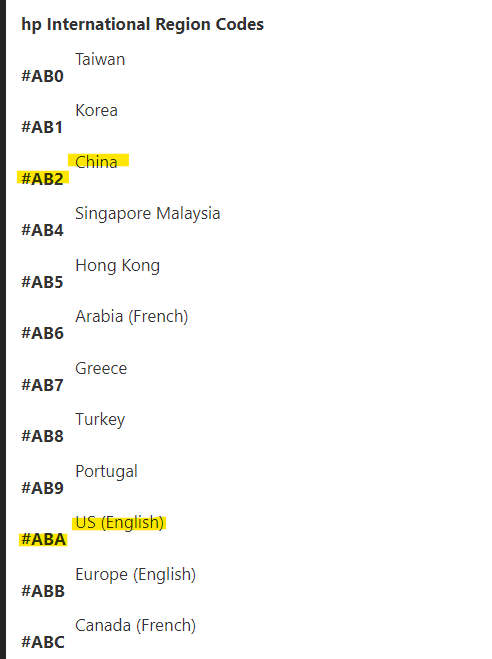
As we are seeing the Country Code is AB2 so I did a little research on this and found the CODE AB2 means Chinese where ABA is for English (US) - See the below screenshot:
I think the country code AB2 indicates the installer to make the Chinese as default! Now Is there any way to change/Bypass this code to ABA so it installs English US as the default language?
TIA.
09-26-2021 07:35 AM
Hi:
The image must be set to Chinese, and unfortunately I don't know how you can change it because you don't get any options other to follow the on-screen instructions.
You may have to just use the Media creation tool to create a bootable W10 installation flash drive and you should be able to select your preferred language from the menu when you first go to install Windows.
Download Windows 10 (microsoft.com)
After W10 has completed installing you can install the drivers and available software from your notebook's support page.
HP Pavilion Gaming 15-dk0000 Laptop PC Software and Driver Downloads | HP® Customer Support
I tried every #XXX country code that indicated English language after the 7LH63PA in the cloud recovery tool, and nothing worked but the Chinese AB2
CESDH0018 - Hewlett Packard Keyboard Layout / Language and Localisation Codes - hpcfactor.com
09-26-2021 08:37 AM
Hello Paul_Tikkanen,
Thanks for your reply. I appreciate your try's to solve my problem.
I also think that as the country code after product ID indicates Chinese so It downloads the Chinese language as windows defaults. I'm still looking to anyway to get it in English instead.
Thanks again.