
-
×InformationNeed Windows 11 help?Check documents on compatibility, FAQs, upgrade information and available fixes.
Windows 11 Support Center. -
-
×InformationNeed Windows 11 help?Check documents on compatibility, FAQs, upgrade information and available fixes.
Windows 11 Support Center. -
- HP Community
- Gaming
- Gaming Notebooks
- Re: HP Omen 17 sound problems

Create an account on the HP Community to personalize your profile and ask a question
Your account also allows you to connect with HP support faster, access a personal dashboard to manage all of your devices in one place, view warranty information, case status and more.

It has been a while since anyone has replied. Simply ask a new question if you would like to start the discussion again.

08-25-2020
10:51 AM
- last edited on
08-25-2020
12:55 PM
by
 RodrigoB
 HP Recommended
Product: OMEN by HP Laptop 17-cb1xxx
Operating System: Microsoft Windows 10 (64-bit)
Product number: 17G22EA#ABU Serial number:[Personal Information Removed]
Hi all my new Hp omen 17
Has a problem with audio drivers since i upgraded from home to pro version of Windows 10.
My omen audio control has no audio enhancements see photo included in link below forum wouldn't let me upload screenshot
Audio it also very low on my internal speakers.
I also don't have any b&o settings.
Please help fix this problem i need my laptop sorted as i am a DJ and use the enhancements.
5 REPLIES 5

08-28-2020 05:35 AM
HP Recommended
Welcome to HP Community
I have gone through your Post and would like to help
I suggest you download and run the HP Support Assistant from this Link: https://www8.hp.com/us/en/campaigns/hpsupportassistant/hpsupport.html?jumpid=va_r602_us/en/any/psg/p...
HPSA will automatically search for all the latest drivers for your Notebook
-
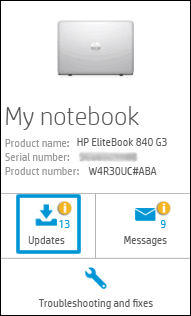
Click My devices in the top menu, and then click Updates in the My PC or My notebook pane.
-
Click Check for updates and messages to scan for new updates.

-
Review the list of updates. Updates with a yellow information icon are recommended. Updates with a blue information icon are optional.
-
Click the update name for a description, version number, and file size.
-
Select the box next to any updates you want to install, and then click Download and install.
Also ensure Windows is up to date.
Select the Start button, and then go to Settings > Update & security > Windows Update , and select Check for updates. If Windows Update says your device is up to date, you have all the updates that are currently available
Keep me posted how it goes
Thank you and have a wonderful day 😊
If the information I've provided was helpful, give us some reinforcement by clicking the "Solution Accepted" on this Post and it will also help other community members with similar issue.
KrazyToad
I Am An HP Employee
08-28-2020 01:14 PM
HP Recommended
Please run an Audio Test from F2 Diagnostic and let me know the sound quality
- Hold the power button for at least five seconds to turn off the Notebook.
- Turn on the computer and immediately press Esc repeatedly, about once every second.
- When the menu appears, press the F2 key.
- On the main menu, click Component Tests and Audio
KrazyToad
I Am An HP Employee
08-29-2020 12:22 PM
HP Recommended
If the Test passed please perform a Reset. Link: https://support.hp.com/in-en/document/c04742289
Keep me posted
KrazyToad
I Am An HP Employee

Be alert for scammers posting fake support phone numbers and/or email addresses on the community.
If you think you have received a fake HP Support message, please report it to us by clicking on "Flag Post".
† The opinions expressed above are the personal opinions of the authors, not of HP. By using this site, you accept the Terms of Use and Rules of Participation.


Didn't find what you were looking for?
Ask the community
† The opinions expressed above are the personal opinions of the authors, not of HP. By using this site, you accept the <a href="https://www8.hp.com/us/en/terms-of-use.html" class="udrlinesmall">Terms of Use</a> and <a href="/t5/custom/page/page-id/hp.rulespage" class="udrlinesmall"> Rules of Participation</a>.