
-
×InformationNeed Windows 11 help?Check documents on compatibility, FAQs, upgrade information and available fixes.
Windows 11 Support Center. -
-
×InformationNeed Windows 11 help?Check documents on compatibility, FAQs, upgrade information and available fixes.
Windows 11 Support Center. -
- HP Community
- Gaming
- Gaming Notebooks
- Intel optane memory

Create an account on the HP Community to personalize your profile and ask a question
Your account also allows you to connect with HP support faster, access a personal dashboard to manage all of your devices in one place, view warranty information, case status and more.

It has been a while since anyone has replied. Simply ask a new question if you would like to start the discussion again.

8 REPLIES 8

06-30-2020 11:50 AM
 HP Recommended
Hello @RahulVijay13
Please always include the full Product Number of your Omen so we can look up the specs.
Run the HP Support Assistant to find it, or press Ctrl/Alt/S for a menu to pop open (takes a few seconds to appear).
06-30-2020 02:50 PM
HP Recommended
OMEN by HP - 15-ce008nw and it has 1050 GTX and i5 7th gen windows 10 64-bit
product ID: 2BR99EA#AKD
please help me my laptop performance is too slow
does adding intel optane memory will fix it
will intel optane support in my laptop ?
thankyou for replying earlier
06-30-2020 03:47 PM
HP Recommended
OK thanks. According to the documentation, Optane was never included with that series. There was no bios update to include it.
But to be honest, you are better off installing an M.2 NVMe SSD instead. That will give you much better performance.
Any brand or capacity will work as long as its M.2 3x4 2280mm.
If you have questions on a particular brand drive, let me know.
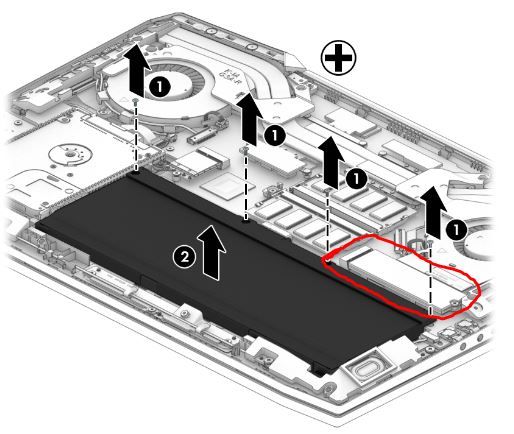
Your manual... http://h10032.www1.hp.com/ctg/Manual/c06002077
the manual reflects the 2nd series but the layout is exactly the same.
06-30-2020 11:54 PM
HP Recommended
yes please tell me specific M2 SSD and RAM 8 GB
which ram and m2 will be better in use and support it perfectly
if possible could share link of both ? i will be so thankful
i need 8GB RAM and 240 sth similar M2 SSD
Thankyou
07-01-2020 06:59 AM
HP Recommended
https://www.x-kom.pl/p/508124-dysk-ssd-silicon-power-256gb-m2-pcie-nvme-a80.html
will this ram and m2 work in laptop ?
will above link attach ram and m2 support ?
thankyou
07-01-2020 02:28 PM
HP Recommended
the SSD will work yes.
The ram, probably but lets do a test first.
Download this tool and unzip it...
https://www.cpuid.com/downloads/cpu-z/cpu-z_1.92-en.zip
after you unzip it, open the folder and run the cpuz_x64.exe file.
Look at the timings under the memory tab like this...
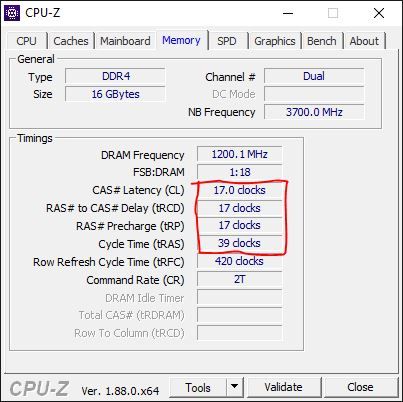
Post a screen shot of it here.


Be alert for scammers posting fake support phone numbers and/or email addresses on the community.
If you think you have received a fake HP Support message, please report it to us by clicking on "Flag Post".
† The opinions expressed above are the personal opinions of the authors, not of HP. By using this site, you accept the Terms of Use and Rules of Participation.


Didn't find what you were looking for?
Ask the community
† The opinions expressed above are the personal opinions of the authors, not of HP. By using this site, you accept the <a href="https://www8.hp.com/us/en/terms-of-use.html" class="udrlinesmall">Terms of Use</a> and <a href="/t5/custom/page/page-id/hp.rulespage" class="udrlinesmall"> Rules of Participation</a>.