-
×InformationNeed Windows 11 help?Check documents on compatibility, FAQs, upgrade information and available fixes.
Windows 11 Support Center. -
-
×InformationNeed Windows 11 help?Check documents on compatibility, FAQs, upgrade information and available fixes.
Windows 11 Support Center. -
- HP Community
- Gaming
- Gaming Notebooks
- Keyboard lighting gone wrong - no white light

Create an account on the HP Community to personalize your profile and ask a question
02-14-2021 07:58 AM
Hello,
My keyboard lighting on the OMEN does not light correctly - it appears that the white light has gone wrong so the colours you select do not tally up to what is selected - IE some colours look darker than they would it the white LED was working. Just wondering if anyone else has this issue?
02-16-2021 01:31 PM
Hi@DangerousDave1, Welcome to the HP Support Community!
I understand that notebook has an issue with the keyboard OMEN does not light correctly ,
Request you to follow the below troubleshooting steps from the document fix :-
under Keyboard Animation to fix the issue
Keep me posted. Happy to help!
Please click “Accept as Solution” if you feel my post solved your issue, it will help others find the solution.
Click the “Kudos, Thumbs Up" on the bottom right to say “Thanks” for helping!
Have a great day!
02-17-2021 01:38 AM
Hi,
That link only provides how to change the lighting and not fix the fact that the white light does not work.
If I was to set the whole keyboard to one particular colour like red, part of the keyboard would look orange instead. If I want it all white then that same part looks yellow.
It is possibly a fault on the lighting system of the keyboard that needs fixing and something that mere software or reset will not fix.
Also the Omen Gaming Hub key does not work - does not open the Gaming Hub.
02-17-2021 10:38 AM
OMEN Gaming Hub will pop up messages to require driver updates. but currently, your laptop installed the latest XTU driver, it is newer than the OMEN SDK driver (including XTU drivers as well but might be an older version), so even reinstall OMEN SDK by the following pop up message link still fail.
I know the engineering team will release a new OMEN SDK driver to include the latest XTU drivers.
At this moment, you can try the below steps to see if it works.
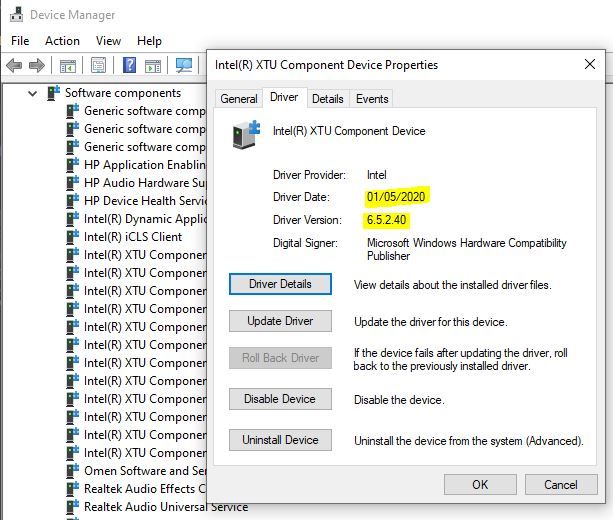
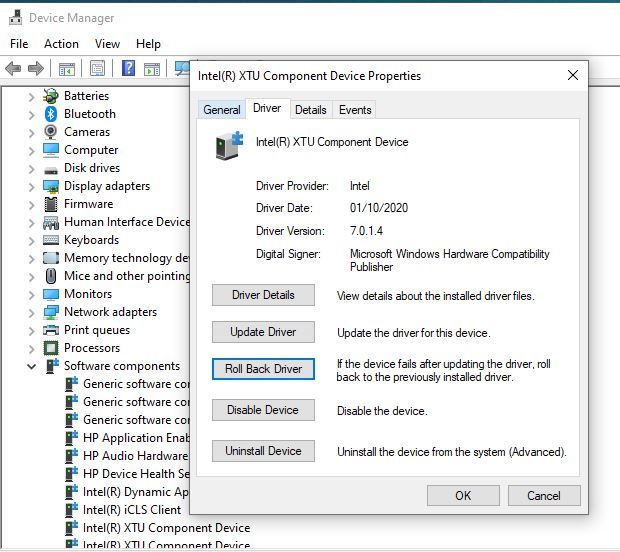
Uninstall your Intel Extreme tuning utility, and roll back your XTU driver to the previous version (in Device manager, software components), after roll back to the previous version, open OMEN Gaming Hub to follow the link to install
Working old version:
Not working new version:
With the latest XTU version 7.0.1.4. This is because the XTU service didn't load successfully, . Rollback to the previous version and then install OMEN SDK can initial XTU service again.
the 7.0.1.4 would be through Windows update automatically, so maybe after a period of time, the driver will be updated to 7.0.1.4 again automatically.
Keep me posted. Happy to help!
Please click “Accept as Solution” if you feel my post solved your issue, it will help others find the solution.
Click the “Kudos, Thumbs Up" on the bottom right to say “Thanks” for helping!
Have a great day!
02-27-2021 06:38 AM
Hi@DangerousDave1,
We have done the basic troubleshooting as per the document and the notebook needs to checked taking remote access so that get to know it's a hardware or software issue.
I'd suggest you contact HP in your region regarding the service options for your computer or HP Chat Support Team.