• ×
    Information
    Need Windows 11 help?
    Check documents on compatibility, FAQs, upgrade information and available fixes.
    Windows 11 Support Center.
  • post a message
  • ×
    Information
    Need Windows 11 help?
    Check documents on compatibility, FAQs, upgrade information and available fixes.
    Windows 11 Support Center.
  • post a message
Guidelines
Seize the moment! nominate yourself or a tech enthusiast you admire & join the HP Community Experts!
HP Recommended
Victus by HP 16.1 inch Gaming Laptop PC 16-e0000 (2V8Z6AV)

Greetings!

I'm having stutters on my HP Victus laptop every 7-10 seconds in-game on 3060. I tried switching from win10 to 11, updated drivers and bios and nothing helps.

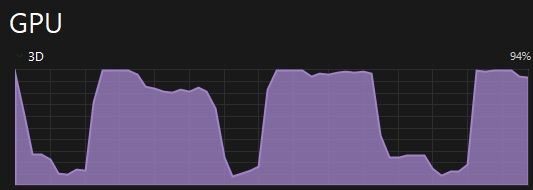
Windows shows gpu drops down to ~0%. I'm testing in game Serial Cleaners, it has rather mediocre graphics that I'm sure should not be that hard to cope for 3060. GRAM is no more than 23% load during game btw.

Hope for your help with it.


OS Name - Windows 11 Pro
Version 10.0.22621 Build 22621

System Model Victus by HP Laptop 16-e0xxx

System SKU 5D5F4EA#ACB

Processor AMD Ryzen 5 5600H with Radeon Graphics, 3301 MHz, cores: 6, logic processors: 12

BIOS Version/Date AMI F.15, 10.08.2022

NVIDIA driver version - 31.0.15.2756 from 12/05/2022


Win11 resource manager screenshot during game:


n.jpg


Some additional info:

  • OMEN Hub didn't help
  • Ultimate power plan didn't help
  • Applying OpenGL option in NVidia control panel to force-use 3060 didn't help

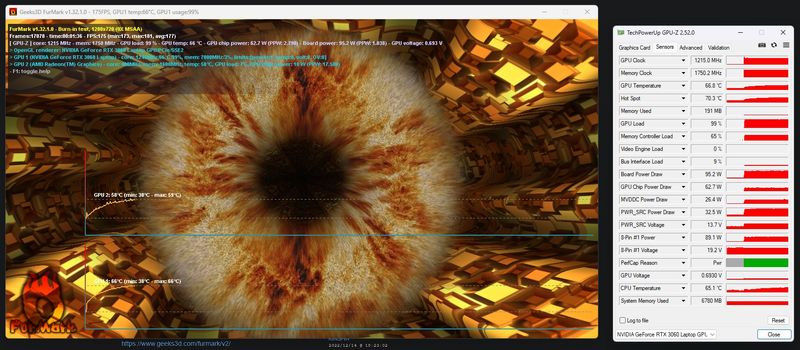
Below is FurMark test results.

123.jpg

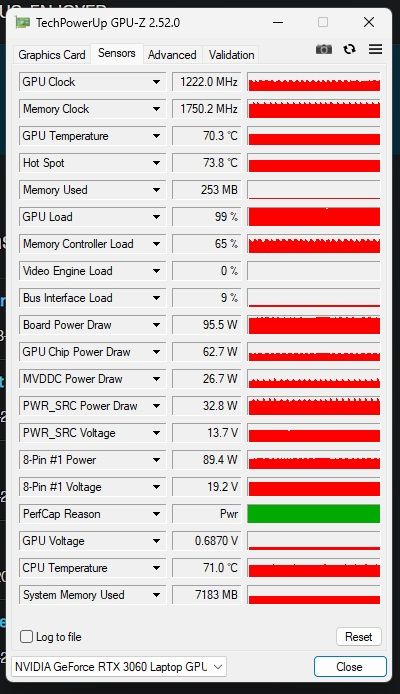
and the results after 10 mins, pretty sure there's not a hardware problem.

4.jpg

† The opinions expressed above are the personal opinions of the authors, not of HP. By using this site, you accept the <a href="https://www8.hp.com/us/en/terms-of-use.html" class="udrlinesmall">Terms of Use</a> and <a href="/t5/custom/page/page-id/hp.rulespage" class="udrlinesmall"> Rules of Participation</a>.