
-
×InformationNeed Windows 11 help?Check documents on compatibility, FAQs, upgrade information and available fixes.
Windows 11 Support Center. -
-
×InformationNeed Windows 11 help?Check documents on compatibility, FAQs, upgrade information and available fixes.
Windows 11 Support Center. -
- HP Community
- Gaming
- Gaming Notebooks
- Lower down CPU fan noise?

Create an account on the HP Community to personalize your profile and ask a question
Your account also allows you to connect with HP support faster, access a personal dashboard to manage all of your devices in one place, view warranty information, case status and more.

It has been a while since anyone has replied. Simply ask a new question if you would like to start the discussion again.

09-12-2019 10:21 AM
 HP Recommended
Product: OMEN by HP - 15t-dc000 CTO
Operating System: Microsoft Windows 10 (64-bit)
So I have been gaming intensively recently and I realize that the fan noise still running quite often and loud recently even when it's idle. Before I play game that intensive the laptop's fan doesn't run that loud. Is there any way to diagnose this out?
5 REPLIES 5


09-12-2019 10:32 AM - edited 09-12-2019 10:32 AM
HP Recommended
Your notebook is supposed to keep itself cool. If it didn't, the CPU would either shutdown or be fried.
The fan is cooling down the processor and the graphics solution.
Your gaming notebook's BIOS is protecting your investment.
I am a volunteer forum member. If my suggestion helped you solve your issue, help others by marking that post as the accepted solution. Say thanks by clicking on the Yes button next to the "was this reply helpful?"


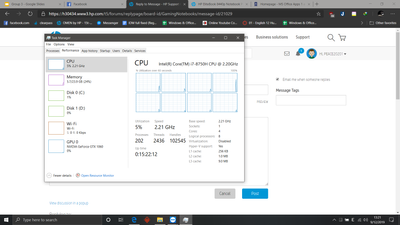
09-12-2019 12:40 PM
HP Recommended
Why do you believe that has something to do with the fan running?
I am a volunteer forum member. If my suggestion helped you solve your issue, help others by marking that post as the accepted solution. Say thanks by clicking on the Yes button next to the "was this reply helpful?"
09-12-2019 12:52 PM
HP Recommended
Before this windows 10 1903 update (version 1809), my laptop is quieter than this version. I don't know if that's a HP problem or windows problem. But this is rather annoying for me since I often study in a library and my laptop is literally screaming... I don't even want to put my charger in because that will make the fan runs worse.... I have no idea what to do right now.

09-25-2019 11:49 PM
HP Recommended
I have the same problem. The left fan of my omen 17 is spinning at 2800rpm from the moment I boot into Windows 10 and never slows down. I have a clean install of windows 10 with all the latest update as well as all firmware/driver updated from the HP support software. And I just bought my laptop a week ago so it’s unlikely to be dust. I also noticed that the all cores are locked at the maximum frequency even when it’s idle. I adopted someone’s suggestion from this forum and added a power plan and undervolted my pc using throttlestop, the core slows down to about 900MHz when it’s idle while the left fan is still runs at 2000 rpm, admittedly not as loud. I think this is unacceptable but I don’t know what else I could do, I do like everything else about this laptop I hate to return it.

Be alert for scammers posting fake support phone numbers and/or email addresses on the community.
If you think you have received a fake HP Support message, please report it to us by clicking on "Flag Post".
† The opinions expressed above are the personal opinions of the authors, not of HP. By using this site, you accept the Terms of Use and Rules of Participation.


Didn't find what you were looking for?
Ask the community
† The opinions expressed above are the personal opinions of the authors, not of HP. By using this site, you accept the <a href="https://www8.hp.com/us/en/terms-of-use.html" class="udrlinesmall">Terms of Use</a> and <a href="/t5/custom/page/page-id/hp.rulespage" class="udrlinesmall"> Rules of Participation</a>.