
-
×InformationNeed Windows 11 help?Check documents on compatibility, FAQs, upgrade information and available fixes.
Windows 11 Support Center. -
-
×InformationNeed Windows 11 help?Check documents on compatibility, FAQs, upgrade information and available fixes.
Windows 11 Support Center. -
- HP Community
- Gaming
- Gaming Notebooks
- Omen command centre showing no supported omen pc host

Create an account on the HP Community to personalize your profile and ask a question
Your account also allows you to connect with HP support faster, access a personal dashboard to manage all of your devices in one place, view warranty information, case status and more.

It has been a while since anyone has replied. Simply ask a new question if you would like to start the discussion again.

10-29-2018 06:46 PM
 HP Recommended
Product: OMEN by HP - 15-ce054na
Operating System: Microsoft Windows 10 (64-bit)
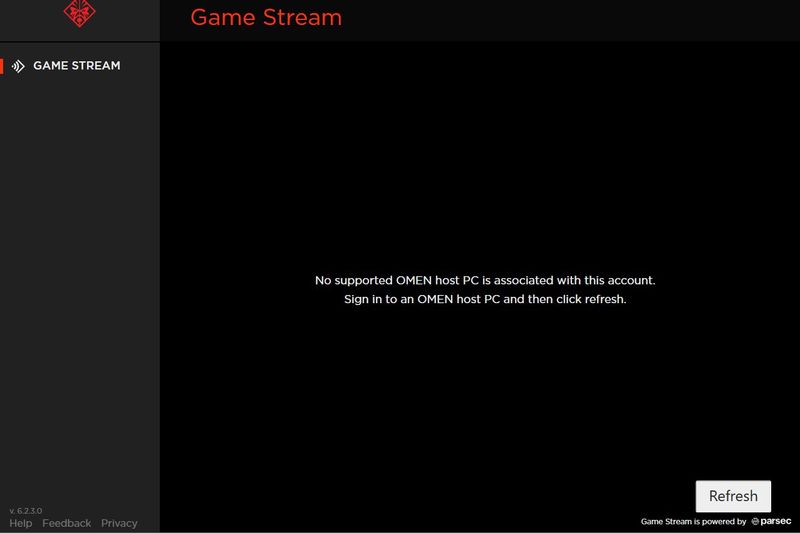
I recently had to install the windows store app of the command center as the original one I had that came with my notebook, suddenly stopped working and popped up with a "fatal error" so I uninstalled it and found out that was out of date and there was a newer one on the windows store. I noticed I didn't have an account for HP. So I created one. I signed in on the newer command center but it came up with "no supported omen pc host is associated with this account. But I never had an account, to begin with, to use the older one... it might be a simple fix I have overlooked. But its quite annoying.
29 REPLIES 29

10-30-2018 02:10 PM
HP Recommended
Hello @Christheman117
A couple of things to try.
You have version 6.2.3.0 of the Omen command center installed, correct?
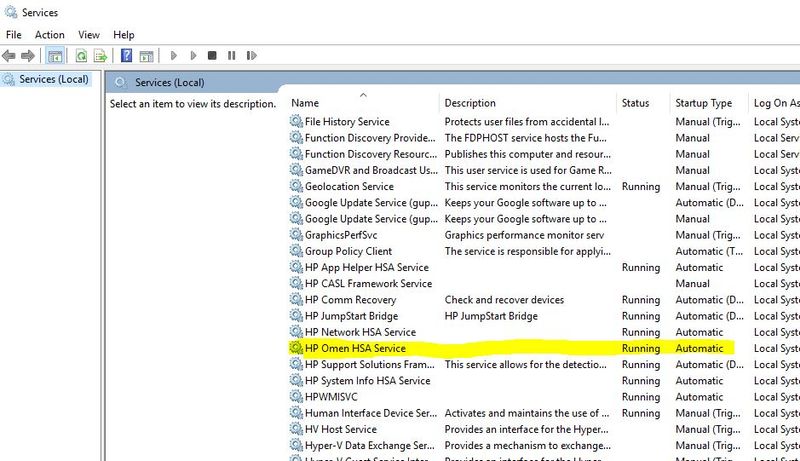
Go to Services and make sure the HP Omen HSA is enabled...
Next...
Go to Device Manager... Type Device Manager in Search and hit the Enter key.
Scroll to Software Components and expand the arrow.
Right-click HP Software and Services, and then click Properties.
Navigate to the Driver tab and click Update Driver.
Do the same for Omen Software and Services.
Restart the OCC and see if anything happens.
10-30-2018 03:55 PM
HP Recommended
I'm afraid that didn't work; I did exactly what you said too; all drivers are up to date and its running and on automatic.
This is purely theoretical, but Is there any way to "register" for my Omen pc; To be an Omen Host PC?
Id understand this problem if I didn't have an Omen notebook ( for example another brand) But I do have an Omen notebook... Is there any way to clarify that I do? It's like the command center doesn't believe I have an Omen Notebook.
like I said previous, the Command Center was pre-installed when I bought it from PCWorld. And I could use it fine, without logging on to an email. Thank you for helping and hopefully I'm not the only one with this problem.
10-30-2018 04:02 PM
HP Recommended
There are some users besides you who are also having this odd issue.
I have reported it and will have to wait for a fix. Im sorry.
I will let you know when I hear of something else. It might be that another update will fix it now.
Your OCC is not working properly now, so Hosting wont work as it should either.
I will get back to you when I hear of something.


02-25-2019 01:07 PM
HP Recommended
I'm having the same problem here as well, and I have the 7.4.2.0 version installed as well. I followed the steps exactly as you posted, all of the drivers are up to date, and the HP Omen HSA is also enabled... I almost forgot too, I'm using the HP Omen X 17 inch gaming laptop, and I've never had this problem before on the older version until I updated it from the Windows Store...



Be alert for scammers posting fake support phone numbers and/or email addresses on the community.
If you think you have received a fake HP Support message, please report it to us by clicking on "Flag Post".
† The opinions expressed above are the personal opinions of the authors, not of HP. By using this site, you accept the Terms of Use and Rules of Participation.


Didn't find what you were looking for?
Ask the community
† The opinions expressed above are the personal opinions of the authors, not of HP. By using this site, you accept the <a href="https://www8.hp.com/us/en/terms-of-use.html" class="udrlinesmall">Terms of Use</a> and <a href="/t5/custom/page/page-id/hp.rulespage" class="udrlinesmall"> Rules of Participation</a>.