• ×
    Information
    Need Windows 11 help?
    Check documents on compatibility, FAQs, upgrade information and available fixes.
    Windows 11 Support Center.
  • post a message
  • ×
    Information
    Need Windows 11 help?
    Check documents on compatibility, FAQs, upgrade information and available fixes.
    Windows 11 Support Center.
  • post a message
Guidelines
Does your laptop battery charge only when the laptop is turned off? Click here to view the solution
HP Recommended
HP Pavilion Gaming Laptop 15-DK0056WM
Microsoft Windows 10 (64-bit)

Hi,


It is my first time purchasing a gamer computer, even though it is not super high end it is the one I feel more comfortable with at the moment. I am content with the specifications of the laptop itself but the storage and RAM, and I'm planning on upgrading those two.


I was able to verify that my current storage is 256 GB PCIe NVMe M.2 SSD, since I'm purchasing the upgrades online I would like to be sure I am making the right choice because it will have to be shipped overseas. Do I have to purchase the upgrade for the same brand, or it does not matter as long as it is SSD?


As for the RAM upgrade for the moment I will only upgrade it to a 16 GB one, do I also have to purchase it for the same brand my computer has?


Thank you,

1 ACCEPTED SOLUTION

Accepted Solutions
HP Recommended

@qkoguy 


The specs of your machine is


          https://support.hp.com/au-en/document/c06655486


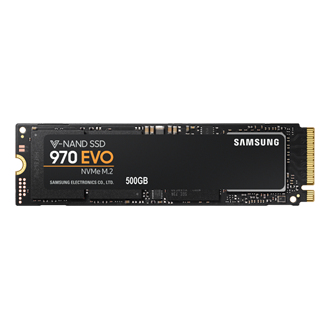
1. STORAGE: It has 256 GB PCIe® NVMe™ M.2 SSD now, you can upgrade to larger (capacity) using standard M.2 NVMe SSD from good vendors. We normally use examples from a popular product such as Samsung 970 EVO

                    https://www.samsung.com/au/memory-storage/nvme-ssd/970-evo-nvme-m-2-ssd-500gb-mz-v7e500bw/

because HP uses many different available suppliers including Samsung


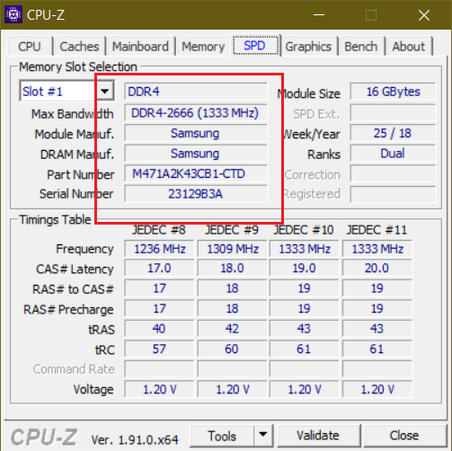
2. RAM:  It has 8 GB DDR4-2666 SDRAM (1 x 8 GB) now, you can simply use SAME existing 8GB to get 16GB or using same RAM as on my HP Omen machine


               SamsungR.png


Not: my HP Omen has 32GB (2 x 16GB) preinstalled.


Regards.

BH
***
**Click the KUDOS thumb up on the left to say 'Thanks'**
Make it easier for other people to find solutions by marking a Reply 'Accept as Solution' if it solves your problem.


View solution in original post

1 REPLY 1
HP Recommended

@qkoguy 


The specs of your machine is


          https://support.hp.com/au-en/document/c06655486


1. STORAGE: It has 256 GB PCIe® NVMe™ M.2 SSD now, you can upgrade to larger (capacity) using standard M.2 NVMe SSD from good vendors. We normally use examples from a popular product such as Samsung 970 EVO

                    https://www.samsung.com/au/memory-storage/nvme-ssd/970-evo-nvme-m-2-ssd-500gb-mz-v7e500bw/

because HP uses many different available suppliers including Samsung


2. RAM:  It has 8 GB DDR4-2666 SDRAM (1 x 8 GB) now, you can simply use SAME existing 8GB to get 16GB or using same RAM as on my HP Omen machine


               SamsungR.png


Not: my HP Omen has 32GB (2 x 16GB) preinstalled.


Regards.

BH
***
**Click the KUDOS thumb up on the left to say 'Thanks'**
Make it easier for other people to find solutions by marking a Reply 'Accept as Solution' if it solves your problem.


† The opinions expressed above are the personal opinions of the authors, not of HP. By using this site, you accept the <a href="https://www8.hp.com/us/en/terms-of-use.html" class="udrlinesmall">Terms of Use</a> and <a href="/t5/custom/page/page-id/hp.rulespage" class="udrlinesmall"> Rules of Participation</a>.