
-
×InformationNeed Windows 11 help?Check documents on compatibility, FAQs, upgrade information and available fixes.
Windows 11 Support Center. -
-
×InformationNeed Windows 11 help?Check documents on compatibility, FAQs, upgrade information and available fixes.
Windows 11 Support Center. -
- HP Community
- Gaming
- Gaming Notebooks
- Re: SSD compatiblity size

Create an account on the HP Community to personalize your profile and ask a question
Your account also allows you to connect with HP support faster, access a personal dashboard to manage all of your devices in one place, view warranty information, case status and more.

It has been a while since anyone has replied. Simply ask a new question if you would like to start the discussion again.

10 REPLIES 10


07-11-2020 04:18 PM
 HP Recommended
What is your Omen 15- ce0xx ? For example
Your machine should be very close to the above machine. You can use 1TB of
https://www.samsung.com/au/memory-storage/970-evo-nvme-m2-ssd/MZ-V7E2T0BW/
https://www.crucial.com/products/ssd/crucial-p2-ssd
https://www.crucial.com/products/ssd/crucial-p5-ssd
Or similar from reputable vendors.
One example
https://www.crucial.com/ssd/p5/ct1000p5ssd8/ct18123523
Regards.
BH
***
**Click the KUDOS thumb up on the left to say 'Thanks'**
Make it easier for other people to find solutions by marking a Reply 'Accept as Solution' if it solves your problem.


***
**Click the KUDOS thumb up on the left to say 'Thanks'**
Make it easier for other people to find solutions by marking a Reply 'Accept as Solution' if it solves your problem.
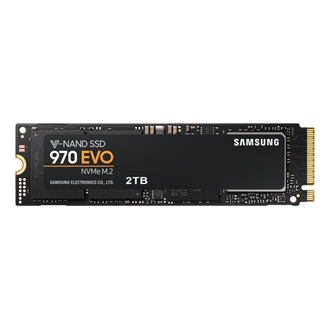
Enjoy blazing speeds and vast storage with the Samsung 970 EVO 2TB NVMe SSD. Ideal for high-performance tasks, offering seamless multitasking and reliability.

07-11-2020 10:39 PM
HP Recommended
I am currently running a Micron 1100 2TB SSD in my Omen without a problem. Your EVO is a better SSD and should work fine. If you are talking about the m.2 slot, a 2 TB M.2 ought to work fine too. I'll test it out shortly to see, I happen to have a 2TB XPG in my parts bin that looks like it'd replace the OEM 256GB m.2 just fine.
07-12-2020 12:37 AM - edited 07-12-2020 12:38 AM
HP Recommended
Yes. I am currently running a 1tb NVME M.2 SSD in place of the stock 256Gb one in my version of that laptop, and a 2tb SATA SSD in place of the stock 1tb hard drive. Not a problem. Rock solid. Only issue I've had with my laptop is that the CPU fan died and unfortunately HP doesn't appear to stock it anymore. Had to order it from the manufacturer in China.
07-12-2020 01:22 AM
HP Recommended
Your fan died because you upgraded them to 1tb of SSD and 2 tb of sata?? How about your ram? Mine the stocks is 8 and has available slots for another ram. How big do you think my laptop can handle the size of ram?
07-12-2020 02:00 AM
HP Recommended
No, my fan died because it was full of cat hair, lol. And you can upgrade to 32gb of RAM as two 16gb so-dimms, or 24gb by adding a single 16gb. I ordered mine with 32gb from the factory but I did the 24gb on another laptop with that cpu and it worked fine.
07-12-2020 12:49 PM
HP Recommended
To see what kind of memory is currently in your system, install the HP PC Hardware Diagnostics program out of the Windows store and run it. Navigate to "System Information" in the left side menu, then "Memory" in the tabs. This will tell you the type of memory that you have in your system. As I noted earlier, I have the memory installed that HP installed in my Omen. Generally HP installs the fastest memory that works with your processor in an Omen. I have the next fastest processor in my Omen compared to you, so I may have different memory. Anyhow, for *my* Omen, it says it's 2667 Mhz memory. Checking the Intel specs for my processor, that's the fastest memory for my processor.
So if you want to double your memory to 16gb, which is quite usable btw for anything other than running virtual machines (and with WSL I don't need to run virtual machines anymore), run that hardware diagnostics program and buy another stick identical to what's currently in your machine. Done. BTW, it's pretty easy to get into an Omen, there's YouTube videos all over the place showing you what screws to unscrew and how to use a spoog stick to unclip the clips, the videos are far better than any text description I could ever say here. These appear to be popular laptops, at least if you're judging by how many YouTube videos there are about them.

Be alert for scammers posting fake support phone numbers and/or email addresses on the community.
If you think you have received a fake HP Support message, please report it to us by clicking on "Flag Post".
† The opinions expressed above are the personal opinions of the authors, not of HP. By using this site, you accept the Terms of Use and Rules of Participation.


Didn't find what you were looking for?
Ask the community
† The opinions expressed above are the personal opinions of the authors, not of HP. By using this site, you accept the <a href="https://www8.hp.com/us/en/terms-of-use.html" class="udrlinesmall">Terms of Use</a> and <a href="/t5/custom/page/page-id/hp.rulespage" class="udrlinesmall"> Rules of Participation</a>.