-
×InformationNeed Windows 11 help?Check documents on compatibility, FAQs, upgrade information and available fixes.
Windows 11 Support Center. -

-
×InformationNeed Windows 11 help?Check documents on compatibility, FAQs, upgrade information and available fixes.
Windows 11 Support Center. -
- HP Community
- Gaming
- Gaming Notebooks
- Unable to connect to RPC service, Install OMEN Audio Control...

Create an account on the HP Community to personalize your profile and ask a question
10-26-2021 09:14 AM
Hello
It's not really a question it's a solution
I made a clean install of Windows 11 in my HP Omen 15-dh0016nf
The problem was that it was impossible to install back Omen Audio control and when I followed a tutoriel I had another problem while trying to contact RPC services!
What I did is: Going to the HP page for drivers, letting the page detect my computer, and download the last Realtek Pilot for my device.
You will have an Exe called spxxxxxx.exe, run it and extract the file as asked.
You will have a folder in your hard disk called spxxxxxx (same as previous exe)
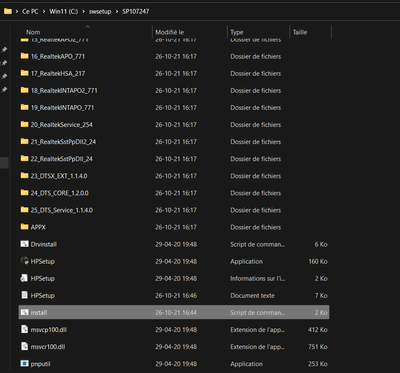
Go in:
For W10 user just click on the HPsetup.exe
For W11 user there's a problem we'll solve easily.
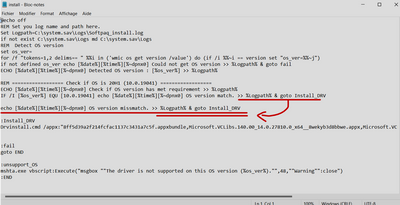
The program is trying to know whether you use or not a specific version of W10
What we gonna do is telling him that if your version isn't W10 then execute anyway.
Right click on the enlightened file above (install.cmd)
The part I underlined twice isn't the original part but it is what you should have, copy the part from above and just past it at this place like the screenshot above.
Save it in your desktop as install.cmd (you won't be able to save it directly in the folder) and replace it.
Now launch HPsetup.exe
It will open a CMD window, do not close it, it will show "Wait 4 seconds, press a Key to continue"
It will install all the library from the 25 folder above and Omen Audio Control
Do not touch anything, when the window is closed, you will see Omen Audio Control is installed
Reboot!
Enjoy!!
Hope it helped, It took me an hour to find out how to do it for W11 but it worked for me!
Feel free to ask questions!