
-
×InformationNeed Windows 11 help?Check documents on compatibility, FAQs, upgrade information and available fixes.
Windows 11 Support Center. -
-
×InformationNeed Windows 11 help?Check documents on compatibility, FAQs, upgrade information and available fixes.
Windows 11 Support Center. -
- HP Community
- Gaming
- Gaming Notebooks
- Re: keyboard bYou are welcome.

Create an account on the HP Community to personalize your profile and ask a question
Your account also allows you to connect with HP support faster, access a personal dashboard to manage all of your devices in one place, view warranty information, case status and more.

It has been a while since anyone has replied. Simply ask a new question if you would like to start the discussion again.

04-26-2020 11:17 AM
 HP Recommended
Product: Omen 17 by HP cb0010nl
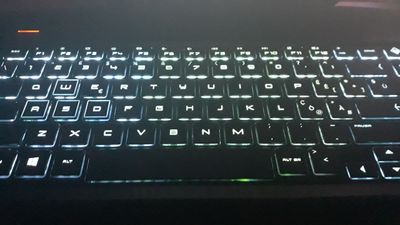
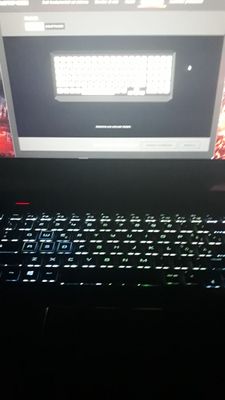
I noticed this in the backlight of my keyboard. The central part tends to be green, especially with light colors. Why? Is there any way to solve it? The pc is only one month old.
7 REPLIES 7

04-27-2020 05:54 AM
HP Recommended
Yes, I know. I forgot to specify that I was using a white color for the whole keyboard. Yesterday I spoke to an HP technician, and he like me noticed two green LEDs under the space bar and ALT, even when I used other colors, such as light ones .. white, cyan, yellow ...

04-29-2020 03:46 AM
HP Recommended
I have the same issue, same laptop only few months old. I've seen a few forms where people who own OMEN Laptops bought from 2019 to now are having the same issue.
Only solution I found was to reinstall the omen command center but I tried it and it doesn't work.
Hope some one can provide a solution soon...
04-29-2020 03:53 AM
HP Recommended
From what I understand these models are all like that. Apparently a factory defect. In addition to other things. For its cost, it should be perfect. But if they are all like that, at least they lowered the cost.
04-29-2020 04:06 AM
HP Recommended
Thanks for the reply Inferi.
wow... can't believe I spent so much money on a product that comes defective from the factory.
I still have my warranty, do you know if they can replace it with new lighting that works properly or is this a "forever" issue?
Thank you
04-29-2020 04:48 AM - edited 04-29-2020 04:50 AM
HP Recommended
You are welcome. If you have the guarantee, you can take it back and ask for a replacement, or ask for a keyboard repair, which maybe I'll do too, but now I can't do it for the covid19 problem. I spoke to an HP supporter last night and he said he could bring him to assistance and ask for a repair of the keyboard. I also recommend you to contact support, also via chat and see what they say. Are you also experiencing a backlight bleeding problem?
I too was disappointed to find certain defects. They will be small things, but they make a difference in my opinion.
05-01-2020 01:26 AM
HP Recommended
Can't say I have any backlight bleeding problems, all in all I really like my Omen. I haven't found many issues beyond the Omen software and the keyboard lighting that is colorblind. My keyboard is becoming really irritating as I write a lot of code and my ocd keeps getting distracted by the different color tones. I contacted HP but their automated system informed me that they aren't operating during the covid19 crisis and I understand, just feel a little ripped off at this point and feels like HP is being meh about it. So many posts about this problem going back to last year but not one helpful solution or answer, apart from yours. Thanks again for all your reply's and advice.
Good luck with your rig, hopefully everything gets back to "normal" soon

Be alert for scammers posting fake support phone numbers and/or email addresses on the community.
If you think you have received a fake HP Support message, please report it to us by clicking on "Flag Post".
† The opinions expressed above are the personal opinions of the authors, not of HP. By using this site, you accept the Terms of Use and Rules of Participation.


Didn't find what you were looking for?
Ask the community
† The opinions expressed above are the personal opinions of the authors, not of HP. By using this site, you accept the <a href="https://www8.hp.com/us/en/terms-of-use.html" class="udrlinesmall">Terms of Use</a> and <a href="/t5/custom/page/page-id/hp.rulespage" class="udrlinesmall"> Rules of Participation</a>.