-
×InformationNeed Windows 11 help?Check documents on compatibility, FAQs, upgrade information and available fixes.
Windows 11 Support Center. -

-
×InformationNeed Windows 11 help?Check documents on compatibility, FAQs, upgrade information and available fixes.
Windows 11 Support Center. -
- HP Community
- Apps, Services & Software
- RGS
- Re: How to suppress warning when install RGS Sender 7.6.1 by...

Create an account on the HP Community to personalize your profile and ask a question
09-19-2019 12:52 AM
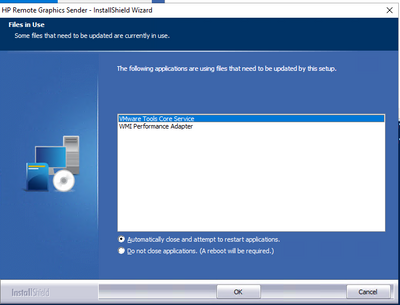
When I use command line to install RGS 7.6.1 on Windows 10, in some case, it gives me a warning about some application is using the files need to be updated by RGS. Is there a way to suppress the warning by using any switch to the command?
I am using this to install it.
SenderSetup64.exe" /z"/autoinstall /agreetolicense /sso /clipboard /noreboot /rgslicenseserver=27000@license server"
It gives me this in some case:
09-19-2019 01:42 AM - edited 09-19-2019 01:44 AM
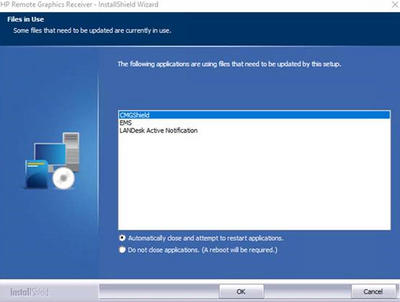
We have had the same issue as well in HP RGS 7.6 with a few apps, at first it was Dell Encryption and updating that to the latest version fixed the below issue.
Then as long as the versions were correct the install worked fine on existing machines, we then tried to add the package to the build and are hitting a similar issue but with the pop up above only saying "LANDESK Active Notification" which is the software managing the install of the build process.
It seems to be on the receiver install. We install receiver, then sender, vmouse then reboot and on checking the machine during the process neither the sender nor vmouse are installed.
HPRGS76\ReceiverSetup64.exe" /S /v/qn /z"/autoinstall /agreetolicense /clipboard /usb=localRemote /noreboot"'
09-19-2019 03:13 AM
Thank you for sharing this. What we are doing is to automate the installation process for RGS. Usually it is on clean installed Windows. I thought about finding the applications may affect the RGS installation so that I can stop them before RGS. But user could still use this automation to install RGS on a Windows that has all kinds of applications installed. Then no body knows what will interrupt the automation. If we would only find a way to suppress the pop up to say letting the auto install to close whatever applications are, that would be great