• ×
    Information
    Need Windows 11 help?
    Check documents on compatibility, FAQs, upgrade information and available fixes.
    Windows 11 Support Center.
  • post a message
  • ×
    Information
    Need Windows 11 help?
    Check documents on compatibility, FAQs, upgrade information and available fixes.
    Windows 11 Support Center.
  • post a message
Guidelines
Join the HP Community Solve‑a‑thon | Help Others & Share Your Solutions | Live on Zoom | 2:30 PM to 2:30 AM IST | Every Wednesday Click here to know more
HP Recommended
Envy 5660 All In One
macOS 10.14 Mojave

I am working on a logo project and need to resize pictures.  Using just my 5660 Envy All In One does not give me the results I want.  I am not truly proficient at picture editing  at this time.  It is a work in progress, but I can handle instructions with many variations.  How can I use what software is available and the printer to resize on my Mac running Mojave.

1 REPLY 1
HP Recommended

@Cricket50, Welcome to the HP Support Community!


To know how to print photos in MAC, click here


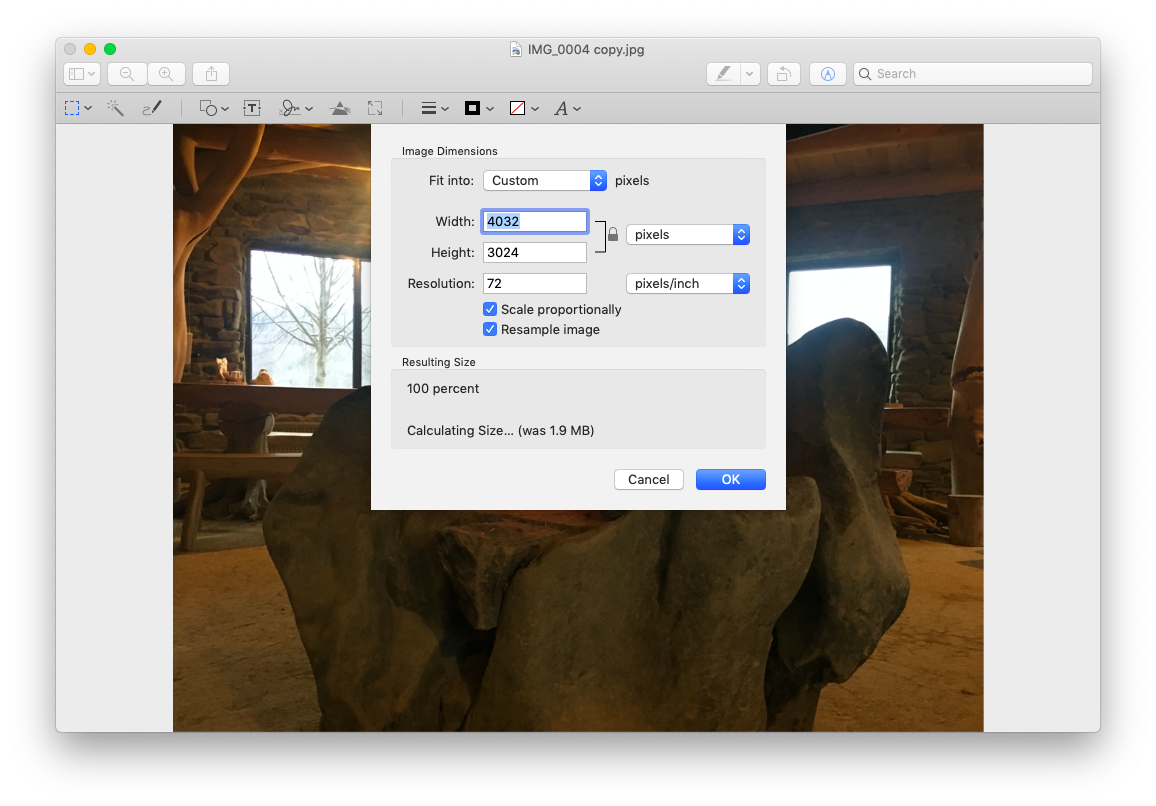
Here are the steps to resize an image in Preview:

  1. Open the image you want to modify
  2. Click on Tools and select Adjust Size
  3. Now you can adjust the Width, Height, and Resolution
  4. Once you’ve made those changes, make sure you’ve ticked the “Scale proportionally” box; otherwise, you risk an image that is out of proportion and may not look very professional
  5. Now the resized image will show in the Preview window, and you can keep trying out new sizes until you are happy with the end result. Go to File > Save to save the image with the original name or File > Rename if you want to keep the original (useful if you need to keep a high-resolution version) and apply a different name to this copy.

Let me know how this goes.


If you feel my post solved your issue, please click “Accept as Solution”, it will help others find the solution. Click the “Kudos/Thumbs Up" on the bottom right to say “Thanks” for helping!


KUMAR0307
I am an HP Employee

† The opinions expressed above are the personal opinions of the authors, not of HP. By using this site, you accept the <a href="https://www8.hp.com/us/en/terms-of-use.html" class="udrlinesmall">Terms of Use</a> and <a href="/t5/custom/page/page-id/hp.rulespage" class="udrlinesmall"> Rules of Participation</a>.