• ×
    Information
    Need Windows 11 help?
    Check documents on compatibility, FAQs, upgrade information and available fixes.
    Windows 11 Support Center.
  • post a message
  • ×
    Information
    Need Windows 11 help?
    Check documents on compatibility, FAQs, upgrade information and available fixes.
    Windows 11 Support Center.
  • post a message
Guidelines
Seize the moment! nominate yourself or a tech enthusiast you admire & join the HP Community Experts!
HP Recommended
Laser Jet Pro M277dw
macOS 10.14 Mojave

I have a number of booklets which end up as A5, but are printed on A4 landscape but formed into booklets at the printing stage. This has worked beautifully until installing Mojave - I can print but not in the booklet format and I am in despair after hours of trying, restarting, uninstalling printers etc. I am using Mac OS 10.14.2 and the printer driver is 2.0. I have spoken to Apple support who could not help me and my techy son is now hiding as I have exhausted his expertise too. Help please!

1 REPLY 1
HP Recommended

@zannefin


Welcome to HP forums, I see that you are getting issues in printing in booklet format after upgrading to Mojave.


Follow the below steps to change the settings.

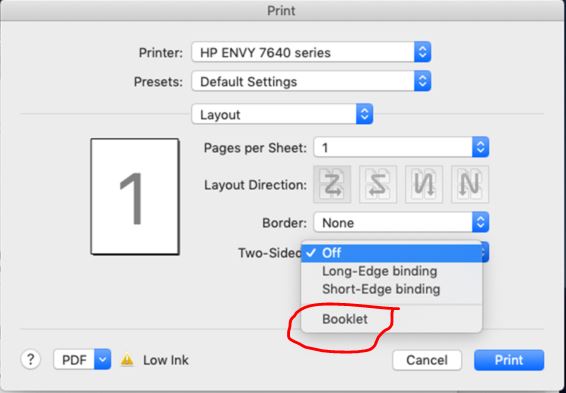
Open the document you want to print, click File, click Print, and then click Show Details, if necessary

Click Layout in the unnamed print options menu at the center of the dialog. Click Booklet.


Let me know if that help.

To thank me for my efforts to help you, please mark my post as an accepted solution so that it benefits several others.

Cheers.

Sandytechy20
I am an HP Employee

† The opinions expressed above are the personal opinions of the authors, not of HP. By using this site, you accept the <a href="https://www8.hp.com/us/en/terms-of-use.html" class="udrlinesmall">Terms of Use</a> and <a href="/t5/custom/page/page-id/hp.rulespage" class="udrlinesmall"> Rules of Participation</a>.