• ×
    Information
    Need Windows 11 help?
    Check documents on compatibility, FAQs, upgrade information and available fixes.
    Windows 11 Support Center.
  • post a message
  • ×
    Information
    Need Windows 11 help?
    Check documents on compatibility, FAQs, upgrade information and available fixes.
    Windows 11 Support Center.
  • post a message
Guidelines
Seize the moment! nominate yourself or a tech enthusiast you admire & join the HP Community Experts!
HP Recommended
OfficeJet 4500
Microsoft Windows 8 (32-bit)

I have a working OfficeJet which connects only with a cable. Before tossing it, I wonder if there is any "adapter"  that may might convert this printer to WIFI capabilities? THANKS!

1 REPLY 1
HP Recommended

@NB325

Thank you for joining HP Forums.

It's a pleasure assisting you in finding answers to your technical queries.


I'll be happy to assist you with Changing from a USB to a Wireless Connection.


Change the connection type with the HP Printer Setup & Software utility or with the HP Smart app for Windows 10. Leave the USB cable connected until you are prompted to disconnect it.

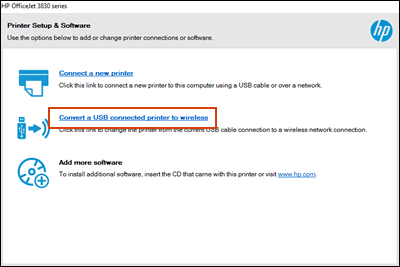
  • HP Printer Setup & Software utility: Search Windows for 'HP', and then click the name of your printer in the results to open HP Printer Assistant. Click Utilities or Tools in the top menu bar, click Printer Setup & Software or Device Setup & Software, and then click Convert a USB connected printer to wireless to launch the utility.
     

    Figure: Convert a USB connected printer to wireless utility in HP Printer Assistant
     

    Convert a USB connected printer to wireless utility in HP Printer Assistant
     
  • HP Smart app: On the app home screen, look for a Make printing easier by connecting your printer wirelessly message at the top of the window. If it displays, click Learn More to start the guided conversion.

    NOTE: 

    If the message does not display, use the method to convert the connection through the HP Printer Setup & Software utility.

    Figure : Set up the printer wirelessly in HP Smart

    Set up a new printer feature in HP Smart


Use this link: https://support.hp.com/us-en/product/hp-officejet-4500-all-in-one-printer-series-g510/3919445/docume... for your reference.


Keep me posted, how it goes!

If the information I've provided was helpful, give us some reinforcement by clicking the Accepted Solution and Kudos buttons, that'll help us and others see that we've got the answers!

Have a great day!

Cheers:)

Raj1788
I am an HP Employee 

† The opinions expressed above are the personal opinions of the authors, not of HP. By using this site, you accept the <a href="https://www8.hp.com/us/en/terms-of-use.html" class="udrlinesmall">Terms of Use</a> and <a href="/t5/custom/page/page-id/hp.rulespage" class="udrlinesmall"> Rules of Participation</a>.