• ×
    Information
    Need Windows 11 help?
    Check documents on compatibility, FAQs, upgrade information and available fixes.
    Windows 11 Support Center.
  • post a message
  • ×
    Information
    Need Windows 11 help?
    Check documents on compatibility, FAQs, upgrade information and available fixes.
    Windows 11 Support Center.
  • post a message
Guidelines
Seize the moment! nominate yourself or a tech enthusiast you admire & join the HP Community Experts!
HP Recommended
LaserJet M281
Microsoft Windows 10 (64-bit)

During set up I chose the wrong location (small buttons, fat fingers). Despite resetting the printer, it doesn't give me the option of changing the county/location, only language. Can you advise on how to change the location, please?

6 REPLIES 6
HP Recommended

@Grangey


Welcome to HP Forums. This is a great place to get support, find answers and tips.


I understand that you would like to change the Country in the Printer Settings.


I'd like to help.


You need to make the changes in the EWS Server Page.


Please follow these Steps.


Note: The Printer Model mentioned in the pictures might be different but the same concept applies.

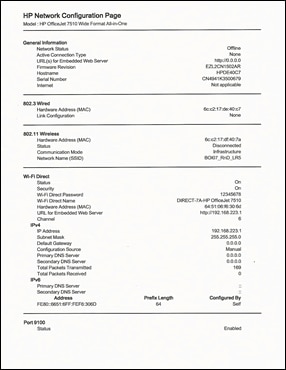
  1. Print a Network Configuration Page.

    1.  

      Image: Example of a Network Configuration Page
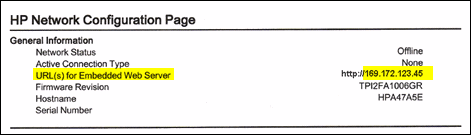
  2. On the Network Configuration Page, find URL for the embedded web server.


    Image: EWS URL on the Network Configuration Page
  3. From a computer connected to your network, type the entire URL into an Internet browser. If the webpage remains blank, try a different Internet browser.

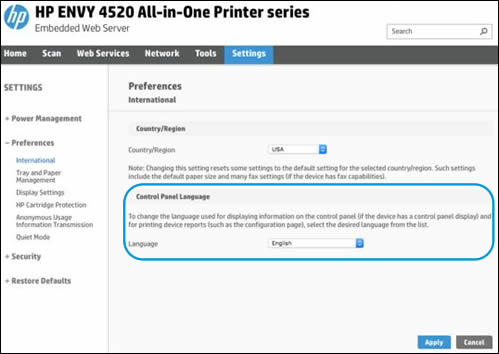
  4. In the EWS, click the Settings tab.

  5. Click Preferences, and then click International.

  6. Under Control Panel Language, select the desired Country


    Image: Example of the Control Panel Language Selection
  7. Click Apply, wait until the changes are confirmed, and then close the EWS.

  8. Turn your printer off and then on.

Keep me posted how it goes


Thank you and have a wonderful day 😊


If the information I've provided was helpful, give us some reinforcement by clicking the "Solution Accepted" on this Post and it will also help other community members with similar issue.

KrazyToad
I Am An HP Employee

HP Recommended

Thanks for your reply but, having been through what I believe are all printable reports, I cannot find the Network Configuration Page that will give me the EWS address. Could you point me in the right direction for my exact printer, the M281FDW?


I shall keep on looking in the meantime.


Regards,


Paul

HP Recommended

Further to this, I have found the url of the printer. Loggining into it, the appearance is different to your screenshot. However, your solution only changes the language of the printer, not the phsyical location. I inadvertnantly selected 'Germany' instead of the UK, and all reports I print are in German.

HP Recommended

@Grangey


Thanks for keeping me posted


We will attempt a n NVRAM Reset to original Factory Settings


Since these steps are specific to your Printer, I will send you a private message with the instructions


Please check your private message icon on the upper right corner of your HP Forums profile.


Next to your profile Name, you should see a little blue envelope


Thank you 😊


If the information I've provided was helpful, give us some reinforcement by clicking the "Solution Accepted" on this Post and it will also help other community members with similar issue.

KrazyToad
I Am An HP Employee

HP Recommended

Thanks again for replying, but the method as outlined in your private message does not alter the country.


Regards,


Paul

HP Recommended

@Grangey


Thanks for keeping me posted


I have sent you another private message with the next course of action


Thank you

KrazyToad
I Am An HP Employee

† The opinions expressed above are the personal opinions of the authors, not of HP. By using this site, you accept the <a href="https://www8.hp.com/us/en/terms-of-use.html" class="udrlinesmall">Terms of Use</a> and <a href="/t5/custom/page/page-id/hp.rulespage" class="udrlinesmall"> Rules of Participation</a>.