• ×
    Information
    Need Windows 11 help?
    Check documents on compatibility, FAQs, upgrade information and available fixes.
    Windows 11 Support Center.
  • post a message
  • ×
    Information
    Need Windows 11 help?
    Check documents on compatibility, FAQs, upgrade information and available fixes.
    Windows 11 Support Center.
  • post a message
Guidelines
Seize the moment! nominate yourself or a tech enthusiast you admire & join the HP Community Experts!
HP Recommended
Laser Jet Pro MFP
macOS 10.14 Mojave

Every time I print a PDF from the internet, I get a corrupt file printing error. Anything I attempt to print seems to get "hung up" in the printer.  The printer says "printing" and the small wheel will try for 10-15 minutes then error out and printer pausing itself.  I have a MAC.  

1 REPLY 1
HP Recommended

@Holly2905, Welcome to HP Support Community!


Are you able to print from other applications?

Have you tried downloading the file and printing it using the preview app?


Let us try to isolate the issue by printing the PDF as an image. Refer to the document https://helpx.adobe.com/acrobat/kb/quick-fix-print-pdf-image.html for help.


Ensure that the printer is up to date with its firmware and Mac is up to date with its software. If you are unsure you may use the links below to update the printer firmware and Mac software:

Update printer firmware

Update software on Mac 


1.) Click the Apple menu, click System Preferences, and then click Print & Scan or Printers & Scanners.

2.) Check if your printer name displays in the Printers list, If your printer is listed, click the printer name, click the minus sign to delete the printer.

3.) If you see multiple printer queues for the same printer, remove all extra printers by selecting them one at a time, and then clicking the minus button  at the bottom of the list.

4.) Click the plus sign  click Add Printer or Scanner, click the printer name.
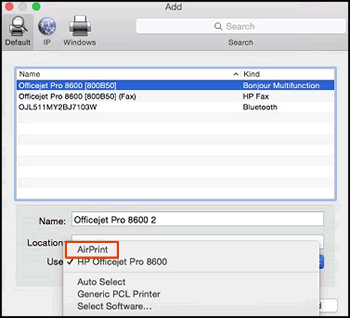
5.) Click the Use or Print Using menu, select AirPrint in the pop-up menu. Then click Add.

Select AirPrint from the Use menu

6.) Try to print.


You can also completely uninstall Acrobat Reader. Go to Adobe website, download and install Acrobat Reader DC. Try printing.


Let me know the outcome.

Cheers 🙂


Please click “Accept as Solution” if you feel my post solved your issue, it will help others find the solution. Click the “Kudos/Thumbs Up" on the bottom right to say “Thanks” for helping!

TEJ1602
I am an HP Employee

† The opinions expressed above are the personal opinions of the authors, not of HP. By using this site, you accept the <a href="https://www8.hp.com/us/en/terms-of-use.html" class="udrlinesmall">Terms of Use</a> and <a href="/t5/custom/page/page-id/hp.rulespage" class="udrlinesmall"> Rules of Participation</a>.


