-
×InformationNeed Windows 11 help?Check documents on compatibility, FAQs, upgrade information and available fixes.
Windows 11 Support Center. -

-
×InformationNeed Windows 11 help?Check documents on compatibility, FAQs, upgrade information and available fixes.
Windows 11 Support Center. -
- HP Community
- Printers
- LaserJet Printing
- Re: LaserJet Pro M254dw is so slow?

Create an account on the HP Community to personalize your profile and ask a question
12-14-2019 12:06 PM
Terrible printing speed. After factory reset, configuration report show almost 50% of available memory in use. Which means any print job larger than a few pages will drastically slow down.
At best this prints 6 pages per minute for normal size pdf docs. If its large, greater than 50MB, about 10 pages, it can take 1 or 2 minutes per page!
Support is not at all helpful. 1 hour to be told to restart printer.... I was transferred over 5 times to the wrong departments. Finally reached a tech agent that couldn't figure out how to reset printer or what was my driver number. The driver models on HP.com do not have the same name as the partner reports or what is in printer utility on computer.
HP is aware of the issue and suggests buying a more expensive model for business workgroups.
Overall, if you plan on printing more than 1-2 page emails or docs this isn't a great printer. I am hoping someone has a workaround out here other than restarting the printer for every job to clear the memory.
12-17-2019 04:57 AM - edited 12-18-2019 02:25 AM
@Pecons, Welcome to HP Support Community!
This could be an issue with the installed drivers. In that case, I'd suggest you remove the existing printer driver and set up the printer with Apple AirPrint. Let's try these steps:
Please ensure that the printer is up to date with its firmware and Mac is up to date with it's software. If you are unsure, you can download and install the latest firmware update from HP Customer Support - Software and Driver Downloads.
1.) Click the Apple menu, click System Preferences, and then click Print & Scan or Printers & Scanners.
2.) Check if your printer name displays in the Printers list, If your printer is listed, click the printer name, click the minus sign
to delete the printer.
3.) If you see multiple printer queues for the same printer, remove all extra printers by selecting them one at a time, and then clicking the minus button
at the bottom of the list.
4.) Click the plus sign
, click Add Printer or Scanner, click the printer name.
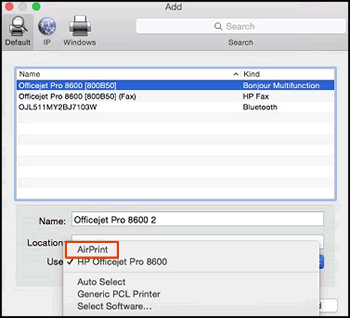
5.) Click the Use or Print Using menu, select AirPrint or Secure AirPrint in the pop-up menu. Then click Add.

6.) Try to print and scan.
Hope this helps! Keep me posted.
Please click “Accept as Solution” if you feel my post solved your issue, it will help others find the solution. Click the “Kudos/Thumbs Up" on the bottom right to say “Thanks” for helping!
TEJ1602
I am an HP Employee
12-17-2019 01:42 PM
Wow. I couldn’t have manufactured a more useless answer response than what was posted in this discussion. You should pay me and anyone else that accidentally reads this.
Let us begin by acknowledging the fact that the HP Pro Laserjet Pro M254dw is a single function laser color printer. To my knowledge, which I’m sure should be less than an HP employee, there is no country that produces this model as a scanner or copy machine. So you either (a) didn’t even bother to actually read the question, or
(b) don’t care and didn’t do any work to actually try to help.
So no, your solution was not at all helpful. I wouldn’t ask tech support if I hadn’t already tried the driver or your other gem, to restart the device. It’s just a bad printer. Almost as bad as HP tech support.
4000 thumbs down!
12-18-2019 02:28 AM
I have brought your issue to the attention of an appropriate team within HP. They will likely request information from you in order to look up your case details or product serial number. Please look for a private message from an identified HP contact. Additionally, keep in mind not to publicly post personal information (serial numbers and case details).
If you are unfamiliar with how the Forum's private message capability works, you can learn about that here.
Thank you for visiting the HP Support Community.
TEJ1602
I am an HP Employee

