• ×
    Information
    Need Windows 11 help?
    Check documents on compatibility, FAQs, upgrade information and available fixes.
    Windows 11 Support Center.
  • post a message
  • ×
    Information
    Need Windows 11 help?
    Check documents on compatibility, FAQs, upgrade information and available fixes.
    Windows 11 Support Center.
  • post a message
Guidelines
Join the HP Community Solve‑a‑thon | Help Others & Share Your Solutions | Live on Zoom | 2:30 PM to 2:30 AM IST | Every Wednesday Click here to know more
HP Recommended
P1606dn
Microsoft Windows 7 (64-bit)

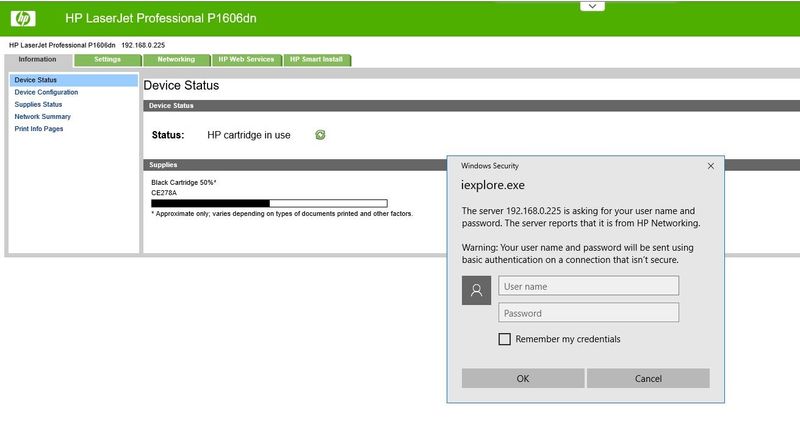
I have to update the network device configuration. When I do I get a windows security pop up asking for my username and password. I tried Admin and Admin,  Admin and blank, Admin and 123456, Administrator and blank, and a slew of others.  Is there a way to reset this or is there a username and password that will work?Capture.JPG

1 REPLY 1
HP Recommended


@cardgunner

Thank you for posting on HP Forums, 

Riddle_Decipher is at your service. 


As I understand you have an error - "Username and password are incorrect",

Don't worry as I'll be glad to help, however, to provide an accurate resolution, I need a few more details: 

Did you attempt to set it up again to resolve this issue?


If you haven't, here's a soothing voice that will lead you towards peace & harmony, by resolving the issue: 😉

Click here to watch the YouTube video to find the solution.


If this doesn't do the trick, let me know and I'll get you more steps that will.


Do get back to me as I have a few more tricks up my sleeve, 

As I will follow up to ensure your concern is resolved,

That said, If I have helped you resolve the issue, 

feel free to give me a virtual high-five by clicking the 'Thumbs Up' icon 

followed by clicking on 'Accepted as Solution' 

And Have a great day Ahead!

Riddle_Decipher
I am an HP Employee


Learning is a journey, not a destination.
Let's keep asking questions and growing together.
† The opinions expressed above are the personal opinions of the authors, not of HP. By using this site, you accept the <a href="https://www8.hp.com/us/en/terms-of-use.html" class="udrlinesmall">Terms of Use</a> and <a href="/t5/custom/page/page-id/hp.rulespage" class="udrlinesmall"> Rules of Participation</a>.