• ×
    Information
    Need Windows 11 help?
    Check documents on compatibility, FAQs, upgrade information and available fixes.
    Windows 11 Support Center.
  • post a message
  • ×
    Information
    Need Windows 11 help?
    Check documents on compatibility, FAQs, upgrade information and available fixes.
    Windows 11 Support Center.
  • post a message
Guidelines
Seize the moment! nominate yourself or a tech enthusiast you admire & join the HP Community Experts!
HP Recommended
Laserjet Pro M521
Microsoft Windows 7 (32-bit)

I have a new Laserjet Pro M521 with the additional paper tray #3.  I can print to tray 3 from the desktop, but can't make a copy using paper from  tray 3 using  the units home screen.  Every time that I choose tray 3 from the copy settings, I get the error message "load tray 3 with plain paper".  It then says "use available media" and prints from tray #2.  The tray settings for #3 are set to bond and letter from both the units settings option and the advanced setting on the computer. 

1 REPLY 1
HP Recommended

@Mickey04


Another similar thread / inquiry was resolved by the member:

I FIXED IT!!!!  The fix was... under paper settings (for each tray) I changed Tray 1 to "Letter Size" instead of "Any Size".  [content removed]... It seems to have fixed Tray 1 from stealing the Print Job!


If you have already set the "computer" side settings, try / consider:


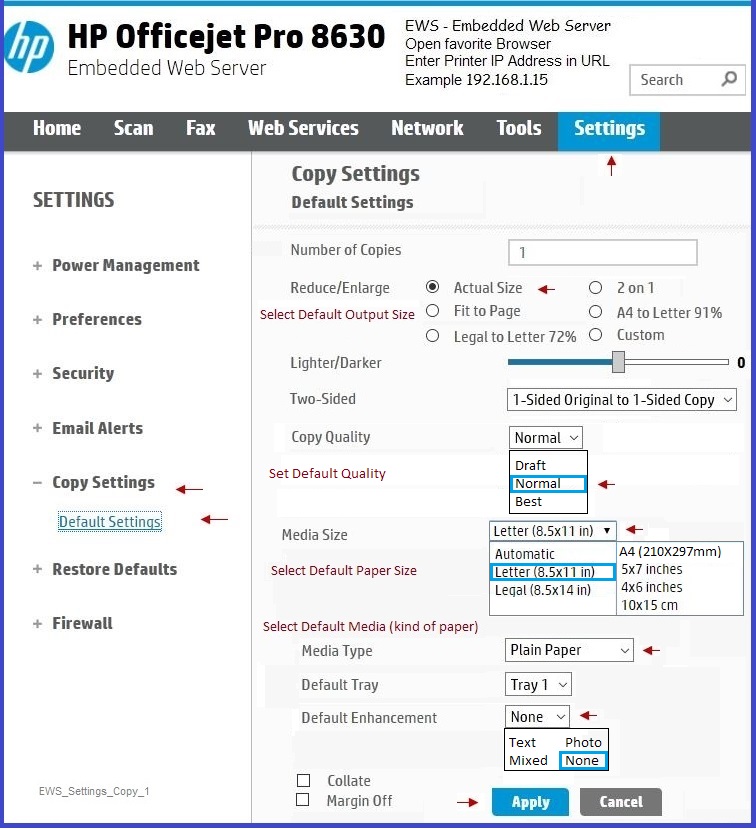
If your printer is on the network and supports the Embedded Web Server (EWS), set the preferences -- scroll down to see "Copy" settings example.


Open your favorite browser >

type / enter Printer IP address into URL / Address bar

tab Settings >

Set options in categories:

Tray Settings

Paper Settings > for each tray


Click Apply to set options "in place"


HP_8630_EWS_Settings_Preferences_Paper_2.jpg


Copy Settings (in EWS) 


EWS_Settings_Copy_1.JPG


Click Thumbs Up to say Thank You!

Answered? Click my post "Accept as Solution" to help others find it.


Dragon-Fur

† The opinions expressed above are the personal opinions of the authors, not of HP. By using this site, you accept the <a href="https://www8.hp.com/us/en/terms-of-use.html" class="udrlinesmall">Terms of Use</a> and <a href="/t5/custom/page/page-id/hp.rulespage" class="udrlinesmall"> Rules of Participation</a>.