• ×
    Information
    Need Windows 11 help?
    Check documents on compatibility, FAQs, upgrade information and available fixes.
    Windows 11 Support Center.
  • post a message
  • ×
    Information
    Need Windows 11 help?
    Check documents on compatibility, FAQs, upgrade information and available fixes.
    Windows 11 Support Center.
  • post a message
Guidelines
Seize the moment! nominate yourself or a tech enthusiast you admire & join the HP Community Experts!
HP Recommended
MFP M281CDW

Hi,


I am trying to print single sided pages, and do not see how to change the double sided default.


I am running a MAC Mojave OS connecected by USB Port to the above printer.   Trying to print through word, as well as other applications.


ANy help appreciated !!!

1 REPLY 1
HP Recommended

@SmallOfficePrin


A warm welcome to HP Community!

I believe we can disable two sided printing from the print dialogue window. Let's try these steps:

1.) Open the document you want to print, click File, click Print, and then click Show Details, if necessary.

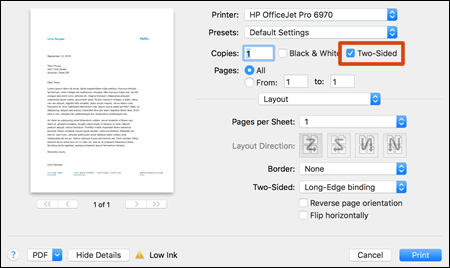
2.) Look for a Two-Sided option in the print dialog and then Un-check the Two Sided box.

Two-Sided option in the print settings


3.) Click Layout in the unnamed print options menu at the center of the dialog. Click Two-Sided and select Off.


4.) Click Print.

Once the print job is complete, these settings will be set as default for future print jobs until you select a new preset or change settings.

Let me know how it goes!


If the information I've provided was helpful, give us some reinforcement by clicking the Accepted Solution and Kudos buttons, that'll help us and others see that we've got the answers!
Have a great day!

Senan6806


I am an HP Employee

† The opinions expressed above are the personal opinions of the authors, not of HP. By using this site, you accept the <a href="https://www8.hp.com/us/en/terms-of-use.html" class="udrlinesmall">Terms of Use</a> and <a href="/t5/custom/page/page-id/hp.rulespage" class="udrlinesmall"> Rules of Participation</a>.