• ×
    Information
    Need Windows 11 help?
    Check documents on compatibility, FAQs, upgrade information and available fixes.
    Windows 11 Support Center.
  • post a message
  • ×
    Information
    Need Windows 11 help?
    Check documents on compatibility, FAQs, upgrade information and available fixes.
    Windows 11 Support Center.
  • post a message
Guidelines
Seize the moment! nominate yourself or a tech enthusiast you admire & join the HP Community Experts!
HP Recommended
HP Laserjet Pro MFP m26a
Microsoft Windows 10 (64-bit)

Hi,

i have a USB HP Laserjet Pro MFP M26a printer and i just want to know that how to increase INK INTENSITY of my printer?? There is a panel in out side and that is supported increase or decrease darkness quality for  scanning, what to do when i am printing from my Computer and printing quality is very poor, very light, toner is approximate 20% remaining. 

is there any one who will answer this that how to increase print intensity in USB Printer. USB printer have no web page and front panel id digital not LED touch.


Regards,,
M Shahid,,,

5 REPLIES 5
HP Recommended

@mshahid85, Welcome to the HP Support Community!


You have an option to print in Draft, Normal and Best mode. This can be done on the computer you are using to print. Make sure HP Full featured driver is installed on your PC.

If not, click here to download the driver for your printer.


Refer to this document to check the print settings.

Check Print quality and improvement settings, Ink and toner handling settings.


Let me know how this goes.


If you feel my post solved your issue, please click “Accept as Solution”, it will help others find the solution. Click the “Kudos/Thumbs Up" on the bottom right to say “Thanks” for helping!


KUMAR0307
I am an HP Employee

HP Recommended

would you please tell me how can i set the draft setting and where it will show in my computer???

any other solution is available or not?? 


i was looking draft into my pc and i saw fastres type things in print quality under my printer preferences, i set it 600 to 1200 but print quality is still very dull.


any other way or option via software, tools????

HP Recommended

@mshahid85


You can try changing the Print Quality settings and check if that helps


- Open the document or photo on your computer, click File or the menu icon then click Print.


Print or Print Pictures window or pane opens with general print job settings, including the menu to select the printer you want to print 


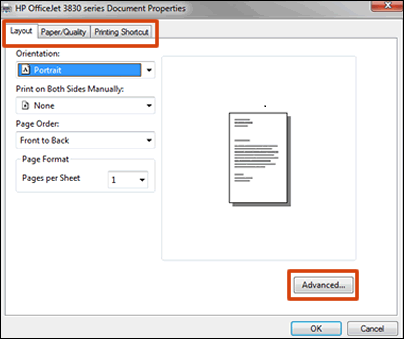
To view the different settings, click the tabs along the top of the window. To access more settings, click the Advanced button that is often located on the Layout tab.


Figure : Example of a printer Document Properties window

HP Document Properties window with settings tabs and the Advanced settings button


- Go to Quality Settings or Media menu on the Paper/Quality tab. Print in Max DPI or Output Quality menus are available on the Advanced tab or in Advanced Options


If the information I've provided was helpful, give us some reinforcement by clicking the "Solution Accepted" on this Post and it will also help other community members with similar issue.


KrazyToad
I Am An HP Employee

HP Recommended

its not working.............


do there any software tool for this matter?

HP Recommended

@mshahid85


Try printing from the HP Smart app and check the print quality

To download and know more about HP Smart, click here


Apart from these, there is no other option to increase the intensity of the printouts.


Keep me posted.

KUMAR0307
I am an HP Employee

† The opinions expressed above are the personal opinions of the authors, not of HP. By using this site, you accept the <a href="https://www8.hp.com/us/en/terms-of-use.html" class="udrlinesmall">Terms of Use</a> and <a href="/t5/custom/page/page-id/hp.rulespage" class="udrlinesmall"> Rules of Participation</a>.