• ×
    Information
    Need Windows 11 help?
    Check documents on compatibility, FAQs, upgrade information and available fixes.
    Windows 11 Support Center.
  • post a message
  • ×
    Information
    Need Windows 11 help?
    Check documents on compatibility, FAQs, upgrade information and available fixes.
    Windows 11 Support Center.
  • post a message
Guidelines
Join the HP Community Solve‑a‑thon | Help Others & Share Your Solutions | Live on Zoom | 2:30 PM to 2:30 AM IST | Every Wednesday Click here to know more
HP Recommended
Laserjet M281fdw
macOS 10.12 Sierra

Hi 

the printer is connected to the wifi network and works completely fine from my iphone / ipad, but I cannot add the printer from my Mac? please help! 


Thanks


1 REPLY 1
HP Recommended

@penfoc

Thank you for joining HP Forums.

It's a pleasure assisting you in finding answers to your technical queries.


update the printer firmware and Mac software:

Update printer firmware

Update software on Mac 


Add the printer

Remove the printer queue from the list of printers, and then add it again. Doing so creates a new printing session.

  1. Search the Mac for Print, and then click Print & Fax, Print & Scan, or Printers & Scanners in the list of results.
     

  2. Make sure your Mac is connected to the Internet.

  3. In the Printers list, click your HP printer, and then click the Minus button  to delete it.

  4. Click the Add button .

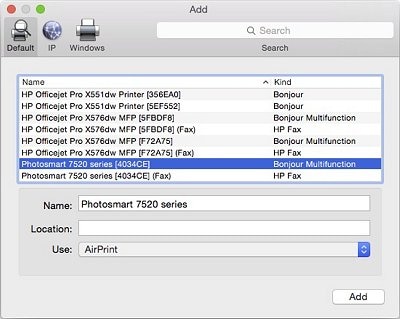
  5. Find and select the name of your printer from the Printer list, and then click Add to add your printer. Do not select an HP Fax driver.

      note:

    If your printer does not display in the list, make sure the printer is connected, turned on, has power, and is ready to print.

    Figure : Example of the printer selection list

    Image: The Add window showing a selection of printers with one model selected.
  6. Click Print Using or Use.

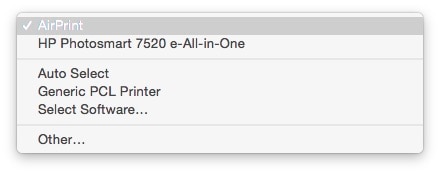
  7. Select the name of your printer (if available) or AirPrint.

    Figure : Menu showing AirPrint selected

    Image: Menu showing AirPrint selected

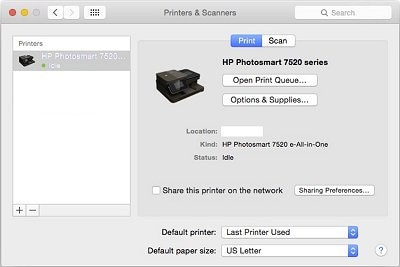
    Your new printer queue displays in the Printers list in an Idle status .

    Figure : Example of a newly added printer in the Printers & Scanners list

    Image: The printers and scanners windows with one printer in the printers list
  8. Try printing again.

Keep me posted, hope this works for you.

If the information I've provided was helpful, give us some reinforcement by clicking the Accepted Solution and Kudos buttons, that'll help us and others see that we've got the answers!

Have a great day!

Cheers:)

Raj1788
I am an HP Employee 

† The opinions expressed above are the personal opinions of the authors, not of HP. By using this site, you accept the <a href="https://www8.hp.com/us/en/terms-of-use.html" class="udrlinesmall">Terms of Use</a> and <a href="/t5/custom/page/page-id/hp.rulespage" class="udrlinesmall"> Rules of Participation</a>.