
-
×InformationNeed Windows 11 help?Check documents on compatibility, FAQs, upgrade information and available fixes.
Windows 11 Support Center. -
-
×InformationNeed Windows 11 help?Check documents on compatibility, FAQs, upgrade information and available fixes.
Windows 11 Support Center. -
- HP Community
- Printers
- LaserJet Printing
- imagemask limit check error printing pdf

Create an account on the HP Community to personalize your profile and ask a question
Your account also allows you to connect with HP support faster, access a personal dashboard to manage all of your devices in one place, view warranty information, case status and more.

It has been a while since anyone has replied. Simply ask a new question if you would like to start the discussion again.

04-19-2019 02:47 PM
 HP Recommended
Product: HP Laser Jet Pro 200
Operating System: macOS 10.14 Mojave

Solved! Go to Solution.
1 ACCEPTED SOLUTION
Accepted Solutions


04-24-2019 02:51 PM - edited 04-24-2019 02:51 PM
HP Recommended
It's possible that the printer driver is causing the problem. Let's remove the existing printer driver and setup the printer with Apple AirPrint and check. Here is how to do it:
Please ensure that the printer is up to date with its firmware and Mac is up to date with it's software. If you are unsure you may use the links below to update the printer firmware and Mac software:
1.) Click the Apple menu, click System Preferences, and then click Print & Scan or Printers & Scanners.
2.) Check if your printer name displays in the Printers list, If your printer is listed, click the printer name, click the minus sign  to delete the printer.
3.) If you see multiple printer queues for the same printer, remove all extra printers by selecting them one at a time, and then clicking the minus button at the bottom of the list.
4.) Click the plus sign  , click Add Printer or Scanner, click the printer name.
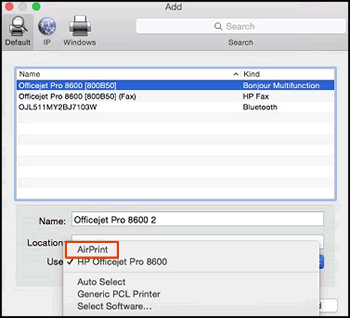
5.) Click the Use or Print Using menu, select AirPrint in the pop-up menu. Then click Add.
6.) Try to print.
Keep me posted!
Senan6806
I am an HP Employee
7 REPLIES 7
04-20-2019 12:29 PM
HP Recommended
A warm welcome to HP Community!
Which application are you using to print PDF files. Eg: Adobe, Preview?
How is the printer connected, USB or Wireless?
What's the exact printer model?
Let me know!
Senan6806
I am an HP Employee
04-23-2019 04:58 PM
HP Recommended
Thanks! Updating the printer firmware and software on Mac may resolve the issue. You may use the steps available here to update the printer firmware. Instructions on how to update the software on Mac can be found here. Once you update the printer firmware and software on Mac, restart both the devices and try to print.
Let me know how it goes!
If the information I've provided was helpful, give us some reinforcement by clicking the Accepted Solution and Kudos buttons, that'll help us and others see that we've got the answers!
Have a great day!
Senan6806
I am an HP Employee
04-24-2019 02:51 PM - edited 04-24-2019 02:51 PM
HP Recommended
It's possible that the printer driver is causing the problem. Let's remove the existing printer driver and setup the printer with Apple AirPrint and check. Here is how to do it:
Please ensure that the printer is up to date with its firmware and Mac is up to date with it's software. If you are unsure you may use the links below to update the printer firmware and Mac software:
1.) Click the Apple menu, click System Preferences, and then click Print & Scan or Printers & Scanners.
2.) Check if your printer name displays in the Printers list, If your printer is listed, click the printer name, click the minus sign to delete the printer.
3.) If you see multiple printer queues for the same printer, remove all extra printers by selecting them one at a time, and then clicking the minus button at the bottom of the list.
4.) Click the plus sign , click Add Printer or Scanner, click the printer name.
5.) Click the Use or Print Using menu, select AirPrint in the pop-up menu. Then click Add.
6.) Try to print.
Keep me posted!
Senan6806
I am an HP Employee

Be alert for scammers posting fake support phone numbers and/or email addresses on the community.
If you think you have received a fake HP Support message, please report it to us by clicking on "Flag Post".
† The opinions expressed above are the personal opinions of the authors, not of HP. By using this site, you accept the Terms of Use and Rules of Participation.


Didn't find what you were looking for?
Ask the community
† The opinions expressed above are the personal opinions of the authors, not of HP. By using this site, you accept the <a href="https://www8.hp.com/us/en/terms-of-use.html" class="udrlinesmall">Terms of Use</a> and <a href="/t5/custom/page/page-id/hp.rulespage" class="udrlinesmall"> Rules of Participation</a>.