• ×
    Information
    Need Windows 11 help?
    Check documents on compatibility, FAQs, upgrade information and available fixes.
    Windows 11 Support Center.
  • post a message
  • ×
    Information
    Need Windows 11 help?
    Check documents on compatibility, FAQs, upgrade information and available fixes.
    Windows 11 Support Center.
  • post a message
Guidelines
Seize the moment! nominate yourself or a tech enthusiast you admire & join the HP Community Experts!
HP Recommended
P1102W
macOS 10.14 Mojave

Hi, since I've updated the printer's driver (yesterday), the custom size option has been acting weird. I'm mostly printing from Acrobat Pro but the problem is the same across softwares (ie. InDesign, Photoshop...). It does not seem to register the custom size (in my case half letter size (8.5"x5.5")) and go back to the default size which is letter size. Is there some sort of calibration I could try to perform? a test? Thank you.

4 REPLIES 4
HP Recommended

@jbaco, Welcome to HP Support Community!


I have a few suggestions that may fix the issue.


Have you created the custom paper size and saved it before printing? If no, refer to the document HP Printers - Creating Custom Paper Sizes for help.


If the saved custom size is not able to retrieve while printing, try removing and adding the printer using AirPrint drivers. Follow the steps below-


Click the Apple menu, and then select System Preferences.

Depending on your operating system version, click Print & Fax, Print & Scan, or Printers & Scanners.

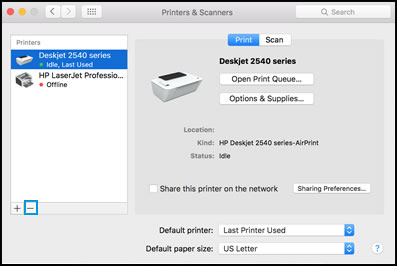
Click the name of your printer, click the Minus sign, and then delete the printer.


Select printer and click the minus sign

Click the Plus sign, and then click Add Printer or Scanner.
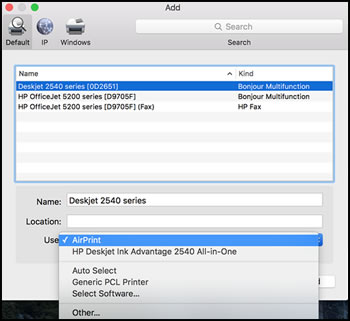
Click the Use or Print Using box, and then select AirPrint


Select AirPrint from the Use menu


Click Add to add the printer to the list.

Try to print.


Keep me posted for further assistance.


Please click “Accept as Solution” if you feel my post solved your issue, it will help others find the solution. Click the “Kudos/Thumbs Up" on the bottom right to say “Thanks” for helping!

TEJ1602
I am an HP Employee

HP Recommended

Hi there,


So I figured out that the issue was/is the latest driver update (5.1, I believe) which do not support custom size paper. I ended up installing a virtual second printer with an older version of the driver and it works fine.

Now I will have to think twice before I install the new macOS update (Catalina) because I know the old driver won't work anymore! When do you think we'll have up a working driver version for it (I do love the custom size option!) ?


Thanks.

HP Recommended

@jbaco


Glad to know!


The updated driver is available for Mac OS 10.15 Catalina. You can download and install the driver for OS Catalina from here.


Hope this helps! Keep me posted. 


Please click “Accept as Solution” if you feel my post solved your issue, it will help others find the solution. Click the “Kudos/Thumbs Up" on the bottom right to say “Thanks” for helping!

TEJ1602
I am an HP Employee

HP Recommended

Yes, but that's the issue. With the latest driver (HPprinterdrivers5.1), the custom size does not work anymore.

† The opinions expressed above are the personal opinions of the authors, not of HP. By using this site, you accept the <a href="https://www8.hp.com/us/en/terms-of-use.html" class="udrlinesmall">Terms of Use</a> and <a href="/t5/custom/page/page-id/hp.rulespage" class="udrlinesmall"> Rules of Participation</a>.