• ×
    Information
    Need Windows 11 help?
    Check documents on compatibility, FAQs, upgrade information and available fixes.
    Windows 11 Support Center.
  • post a message
  • ×
    Information
    Need Windows 11 help?
    Check documents on compatibility, FAQs, upgrade information and available fixes.
    Windows 11 Support Center.
  • post a message
Guidelines
Join the HP Community Solve‑a‑thon | Help Others & Share Your Solutions | Live on Zoom | 2:30 PM to 2:30 AM IST | Every Wednesday Click here to know more
HP Recommended
hp m277dw

Has been using my  hp m277dw for the past 2 years , suddenly when i change my magenta cartridge  i get the error message, "Incompatible Magenta Cartridge" , Thinking it was a bad cartridge, I just went and bought another one but am still getting the same message. 


Does anyone know why I am getting this message and what I can do ?

3 REPLIES 3
HP Recommended

@Nitish2910, Welcome to HP Support Community!


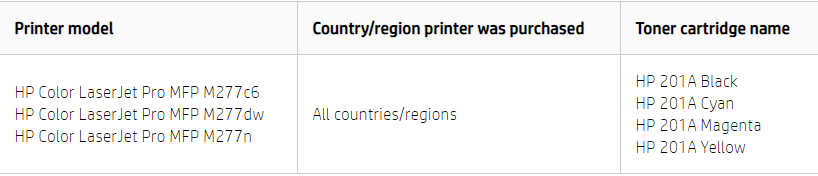
The following table displays toner cartridge information for the HP Color LaserJet Pro MFP M277 Printer Series


If you are using the right toner cartridge, try updating the printer firmware. Follow the instructions on this link.

If the issue persists, follow the steps in this document.


Let me know if this helps.

Cheers 🙂


Please click “Accept as Solution” if you feel my post solved your issue, it will help others find the solution. Click the “Kudos/Thumbs Up" on the bottom right to say “Thanks” for helping!

TEJ1602
I am an HP Employee

HP Recommended

Thanks but after upgrading firmware also am getting the same issue

HP Recommended

@Nitish2910


That's unfortunate. However, you can try our other support options.


Follow the steps below to reach out to our HP Support team:


Step 1. Open link: www.hp.com/contacthp/
Step 2. Enter the product number or select to auto detect 
Step 3. Scroll down to "Still need help? Complete the form to select your contact options"
Step 4. Scroll down and click: HP contact options - click on Get phone number and phone number appear.


Thank you.


Let me know if this helps.

Cheers 🙂


Please click “Accept as Solution” if you feel my post solved your issue, it will help others find the solution. Click the “Kudos/Thumbs Up" on the bottom right to say “Thanks” for helping! 

TEJ1602
I am an HP Employee

† The opinions expressed above are the personal opinions of the authors, not of HP. By using this site, you accept the <a href="https://www8.hp.com/us/en/terms-of-use.html" class="udrlinesmall">Terms of Use</a> and <a href="/t5/custom/page/page-id/hp.rulespage" class="udrlinesmall"> Rules of Participation</a>.