
-
×InformationNeed Windows 11 help?Check documents on compatibility, FAQs, upgrade information and available fixes.
Windows 11 Support Center. -
-
×InformationNeed Windows 11 help?Check documents on compatibility, FAQs, upgrade information and available fixes.
Windows 11 Support Center. -
- HP Community
- Printers
- LaserJet Printing
- Re: scanner function from HP Colour LaserJet MFP M476dw does...

Create an account on the HP Community to personalize your profile and ask a question
Your account also allows you to connect with HP support faster, access a personal dashboard to manage all of your devices in one place, view warranty information, case status and more.

11-22-2026 08:19 AM
 HP Recommended
My scanner function from HP LaserJet MFP M476dw does not work with the latest OS 27 update on the apple notebook, the printer is recognized on the settings/ Printers/ Scanner menu but the scanner does is not recognized at the menu digital pictures. Does HP offer a scanner driver for that printer model on Mac OS Basis or is there a workaround ?
5 REPLIES 5


11-23-2026 01:37 PM
HP Recommended
Hello @Ingo9, Welcome to the HP Support Community.
Thanks for reaching out about your query regarding the HP LaserJet MFP M476dw.
We appreciate the opportunity to assist you and are glad we could help work toward a resolution. We hope our support has been valuable.
Please check the link for any new software updates available for MacOS 27 in the link provided below. Also, you can install the universal drivers available for the device and check if it helps in resolving the issue.
HP Color LaserJet Pro MFP M476dw Software and Driver Downloads | HP® Support
Have a great day!
I am an HP Employee If you liked what I wrote, select Yes below to show others I was helpful, If it solved your concern, select ACCEPT AS SOLUTION to highlight the post to others. Want to help others in the community? Become a volunteer through the Solve-a-thon. Click here to learn more → |
11-23-2026 03:44 PM
HP Recommended
Hello Meghana_10
than you for your reply and the Link.
Unfortunately at the service page for the HP Colour Laser Jet MFP M476dw only the headline was changed. In the drop down there are only Windows Versions and Linux selectable and no OS options. It looks to me that HP does not offer the drivers for this printer on apple operating system OS anymore. Since the respective scanning driver is a part of the printer drivers package I do not see the solution yet.
Do you see any solution there ?
Have a great day
11-24-2026 02:06 PM
HP Recommended
Thank you for the update. @Ingo9
Please go to the link HP Color LaserJet Pro MFP M476dw Software and Driver Downloads | HP® Support and in the drop down select MacOS 27.
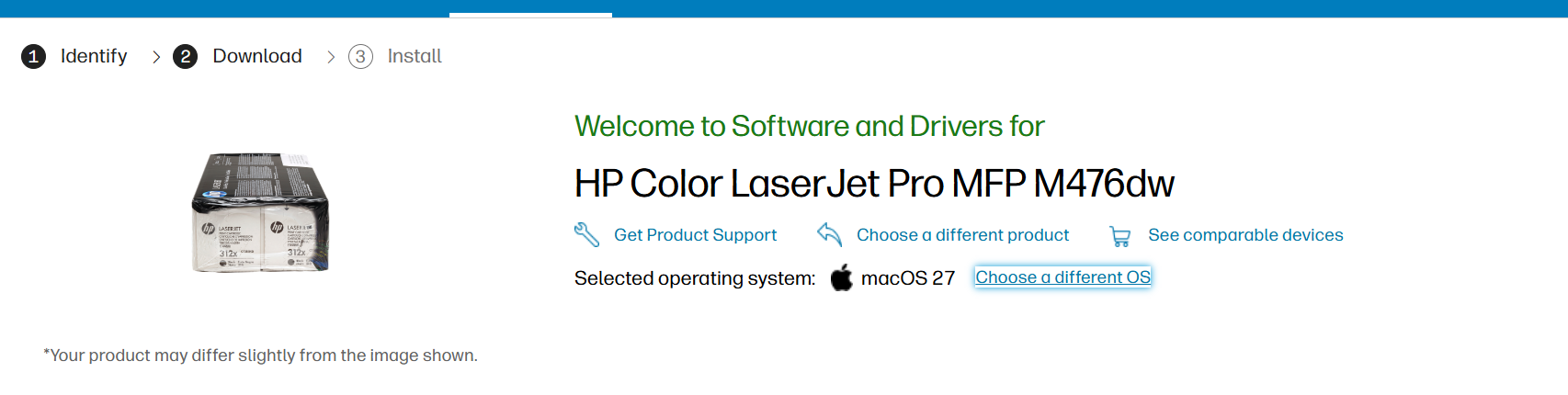
Once done, scroll down to see the HP Easy Start feature. Please download and install that which contains the drivers needed for the MacOS 27.
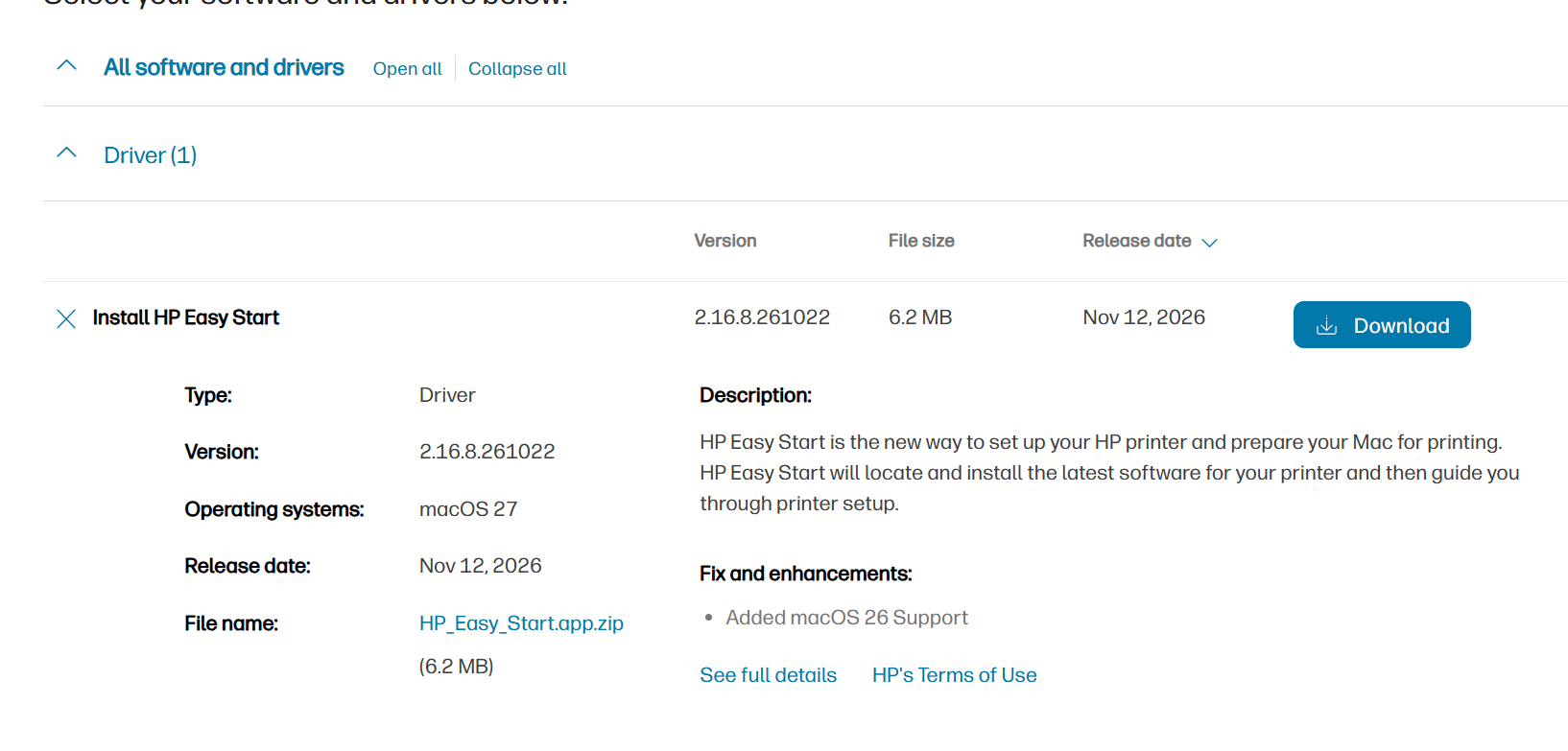
Have a great day!
I am an HP Employee If you liked what I wrote, select Yes below to show others I was helpful, If it solved your concern, select ACCEPT AS SOLUTION to highlight the post to others. Want to help others in the community? Become a volunteer through the Solve-a-thon. Click here to learn more → |
11-25-2026 10:39 AM
HP Recommended
Hi and thank you for the Update,
Your instruction looks nice and I tried to follow your path ...
But the thing is, that in the drop down menu of step 1 there in no option available to select any apple operating system (Mac OS) but only Windows System Versions and Linux (compare screenshot).
Since you can not select any apple operating system (OS27) in your drop down menu but only windows versions I assume the HP does not support the drivers for my printer / scanner.
Can you confirm that / agree ... ?
Best Ingo

11-25-2026 03:00 PM - edited 11-25-2026 03:00 PM
HP Recommended
Thank you for your response. @Ingo9
Click on choose a different OS and you should be able to find the MacOS and the version in the drop down. HP Color LaserJet Pro MFP M476dw Software and Driver Downloads | HP® Support
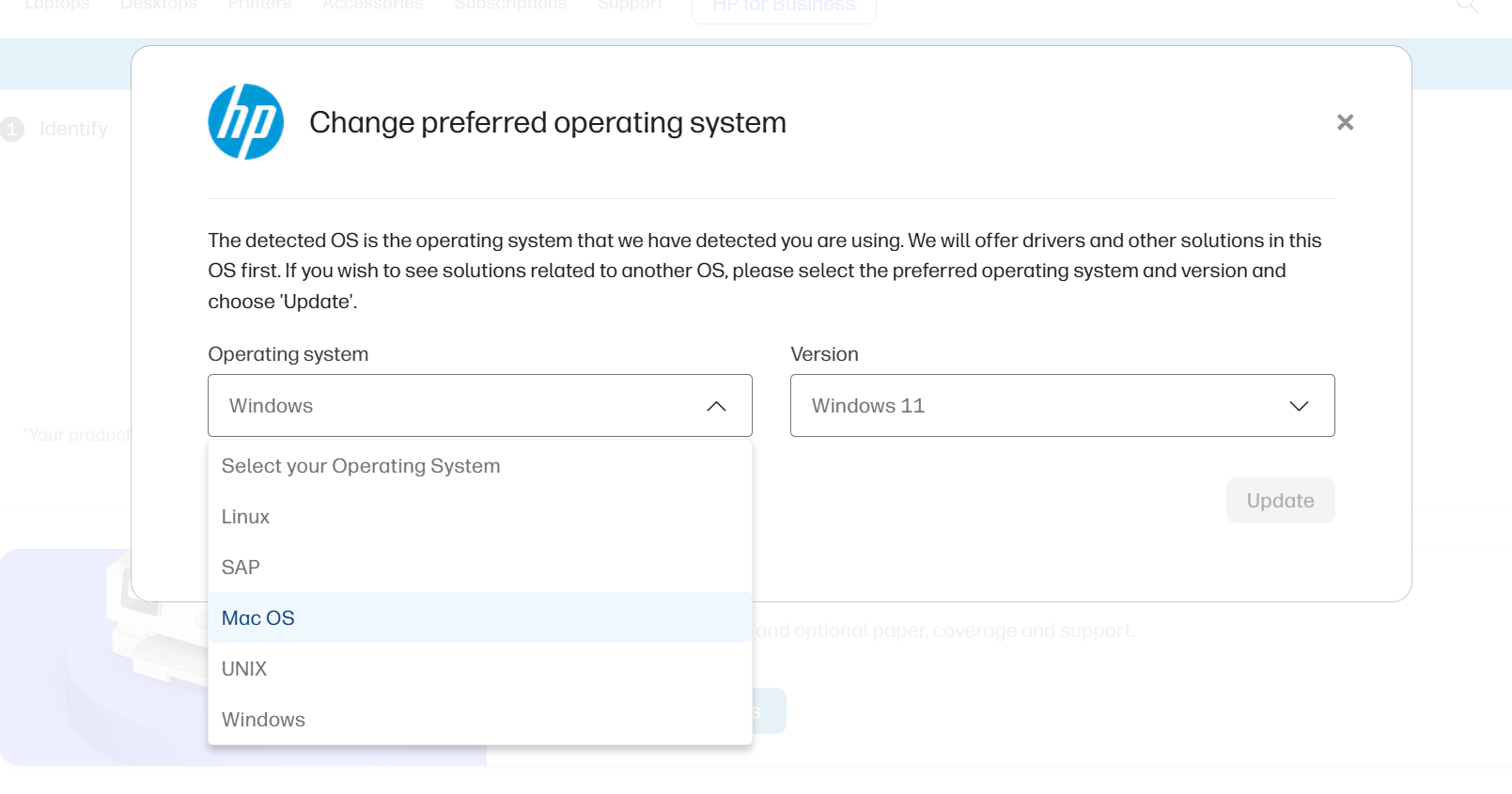
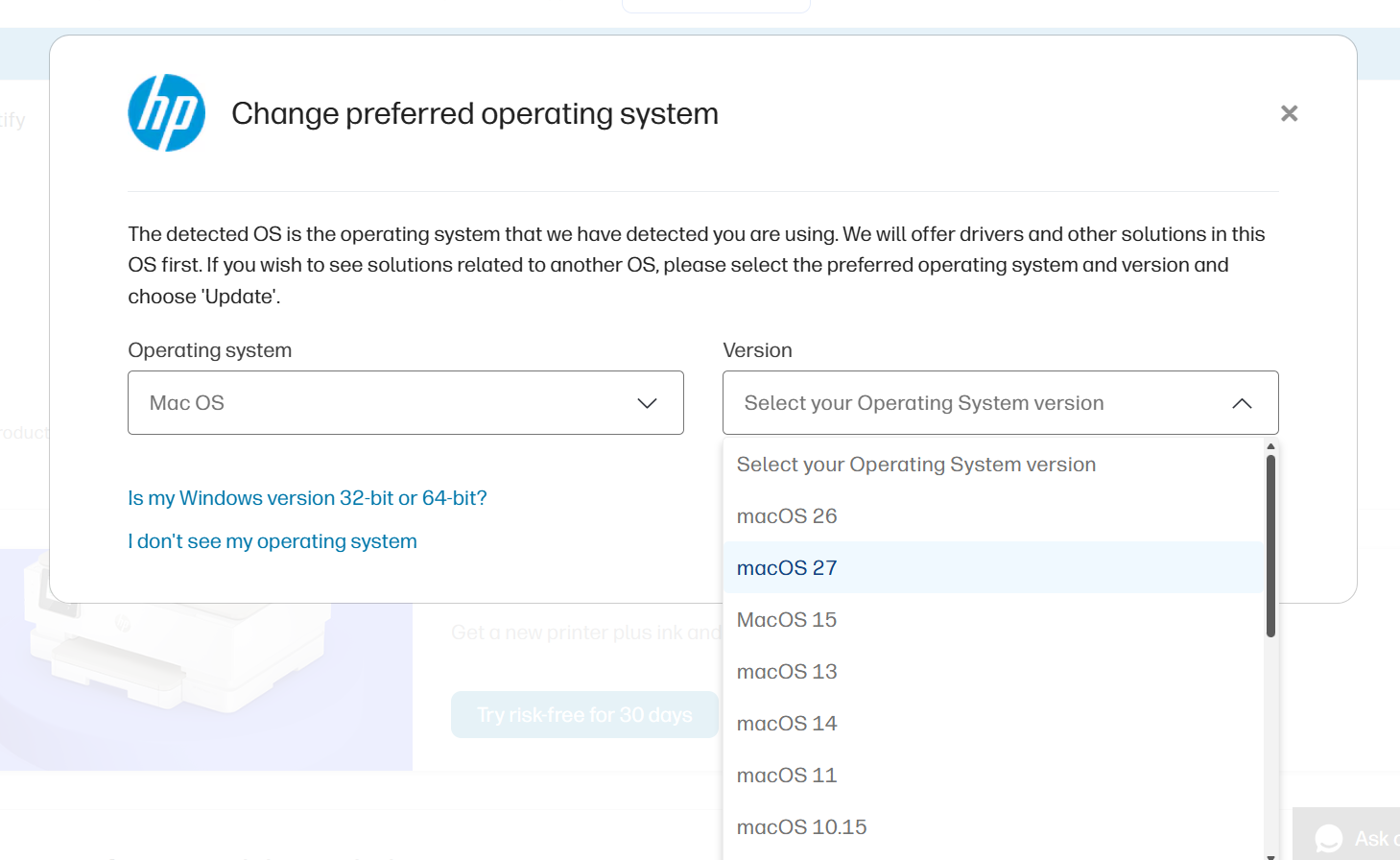
Have a great day!
I am an HP Employee If you liked what I wrote, select Yes below to show others I was helpful, If it solved your concern, select ACCEPT AS SOLUTION to highlight the post to others. Want to help others in the community? Become a volunteer through the Solve-a-thon. Click here to learn more → |

Be alert for scammers posting fake support phone numbers and/or email addresses on the community.
If you think you have received a fake HP Support message, please report it to us by clicking on "Flag Post".
† The opinions expressed above are the personal opinions of the authors, not of HP. By using this site, you accept the Terms of Use and Rules of Participation.


Didn't find what you were looking for?
Ask the community
† The opinions expressed above are the personal opinions of the authors, not of HP. By using this site, you accept the <a href="https://www8.hp.com/us/en/terms-of-use.html" class="udrlinesmall">Terms of Use</a> and <a href="/t5/custom/page/page-id/hp.rulespage" class="udrlinesmall"> Rules of Participation</a>.