• ×
    Information
    Need Windows 11 help?
    Check documents on compatibility, FAQs, upgrade information and available fixes.
    Windows 11 Support Center.
  • post a message
  • ×
    Information
    Need Windows 11 help?
    Check documents on compatibility, FAQs, upgrade information and available fixes.
    Windows 11 Support Center.
  • post a message
Guidelines
Join the HP Community Solve‑a‑thon | Help Others & Share Your Solutions | Live on Zoom | 2:30 PM to 2:30 AM IST | Every Wednesday Click here to know more
Check out our WINDOWS 11 Support Center info about: OPTIMIZATION, KNOWN ISSUES, FAQs, VIDEOS AND MORE.
HP Recommended
Microsoft Windows 8.1 (32-bit)

Hi


I have an HP notebook running windows 8 with a built in webcam. I recently purchased an external microphone to use when making videos. The microphone works with the computer for voice recognition but when I make a webcam video there is no sound. Thanks!

1 REPLY 1
HP Recommended

@denise1962,


Welcome to the HP Forums!


Thank you for posting your query on this forum, it's a great place to find answers.


Don’t worry, I assure you I will try my best to get this sorted.


In order that I may provide you with an accurate solution, I will need a few more details.

  • What is the exact model for your computer?
  • What is the software you are using to record videos with the webcam? 
  • Have you performed any troubleshooting steps before posting?

Meanwhile, follow the below steps and check whether the issue is resolved.


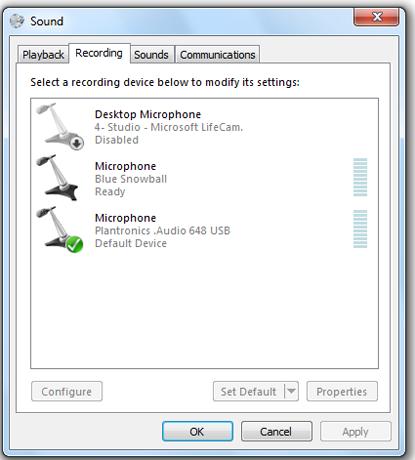
Go to the Sound Control Panel and click on the Recording tab. Here you'll see the audio devices you have available that can be used as a microphone. Again, your current default device is indicated by a green check mark. Select your preferred device and click Set Default.


Let me know how it goes and you have a great day!


If you wish to show appreciation for my efforts, mark my post as Accept as Solution. Your feedback counts!


Cheers!


The_Fossette
I am an HP Employee

† The opinions expressed above are the personal opinions of the authors, not of HP. By using this site, you accept the <a href="https://www8.hp.com/us/en/terms-of-use.html" class="udrlinesmall">Terms of Use</a> and <a href="/t5/custom/page/page-id/hp.rulespage" class="udrlinesmall"> Rules of Participation</a>.