
-
×InformationNeed Windows 11 help?Check documents on compatibility, FAQs, upgrade information and available fixes.
Windows 11 Support Center. -
-
×InformationNeed Windows 11 help?Check documents on compatibility, FAQs, upgrade information and available fixes.
Windows 11 Support Center. -
- HP Community
- Notebooks
- Notebook Audio
- Re: No audio or webcam since Windows 10 update

Create an account on the HP Community to personalize your profile and ask a question
Your account also allows you to connect with HP support faster, access a personal dashboard to manage all of your devices in one place, view warranty information, case status and more.
Check out our WINDOWS 11 Support Center info about: OPTIMIZATION, KNOWN ISSUES, FAQs, VIDEOS AND MORE.

It has been a while since anyone has replied. Simply ask a new question if you would like to start the discussion again.

12 REPLIES 12


08-29-2020 02:11 PM
 HP Recommended
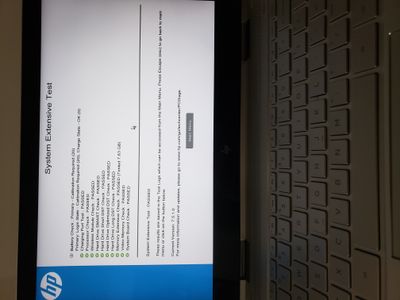
@emerNOAUDIO That's quite alright, since you are certain this isn't a hardware issue, let's confirm the same by running an extensive hardware test on the device, here's how:
Install the latest version of the HP Hardware diagnostics (UEFI) on your device using this link: Click here for details
Hold the power button for at least five seconds to turn off the computer.
Turn on the computer and immediately press Esc repeatedly, about once every second. When the menu appears, press the F2 key.
On the HP PC Hardware Diagnostics (UEFI) main menu, click System Tests.
Click Extensive Test.
Click Run once, or Loop until error.
While the test is running, the time remaining and test result for each component display on the screen.
If a component fails a test, write down the failure ID (24-digit code) for when you respond back to us.
Riddle_Decipher
I am an HP Employee
Learning is a journey, not a destination.
Let's keep asking questions and growing together.
08-29-2020 06:46 PM
HP Recommended
@emerNOAUDIO It's good that the tests passed, however, it looks like the battery requires calibration, use this link for details: click here
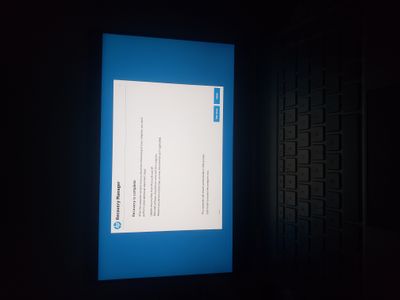
That said, you mentioned that you had done a reset, I'll need to know, how was the reset attempted, did you make use of the HP Recovery partition (F11) or did you use the HP recovery media? If you don't have an HP Recovery media and have attempted reset using the windows troubleshooter or a retail copy of windows, you'll need to order a recovery media: Click here for steps Or you may also attempt to download the same using the steps on this link: click here
For details on how to perform a successful reset: click here
Keep me posted.
Riddle_Decipher
I am an HP Employee
Learning is a journey, not a destination.
Let's keep asking questions and growing together.
08-30-2020 10:24 AM
HP Recommended
@emerNOAUDIO Alright, take your time and get back to us with the results,
Also, using the HP cloud recovery tool is preferred over using the regular windows reset.
keep me posted.
Riddle_Decipher
I am an HP Employee
Learning is a journey, not a destination.
Let's keep asking questions and growing together.


09-01-2020 01:46 PM
HP Recommended
I understand your concerns.
In that case, I would suggest you contact our phone support and check for the support option. They will help you.
Here is how you can get in touch with phone support.
1)Click on this link - www.hp.com/contacthp/
2)Select the product type.
3)Enter the serial number of your device or select let HP detect your product option.
4)Select the country from the drop-down.
5)You should see the HP phone support number or Chat option listed.
We are experiencing longer than expected wait times to reach an agent due to the CoViD-19 impact and there might have been issues in you getting the expected resolution on the issue.
Have a nice day!!
09-01-2020 02:35 PM
HP Recommended
My warranty is outdated, I can't contact the support. My laptop is only 2 years old. So, that is the lifespan of an HP?
Your going to shutdown my display in the future too?
I won't recommend HP to anybody and I'll spread my experience. I feel I was robbed.

Be alert for scammers posting fake support phone numbers and/or email addresses on the community.
If you think you have received a fake HP Support message, please report it to us by clicking on "Flag Post".
† The opinions expressed above are the personal opinions of the authors, not of HP. By using this site, you accept the Terms of Use and Rules of Participation.


Didn't find what you were looking for?
Ask the community
† The opinions expressed above are the personal opinions of the authors, not of HP. By using this site, you accept the <a href="https://www8.hp.com/us/en/terms-of-use.html" class="udrlinesmall">Terms of Use</a> and <a href="/t5/custom/page/page-id/hp.rulespage" class="udrlinesmall"> Rules of Participation</a>.