-
×InformationNeed Windows 11 help?Check documents on compatibility, FAQs, upgrade information and available fixes.
Windows 11 Support Center. -

-
×InformationNeed Windows 11 help?Check documents on compatibility, FAQs, upgrade information and available fixes.
Windows 11 Support Center. -
- HP Community
- Notebooks
- Notebook Audio
- audio 10 sec delay problem after updating windows 10 1903

Create an account on the HP Community to personalize your profile and ask a question
07-06-2020 12:48 PM
Hi, as I said on the subject, My OS updated and my audio started to have a 10 sec delay, its freezes. I dont know what to do, I reinstalled realtek and reset, I reboot windows 10, I unistall the updates and nothing happens, it keeps the same every time it solves the problem but as soon I turn off the computer and use it again the next day the problem continues. Please, I bought the computer a mounth ago and everything was fine until the update.
07-09-2020 06:19 AM
Welcome to HP Community
I have gone through your Post and would like to help
I suggest you download and run the HP Support Assistant from this Link: https://www8.hp.com/us/en/campaigns/hpsupportassistant/hpsupport.html?jumpid=va_r602_us/en/any/psg/p...
HPSA will automatically search for all the latest drivers for your Notebook
-
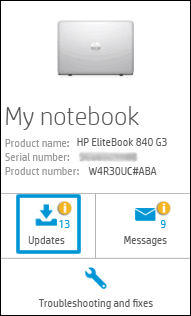
Click My devices in the top menu, and then click Updates in the My PC or My notebook pane.

-
Click Check for updates and messages to scan for new updates.

-
Review the list of updates. Updates with a yellow information icon are recommended. Updates with a blue information icon are optional.
-
Click the update name for a description, version number, and file size.
-
Select the box next to any updates you want to install, and then click Download and install.
Also ensure Windows is up to date.
Select the Start button, and then go to Settings > Update & security > Windows Update , and select Check for updates. If Windows Update says your device is up to date, you have all the updates that are currently available
Keep me posted how it goes
Thank you and have a wonderful day 😊
If the information I've provided was helpful, give us some reinforcement by clicking the "Solution Accepted" on this Post and it will also help other community members with similar iss
KrazyToad
I Am An HP Employee
07-12-2020 05:22 PM
Already did it, it happens the same, I dont know what else to do, is like I cant upgrade my realtek. An old version like 2015 function very well but it cant recognice my headphones, sound comes out from speakrs and headphones at the same time. I read that solucion can be uplgrading the realtek, but everytime i do it i have that delay+freeze issue
07-13-2020 05:33 AM
I understand your concerns.
In that case, I would suggets you uninstall the audio drivers and update the chipset drivers. Then restart the computer.
After the restart, please install the audio drivers.
Please click the below link to download the drivers.
https://support.hp.com/us-en/drivers
Have a nice day!!