• ×
    Information
    Need Windows 11 help?
    Check documents on compatibility, FAQs, upgrade information and available fixes.
    Windows 11 Support Center.
  • post a message
  • ×
    Information
    Need Windows 11 help?
    Check documents on compatibility, FAQs, upgrade information and available fixes.
    Windows 11 Support Center.
  • post a message
Guidelines
Join the HP Community Solve‑a‑thon | Help Others & Share Your Solutions | Live on Zoom | 2:30 PM to 2:30 AM IST | Every Wednesday Click here to know more
HP Recommended
HP Notebook - 15-dw1081wm
Microsoft Windows 11

HP 15-dw1081wm.  Performed the BIOS update.  Upon reboot the system turns on but sits at a black screen.  There isn't any 

hard drive activity.  Have tried to recover the BIOS with the "windows + v" and the "windows +b" keys.  No luck.  I have even disconnected the battery and reseated the RAM.  Still no boot.  Any insight to what I may be missing?

1 REPLY 1
HP Recommended

Hi @AllenH2,


Welcome to the HP Support Community. 


I'd like to help!


I have gone through your Post and would like to help


We could try a BIOS Rollback since the BIOS seems to be corrupted


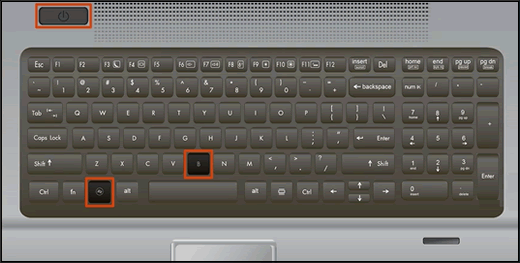
Turn off the computer, and then connect the power cord.

Press and hold the Windows key and the B key at the same time, and then press and hold the Power button for 2 to 3 seconds.

Keyboard highlighting the key presses for BIOS recovery

Release the Power button but continue pressing the Windows and B keys. You might hear a series of beeps.

If the HP BIOS Update screen does not display, repeat the previous steps but press the Windows key and the V key. If the screen still does not display, your computer might not support the feature 

If the issue persists try to Recover the BIOS using a USB recovery drive. Please refer to this Link: https://support.hp.com/in-en/document/c02693833


Thank you

Hope this helps! Keep me posted for further assistance.
Please click “Accepted Solution” if you feel my post solved your issue, it will help others find the solution. Click the “Kudos/Thumbs Up" on the bottom right to say “Thanks” for helping!

Nal_NR-
HP Community Moderator


† The opinions expressed above are the personal opinions of the authors, not of HP. By using this site, you accept the <a href="https://www8.hp.com/us/en/terms-of-use.html" class="udrlinesmall">Terms of Use</a> and <a href="/t5/custom/page/page-id/hp.rulespage" class="udrlinesmall"> Rules of Participation</a>.