-
×InformationNeed Windows 11 help?Check documents on compatibility, FAQs, upgrade information and available fixes.
Windows 11 Support Center. -

-
×InformationNeed Windows 11 help?Check documents on compatibility, FAQs, upgrade information and available fixes.
Windows 11 Support Center. -
- HP Community
- Gaming
- Gaming Notebooks
- Battery issue??

Create an account on the HP Community to personalize your profile and ask a question
04-29-2020 03:10 AM - edited 04-29-2020 03:27 AM
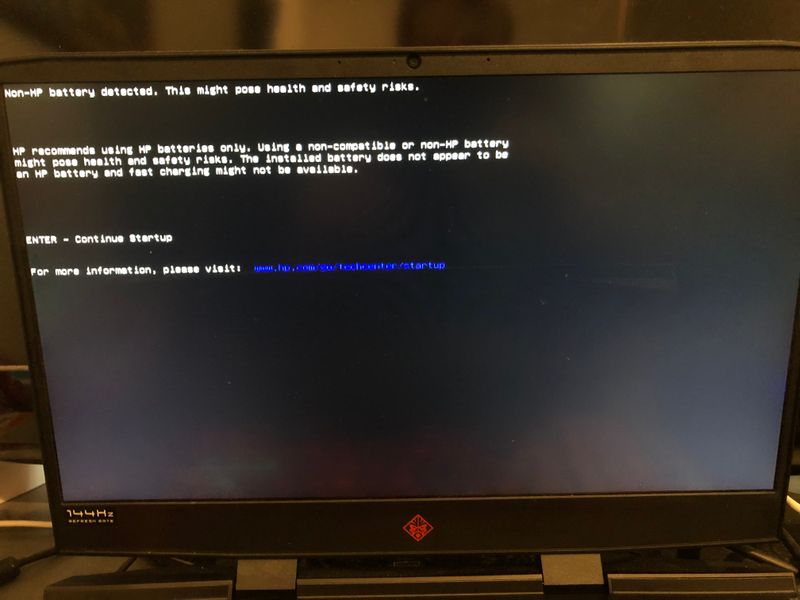
Everytime i turn on my computer this shows, i haven´t changed anything in hardware so i´m a bit confused here!
Is it anyone who knows about this issue and how it fix it? (inserted two images)
Kind regards,
Solved! Go to Solution.
Accepted Solutions
05-06-2020 12:27 PM
@Maxedouttothema It's not a flaw as such, just a minor change to the system files, possibly due to a bad update, nevertheless, here's what should help:
- check the C:\Program Files (x86)\HP\HP System Event.
- Simply rename USBCMSG.exe to USBCMSG.exe.old and it should resolve the issue.
A good tip: you can find the file by opening Task Manager after the popup (and while its still open), right-clicking on the HP System Information program and then selecting Open File Location, it should work.
P.S: Welcome to HP Community 😉
Keep us posted,
If you would like to thank us for our efforts to help you,
Give us a virtual high-five by clicking the 'Thumbs Up' icon below, followed by clicking on the "Accept as solution" on this post,
Have a great day!
Riddle_Decipher
I am an HP Employee
Learning is a journey, not a destination.
Let's keep asking questions and growing together.
05-06-2020 12:27 PM
@Maxedouttothema It's not a flaw as such, just a minor change to the system files, possibly due to a bad update, nevertheless, here's what should help:
- check the C:\Program Files (x86)\HP\HP System Event.
- Simply rename USBCMSG.exe to USBCMSG.exe.old and it should resolve the issue.
A good tip: you can find the file by opening Task Manager after the popup (and while its still open), right-clicking on the HP System Information program and then selecting Open File Location, it should work.
P.S: Welcome to HP Community 😉
Keep us posted,
If you would like to thank us for our efforts to help you,
Give us a virtual high-five by clicking the 'Thumbs Up' icon below, followed by clicking on the "Accept as solution" on this post,
Have a great day!
Riddle_Decipher
I am an HP Employee
Learning is a journey, not a destination.
Let's keep asking questions and growing together.