
-
×InformationNeed Windows 11 help?Check documents on compatibility, FAQs, upgrade information and available fixes.
Windows 11 Support Center. -
-
×InformationNeed Windows 11 help?Check documents on compatibility, FAQs, upgrade information and available fixes.
Windows 11 Support Center. -
- HP Community
- Notebooks
- Notebook Boot and Lockup
- Hp Envy 17 bios recovery

Create an account on the HP Community to personalize your profile and ask a question
Your account also allows you to connect with HP support faster, access a personal dashboard to manage all of your devices in one place, view warranty information, case status and more.

It has been a while since anyone has replied. Simply ask a new question if you would like to start the discussion again.

11-14-2018 01:20 PM - edited 11-14-2018 03:16 PM
 HP Recommended
Product: LW900AV
Operating System: Microsoft Windows 7 (64-bit)
So I need to recover the bios on an HP Envy 17 model:LW900AV (flashing caps lock on boot). The win key + B (or V) on boot yeilds no change. I downloaded every bios version for this model on the HP site, and in none of them do I find any the create rcovery USB flash drive option. I was able to open and extract the insydeflash.exe with 7-Zip, no *.bin file found but there is a large *.fd file so that's the bios info. Copying that to a usb drive and trying the win + B (or V) still had no effect. I guessing back when this model was made/supported this contengency wasn't really prepared for. Any thoughts/suggestions?
7 REPLIES 7


11-16-2018 03:55 PM
HP Recommended
Thank you for posting on HP Forums,
Echo_Lake is at your service.
I understand you are in need of support,
And to help you out, I'm sending out a Private message with the reset instructions,
Please check your Private message icon on the upper right corner of your HP Forums profile
Next, to your profile Name, you should see a little blue envelope, please click on it or simply click on this link: https://h30434.www3.hp.com/t5/notes/privatenotespage
ECHO_LAKE
I am an HP Employee
11-19-2018 09:49 AM
HP Recommended
I'm not sure that was really an answer to the issue at hand. Is there a way to make a USB bios recovery for my model since the bios files listed for my procust don't seem to support that option. If not is the general procedure for bios recovery on this model?
11-20-2018 09:19 AM
HP Recommended
Thank you for posting back.
To Install a BIOS recovery file from the HP website using a USB flash drive. To complete this step, you need a second working computer with an active Internet connection.
I request you to please follow the steps given below and let me know the results.
-
Obtain the product number for the original notebook that requires a BIOS recovery. This number is typically found on a label on the bottom of the notebook or on the box it shipped in. Go to How Do I Find My Model Number or Product Number? for additional options.
NOTE:
The general family name near the keyboard or on the frame around the display is not specific enough for identifying correct download files.

-
Insert a blank USB flash drive into an available port on the second computer.
-
Go to HP Software & Driver Downloads and enter the product number of the original computer.
NOTE:
If you upgraded the original computer to a new Windows version, in the Selected operating system pane, click Change, select the original operating system that came with your computer, and then click Change.
-
Click BIOS, and then review the details of the latest available version or the specific version recommended for the recovery. Confirm it is the correct BIOS update before proceeding.
-
Click Download, and then click Run.
-
In the InstallShield Wizard window, click Next.
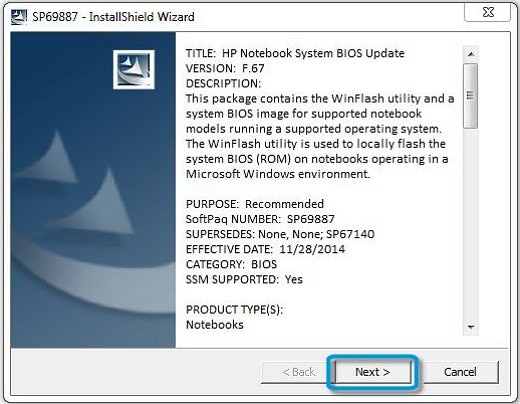
-
Select I accept the terms in the license agreement, and then click Next.
-
Choose to remove or keep the files after the recovery, and then click Next to open the HP BIOS Update and Recovery window.
-
Select Create Recovery USB flash drive, and then click Next.

-
Select your USB flash drive, and then click Next to copy the BIOS file to the drive.
-
When 'The recovery flash drive was created successfully' displays, click Finish.
-
Remove the flash drive from the computer
Keep me posted for further assistance.
If I have helped you resolve the issue, feel free to give me a virtual high-five by clicking the 'Thumbs Up' icon below,
Followed by clicking on "Accept as solution" from the drop-down menu on the upper right corner,
Thank you for posting in the HP Support Forum. Have a great day!
ECHO_LAKE
I am an HP Employee
11-22-2018 10:50 PM
HP Recommended
So for my laptop model the support software link is as follows:
https://support.hp.com/us-en/drivers/selfservice/hp-envy-17-3000-notebook-pc-series/5145668/model/51...
There are 4 bios versions I can download from here.
https://ftp.hp.com/pub/softpaq/sp56001-56500/sp56028.exe
https://ftp.hp.com/pub/softpaq/sp56001-56500/sp56416.exe
https://ftp.hp.com/pub/softpaq/sp59501-60000/sp59845.exe
https://ftp.hp.com/pub/softpaq/sp60501-61000/sp60634.exe
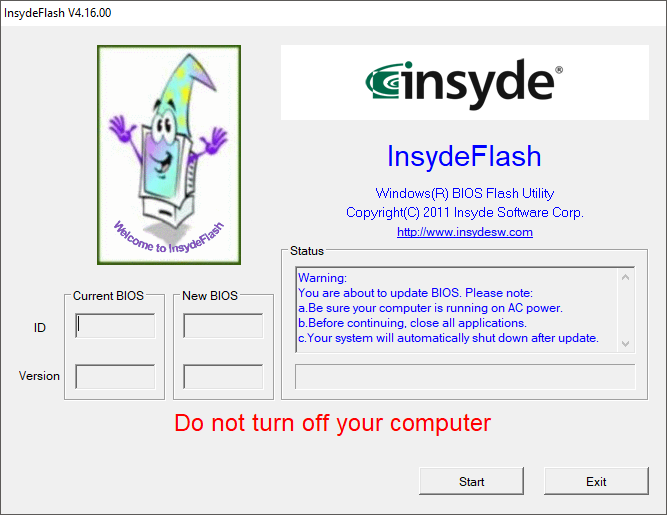
None of these versions show the "step 9" outlined in the instructions you refered to. Instead they all show an insydeflash application screen with two options, start and exit. Start I gather will flash the machine I'm currently on (which would corrupt the bios on this system) and exit exits the application. Is there anyway to do a usb recovery with any of the above bios files, or is there another version I can recover with?
11-23-2018 10:38 AM
HP Recommended
Thank you for posting back.
Let's get this fixed, I have a few suggestions which should help.
Click here to Creating a BIOS Recovery Flash Drive for HP Notebooks.
Download the exact bios version from here
BIOS Version: F.09
Hope this help! Keep me posted for further assistance.
ECHO_LAKE
I am an HP Employee
11-23-2018 12:26 PM
HP Recommended
I think the video you ment to link was "Creating a BIOS Recovery Flash Drive for HP Notebooks | HP Notebooks | HP" not how to do the recovery.
https://www.youtube.com/watch?v=t3S3KgcT-Ao
At any rate it won't help since the bios you suggested (https://ftp.hp.com/pub/softpaq/sp60501-61000/sp60634.exe) is one of the one's I listed above that I tried and does not give you the potion to crate a usb bios recovery disk. It just goes to the insyde flash screen below.
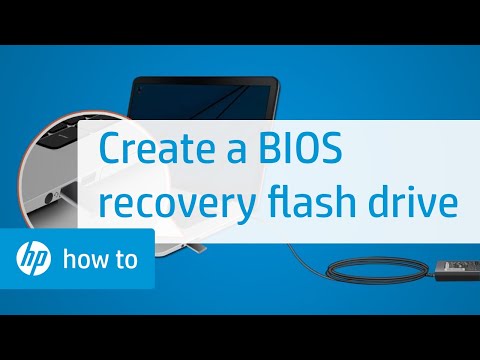
This video shows how to create a BIOS recovery flash drive. If you experience a hard drive failure on your notebook PC or no longer have the HP_Tools volume or partition, follow the steps in this video to create a BIOS recovery flash drive. Chapters: 00:00 Introduction 00:18 Insert USB drive 00:26
11-23-2018 12:54 PM
HP Recommended
@Sfxcelent
Thank you for posting back.
I'm sending out a Private message to assist you with the next course of action.
Please check your Private message icon on the upper right corner of your HP Forums profile
Next, to your profile Name, you should see a little blue envelope, please click on it or simply click on this link: https://h30434.www3.hp.com/t5/notes/privatenotespage
ECHO_LAKE
I am an HP Employee

Be alert for scammers posting fake support phone numbers and/or email addresses on the community.
If you think you have received a fake HP Support message, please report it to us by clicking on "Flag Post".
† The opinions expressed above are the personal opinions of the authors, not of HP. By using this site, you accept the Terms of Use and Rules of Participation.


Didn't find what you were looking for?
Ask the community
† The opinions expressed above are the personal opinions of the authors, not of HP. By using this site, you accept the <a href="https://www8.hp.com/us/en/terms-of-use.html" class="udrlinesmall">Terms of Use</a> and <a href="/t5/custom/page/page-id/hp.rulespage" class="udrlinesmall"> Rules of Participation</a>.