• ×
    Information
    Need Windows 11 help?
    Check documents on compatibility, FAQs, upgrade information and available fixes.
    Windows 11 Support Center.
  • post a message
  • ×
    Information
    Need Windows 11 help?
    Check documents on compatibility, FAQs, upgrade information and available fixes.
    Windows 11 Support Center.
  • post a message
Guidelines
Seize the moment! nominate yourself or a tech enthusiast you admire & join the HP Community Experts!
HP Recommended
HP 15-rb026nm
Microsoft Windows 10 (64-bit)

Helllo, 


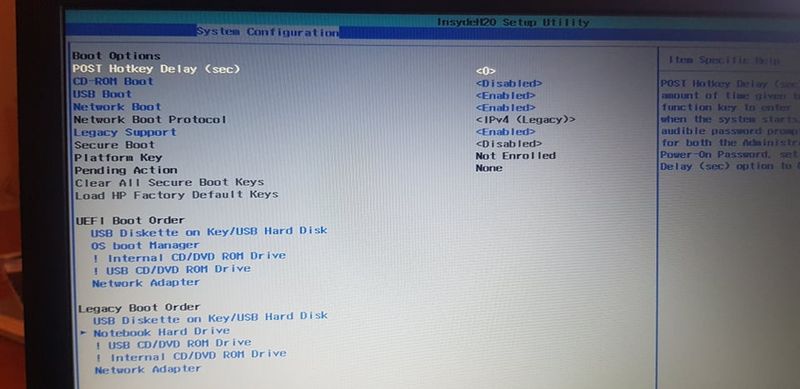
Yesterday i bought new Laptop HP 15-rb026nm, but i have issue. I  made all what i need in bios to boot from my USB drive, but laptop doesn't find  my USB drive. I have download windows 10 on USB drive with rufus 3.8 


Can you help me, how to boot from USB drive because this laptop doesn't have CD/DVD.


1.jpg2.jpg

4 REPLIES 4
HP Recommended

Hi:


See if this works...


With legacy mode enabled and secure boot disabled as you have now, turn on or restart the PC, immediately tap the ESC key to get the menu of options.


Select the F9 boot options, menu and from that, select the legacy USB diskette on key/USB hard drive and press the Enter key.

HP Recommended

Hy friend!


Tnx for fast reply and help!


I did all what you said but i still can't find USB option in Boot manager. Please check my first picture, there is no USB option in boot Manager...


HP Recommended

I made video...   https://youtu.be/tRv2OJf1MN0

HP Recommended

You're very welcome.


The only other suggestion I can offer, would be to try the USB 2 port on the right side of the notebook.


If that doesn't work, try a different model USB flash drive.


† The opinions expressed above are the personal opinions of the authors, not of HP. By using this site, you accept the <a href="https://www8.hp.com/us/en/terms-of-use.html" class="udrlinesmall">Terms of Use</a> and <a href="/t5/custom/page/page-id/hp.rulespage" class="udrlinesmall"> Rules of Participation</a>.