
-
×InformationNeed Windows 11 help?Check documents on compatibility, FAQs, upgrade information and available fixes.
Windows 11 Support Center. -
-
×InformationNeed Windows 11 help?Check documents on compatibility, FAQs, upgrade information and available fixes.
Windows 11 Support Center. -
- HP Community
- Notebooks
- Notebook Boot and Lockup
- Laptop won't wake up

Create an account on the HP Community to personalize your profile and ask a question
Your account also allows you to connect with HP support faster, access a personal dashboard to manage all of your devices in one place, view warranty information, case status and more.

It has been a while since anyone has replied. Simply ask a new question if you would like to start the discussion again.

04-10-2020 11:21 AM
 HP Recommended
Product: 15-R005LA
Operating System: Microsoft Windows 7 (64-bit)
Hola. My son gave me his 15-R005LA laptop that he had totally wiped out the hard drive on. He never made backups of the Windows 8 that came with it. It's not available anymore. MicroSoft doesn't recommend installing 10 so I installed Windows 7. Thanks to the community I have been able to get everything working fine except for one problem. When I put it to sleep it won't wake up. Not by a keystroke or mouse movement or power button. I have to do a hard shutdown and then reboot. I've read everything I can find and I've compared the keyboard selection in Drivers and I've found that on my other laptop there are two. HID Keyboard device and Standard PS/2 Keyboard. The HID Keyboard provides the setting to use the keyboard to wake up. The PS/2 keyboard does not. Both laptops have MS driver 6.1.7601.17514. If anyone can help me with this I would appreciate it. It's a real bother Hibernating all the time.
Solved! Go to Solution.
1 ACCEPTED SOLUTION
Accepted Solutions


04-16-2020 09:45 AM
HP Recommended
Unfortunately we do not have the exact Chipset number.
Try downloading the Intel Management Engine Interface from this Link: https://support.hp.com/us-en/drivers/selfservice/swdetails/hp-15-r000-notebook-pc-series/6875200/mod...
If the issue persists I suggest you perform a Reset and check if the issue persists. Link: https://support.hp.com/nz-en/document/c04742289
KrazyToad
I Am An HP Employee
5 REPLIES 5
04-14-2020 05:02 AM
HP Recommended
Welcome to the HP Support Community!
I suggest you download and run the HP Support Assistant from this Link: https://www8.hp.com/us/en/campaigns/hpsupportassistant/hpsupport.html?jumpid=va_r602_us/en/any/psg/p...
HPSA will automatically search for all the latest drivers for your Notebook
-
Click My devices in the top menu, and then click Updates in the My PC or My notebook pane.
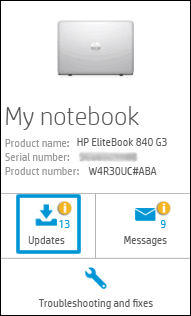
-
Click Check for updates and messages to scan for new updates.

-
Review the list of updates. Updates with a yellow information icon are recommended. Updates with a blue information icon are optional.
-
Click the update name for a description, version number, and file size.
-
Select the box next to any updates you want to install, and then click Download and install.
Next ensure Windows is up to date.
You can also refer to this Link: https://support.hp.com/in-en/document/c01853693
Keep me posted how it goes
Thank you and have a wonderful day 😊
If the information I've provided was helpful, give us some reinforcement by clicking the "Solution Accepted" on this Post and it will also help other community members with similar issue
KrazyToad
I Am An HP Employee
04-15-2020 05:23 AM
HP Recommended
Thanks for getting back to me. I had run HP support a long time ago. But I ran it again. Now I do have the HID keyboard device listed. And it is set to wake up the laptop. I had also been to the link you provided. But it still won't wake up.
I kept poking around while waiting for a response and came up with a chipset driver 9.4.4.1005 for Windows 8.1 from HP. SP65284. How do I determine what chipset and driver is installed? And would it be a good idea to install this one for Windows 8.1 if I'm running 7?
04-16-2020 09:45 AM
HP Recommended
Unfortunately we do not have the exact Chipset number.
Try downloading the Intel Management Engine Interface from this Link: https://support.hp.com/us-en/drivers/selfservice/swdetails/hp-15-r000-notebook-pc-series/6875200/mod...
If the issue persists I suggest you perform a Reset and check if the issue persists. Link: https://support.hp.com/nz-en/document/c04742289
KrazyToad
I Am An HP Employee
04-17-2020 05:33 AM
HP Recommended
Thank you for getting back to me. After going to the link you provided I decided to leave it alone. I don't understand what the Intel Management Engine Interface is and I'm afraid if I do something I'll have to reload windows again. I realize I'm trying to get the laptop to do something it wasn't designed to do. Run Windows 7. I'll just live with hibernating instead of sleeping. Everything else is working fine. Thanks for your help. It was really appreciated.

Be alert for scammers posting fake support phone numbers and/or email addresses on the community.
If you think you have received a fake HP Support message, please report it to us by clicking on "Flag Post".
† The opinions expressed above are the personal opinions of the authors, not of HP. By using this site, you accept the Terms of Use and Rules of Participation.


Didn't find what you were looking for?
Ask the community
† The opinions expressed above are the personal opinions of the authors, not of HP. By using this site, you accept the <a href="https://www8.hp.com/us/en/terms-of-use.html" class="udrlinesmall">Terms of Use</a> and <a href="/t5/custom/page/page-id/hp.rulespage" class="udrlinesmall"> Rules of Participation</a>.