• ×
    Information
    Need Windows 11 help?
    Check documents on compatibility, FAQs, upgrade information and available fixes.
    Windows 11 Support Center.
  • post a message
  • ×
    Information
    Need Windows 11 help?
    Check documents on compatibility, FAQs, upgrade information and available fixes.
    Windows 11 Support Center.
  • post a message
Guidelines
Seize the moment! nominate yourself or a tech enthusiast you admire & join the HP Community Experts!
HP Recommended
Hp 8570p
Microsoft Windows 7 (64-bit)


i have HP 8570p with intel i7 3740qm and AMD HD 7570m
I was having this problem a few days ago, when i was using my notebook, suddenly it freezes and i was forced do to a hard reset
When i tried to turn it back on the fan is spinning and the monitor is black and when i tried to plug in my keyboard, the keyboard light wont turn on
When i was looking for the solution I thought it was because of the cmos battery, because coincidentally for a few week my notebook time was often off every time i turn on the computer after shuting it down
But when i replaced the battery, nothing changed
Does that mean i have motherboard problem?
Is it possible my new battery is dead?

Extra bits:
1.no beep, and the capslock does not blink
  1. When i remove the ram capslock blink 3 time, looking at the hp suport page it mean ram is missing (atleast my notebook recognized that)
  2. The led indicator on the sides turn on, charging indicator is normal, when i turn on the notebook, the power indicator is white, and the wifi indicator starts as orange then turn white
1 REPLY 1
HP Recommended

@Tallos 


This is NOT a criticism directed at YOU, but I really wish folks would quit routinely doing Factory Resets in attempts to repair an ailing PC. Not only does is rarely fix the PC, if there is an underlying hardware issue with the PC, it will make matters worse by leaving the PC in an unusable state.

The HP Factory Reset function relies critically on the contents of the Recovery partition being intact. If those contents get corrupted, which can happen either due to hard drive failing or due to Win10 Upgrade from an older OS, the reset simply will not work.

To check for hard drive failing, if your PC is new enough to support UEFI, you can use these steps to test the hard drive: http://support.hp.com/us-en/document/c00439024

If not, you have to follow these steps:
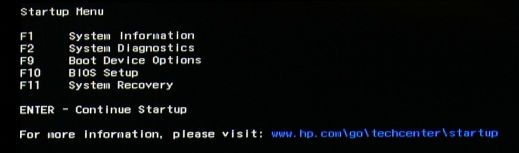
1) Press Esc key repeatedly, several times a second, while rebooting the laptop. Do NOT hold the key down, just press it over and over.
2) Eventually, you will see an HP Startup Menu -- that will look similar to the image below ...
HP Startup Menu.jpg
3) press the Function key for testing the hard drive (usually F2) and let it run.

Please report back the test results.


I am a volunteer and I do not work for, nor represent, HP
† The opinions expressed above are the personal opinions of the authors, not of HP. By using this site, you accept the <a href="https://www8.hp.com/us/en/terms-of-use.html" class="udrlinesmall">Terms of Use</a> and <a href="/t5/custom/page/page-id/hp.rulespage" class="udrlinesmall"> Rules of Participation</a>.