• ×
    Information
    Need Windows 11 help?
    Check documents on compatibility, FAQs, upgrade information and available fixes.
    Windows 11 Support Center.
  • post a message
  • ×
    Information
    Need Windows 11 help?
    Check documents on compatibility, FAQs, upgrade information and available fixes.
    Windows 11 Support Center.
  • post a message
Guidelines
Do you need help resolving ACPI Errors ACPI\VEN_BOOT&DEV_0000 and ACPI\VEN_PRP&DEV_0001 on HP Chromebook G2? Click here for the troubleshooting steps.
HP Recommended
HP Pavilion 14-bf180nd
Microsoft Windows 10 (64-bit)

Hi!

After having updated the NVIDEA GEFORCE Experience, my notebook (HP Pavilion 14-bf180nd) required a restart. It turned off, but I cannot get it to start up again. There is no sign of life whatsoever.


None of the suggested steps have worked so far.


If you have any ideas, please let me know! 🙂

1 REPLY 1
HP Recommended

Hello @TimHuisman 


Welcome to the HP Support Community. Thank you for posting.


  • The video card update caused the problem and needs to be removed to make the PC boot again.


  • Try "turning back time" by using System Restore in Windows


- Please, shutdown the computer using the power button (pressed and hold for a few seconds until PC powers off)

- Power the computer back on.

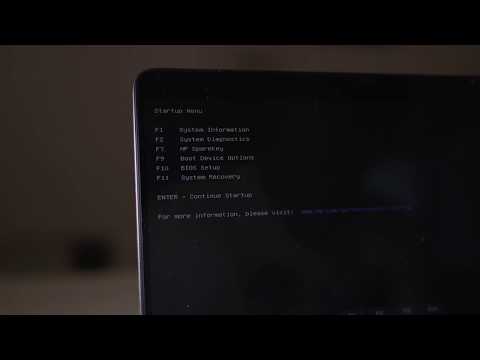
As soon as you press the power-on button, immediately begin hitting the Esc button (like tap-tap-tap) before any logo appears. This should open a HP Startup Menu >> https://www.youtube.com/watch?v=GSN0qzXayUY


- Choose F11 for System Recovery options.

The computer should boot from it's recovery partition to open you various recovery options. Note, that F11 option will only work if the recovery partition is there (not deleted) and intact. From there, you have prenty of options to choose from. Every HP computer comes with recovery partition present to assist in tough moments.


Please, perform "System Restore" first in an attempt to fix the issue. Please, restore back to previous days (restore point) where the issue was not present. Here is more info:

>> http://support.hp.com/us-en/document/c03327545#AbT5

>> https://www.tenforums.com/tutorials/4588-system-restore-windows-10-a.html


Hope this helps. Let me know how it goes. Provide your feedback/reply.

Your FEEDBACK is important. Use the interactive buttons below and let me know if the post helps ;
*** HP employee *** I express personal opinion only *** Joined the Community in 2013
HP Laptops On Amazon BEST PRICE - https://amzn.to/3CEJDF4 HP Spectre x360 - https://amzn.to/40Z1NM4 PLEASE SUBSCRIBE IF THIS HELPS YOU - IT HELPS ME :-) Here is a very quick video on how to enter the HP Boot Menu from a HP Laptop. Step 1 - Press the power on button. Step 2 - Quickly start pressing
† The opinions expressed above are the personal opinions of the authors, not of HP. By using this site, you accept the <a href="https://www8.hp.com/us/en/terms-of-use.html" class="udrlinesmall">Terms of Use</a> and <a href="/t5/custom/page/page-id/hp.rulespage" class="udrlinesmall"> Rules of Participation</a>.