-
×InformationNeed Windows 11 help?Check documents on compatibility, FAQs, upgrade information and available fixes.
Windows 11 Support Center. -

-
×InformationNeed Windows 11 help?Check documents on compatibility, FAQs, upgrade information and available fixes.
Windows 11 Support Center. -
- HP Community
- Notebooks
- Notebook Boot and Lockup
- Re: Product Information not valid

Create an account on the HP Community to personalize your profile and ask a question
12-06-2019 06:46 AM
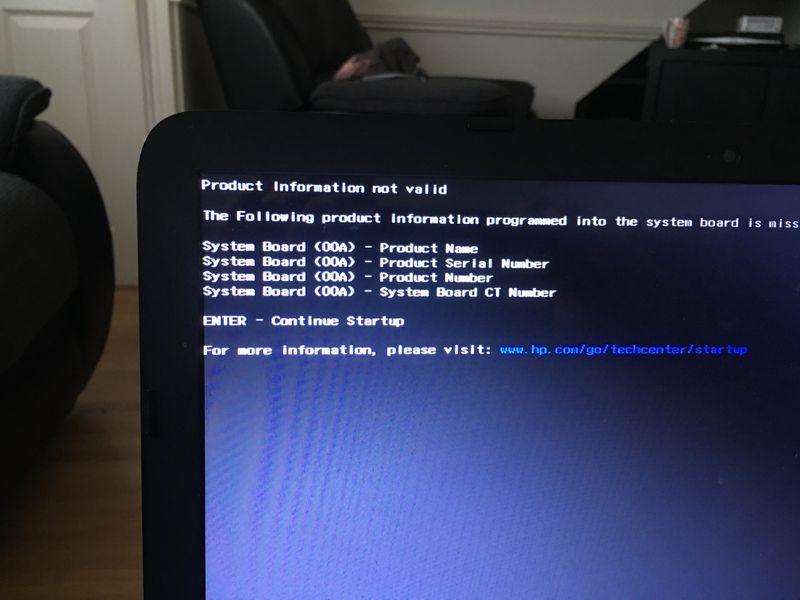
Hi, I keep getting a message on a black background when starting up, but will startup after pressing enter or after a certain time. A problem that occurs is that as soon as the mains plug is disconnected after a few seconds tghe laptop dies
12-06-2019 03:17 PM
Hi BAz8,
Kindly let me know if the system board was recently replaced.
It looks like the system board is not branded and to have the unit branded and it is not something we are able to do from here.
For assistance , you have to contact your regional HP Customer Support location directly
If you live in the US or Canada, contact information is on this page: http://www8.hp.com/us/en/contact-hp/phone-assist.html#section1
If you live elsewhere, contact information is on this page: http://www8.hp.com/us/en/contact-hp/ww-contact-us.html
***If my post helped, click the White thumbs-up symbol to say thanks***
***Please mark Accept As Solution if my post solved your problem***
Regards,
Karthik Nataraj
I am an HP employee.
I'm speaking on my behalf only and I'm not speaking for HP.
Please click the thumbs up button to say "Thanks!"
Clicking "Accept as Solution" on a reply that solves your problem makes it easier for other people to find solutions.
12-07-2019 02:23 AM
Hi, many thanks for the reply. The system board hasnt been replaced, it is still the original. I did have problems with the battery calibration and updated the bios through HP Support Assistant but not sure if that was the same time as this developed
12-07-2019 03:30 AM
Hi BAz8,
Thanks for the update.
follow the steps in the link mentioned below
https://support.hp.com/in-en/document/c01443496
***If my post helped, click the White thumbs-up symbol to say thanks***
***Please mark Accept As Solution if my post solved your problem***
Regards,
Karthik Nataraj
I am an HP employee.
I'm speaking on my behalf only and I'm not speaking for HP.
Please click the thumbs up button to say "Thanks!"
Clicking "Accept as Solution" on a reply that solves your problem makes it easier for other people to find solutions.