
-
×InformationNeed Windows 11 help?Check documents on compatibility, FAQs, upgrade information and available fixes.
Windows 11 Support Center. -
-
×InformationNeed Windows 11 help?Check documents on compatibility, FAQs, upgrade information and available fixes.
Windows 11 Support Center. -
- HP Community
- Notebooks
- Notebook Boot and Lockup
- Re: Windows 10 - Laptop won't go into sleep mode

Create an account on the HP Community to personalize your profile and ask a question
Your account also allows you to connect with HP support faster, access a personal dashboard to manage all of your devices in one place, view warranty information, case status and more.

It has been a while since anyone has replied. Simply ask a new question if you would like to start the discussion again.

08-08-2015 12:58 PM
 HP Recommended
I literally check this forum 5 times everyday and pray to see someone say that they found something that works that isnt something someone has already suggested or said or that an update has finally worked or anything!
What I did find out after the last time i posted that for me, the sleep issue always occurs right after i play something that's demanding. Like a game. I'll have my computer on all morning at right at night( when i'll play a game of LoL or something) is when the sleep issues occur and i thought it was because of the length of time I had the computer on.
So later I played earlier and realized I had a sleep issue when i had walked away, coming to the conclusion that the games I play are also creating the sleep issue, for me that is. I don't know if that matters but maybe it'll help whatever HP employee sees this and finally decides to help and post a message.
08-08-2015 01:00 PM
HP Recommended
Well I gave up and went back to windows 8.1 this evening, however after my shambolic experience of reverting to Windows 8.1 I wouldn't ncessarily recommend it.
Unfortunately I had the same problem as someone else on here that I could not log in after I had reverted so tried everything but in the end I have had to restore my laptop to factory settings.
Thankfully I store everything important online so have lost some stuff in the short term but not the long term.
I was finding it ever more difficult to shut down my laptop so was concerned that eventually I would not be able to shutdown or start up.
I don't like windows 8.1 but needs must.
I will keep a close eye on this forum and watch HP updates to see if a solution is forthcoming but for now they can forget it
08-08-2015 01:04 PM
HP Recommended
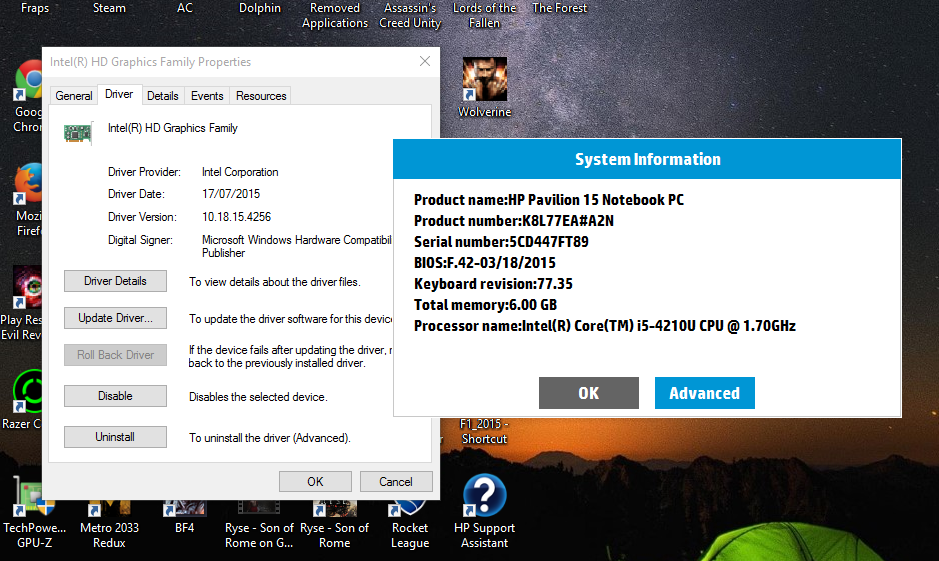
Revert back and then download from Media Creation Tool not from the "Get Window 10" icon. I simply don't understand why you guy are feeling unsafe reverting back to windows 8.1.. its not like it installs all over again, it just reverts (10 minute Process).Then after you revert redownload windows 10 using the tool and your good to go...
Heres the Image of my BIOS and intel driver version
08-08-2015 01:04 PM - edited 08-08-2015 01:05 PM
HP Recommended
Yeah I've also noticed that if I just browse the internet after starting the laptop, and I don't do anything "heavy" then I can go into sleep mode no problem. But if I play a game or open something demanding like a few programs, then I can't shutdown / sleep.
[EDIT]: Thanks for posting that ^. I still refuse reverting back though, I've seen too many comments like the one further above.
08-08-2015 01:04 PM
HP Recommended
All I know is that I'm debating if I should wait till the last time to downgrade to 8.1 is really worth it. If I do, I'll still wait till the last day I have, which is August 28 and then decide to revert or not. Hopefully the problem will be fixed then
08-08-2015 01:07 PM
HP Recommended
So after all the waiting this week for my laptop to be able to sleep/wake up/shut down I decided it was time to revert back! After all, I'm no techie - I haven't done any strange things to my laptop, HP support just asked me to download new drivers that apparently weren't compatible - and would it revert - would it chuff! Said there was a file missing (I haven't deleted anything) - wouldn't restore to my last known point before WIN10 so in the end we had to do a clean sweep.
Needless to say - now my laptop works....and I won't be going back to 'try' WIN 10 - and I will be making sure the Lenovo desktop doesn't auto download it either (although hubbies Lenovo laptop is fine)
08-08-2015 01:14 PM
HP Recommended
@Sat3rn wrote:Revert back and then download from Media Creation Tool not from the "Get Window 10" icon. I simply don't understand why you guy are feeling unsafe reverting back to windows 8.1.. its not like it installs all over again, it just reverts (10 minute Process).Then after you revert redownload windows 10 using the tool and your good to go...
Heres the Image of my BIOS and intel driver version
wow that looks interesting. i dont get it why i am not getting these drivers when i try to update my intel hd graphics drivers from device manager .it always says i have the latest drivers which infact is not correct as seeing the screen shots posted by you clearly tell us that the latest driver version is 10.18.15.4256 instead of 10.18.15.4248. have someone tried the above solution ?? please update this form if someone tries this.

Be alert for scammers posting fake support phone numbers and/or email addresses on the community.
If you think you have received a fake HP Support message, please report it to us by clicking on "Flag Post".
† The opinions expressed above are the personal opinions of the authors, not of HP. By using this site, you accept the Terms of Use and Rules of Participation.


Didn't find what you were looking for?
Ask the community
† The opinions expressed above are the personal opinions of the authors, not of HP. By using this site, you accept the <a href="https://www8.hp.com/us/en/terms-of-use.html" class="udrlinesmall">Terms of Use</a> and <a href="/t5/custom/page/page-id/hp.rulespage" class="udrlinesmall"> Rules of Participation</a>.