
-
×InformationNeed Windows 11 help?Check documents on compatibility, FAQs, upgrade information and available fixes.
Windows 11 Support Center. -
-
×InformationNeed Windows 11 help?Check documents on compatibility, FAQs, upgrade information and available fixes.
Windows 11 Support Center. -
- HP Community
- Notebooks
- Notebook Boot and Lockup
- Re: Windows 10 - Laptop won't go into sleep mode

Create an account on the HP Community to personalize your profile and ask a question
Your account also allows you to connect with HP support faster, access a personal dashboard to manage all of your devices in one place, view warranty information, case status and more.

It has been a while since anyone has replied. Simply ask a new question if you would like to start the discussion again.

08-11-2015 12:03 PM
 HP Recommended
@BeasTech5000 wrote:is it just me or has the update been released to fix this sleep issue, it did say it was intelso it might be it!!!!!!! does this update work for anyone else because i havent tested it yet !! IF THIS WORKS
Can you be more specific? What intel update? What machine? What driver?
08-11-2015 12:07 PM - edited 08-11-2015 12:09 PM
HP Recommended
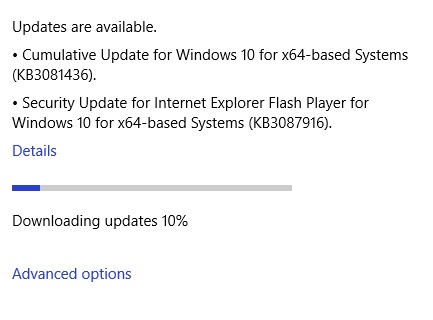
I am currently downloading the above from Windows Update. Of course, I have no idea what the CUMULATIVE UPDATE does. I guess I will go find out. 🙂 ....and the UPDATE contains:
The security update for Windows 10 that is dated August 11, 2015, includes improvements to improve the functionality of Windows 10 and resolves the following vulnerabilities in Windows:
- 3086251 MS15-092: Vulnerabilities in the .NET Framework could allow elevation of privilege: August 11, 2015
- 3084525 MS15-091: Cumulative security update for Microsoft Edge: August 11, 2015
- 3082458 MS15-088: Unsafe command-line parameter passing could allow information disclosure: August 11, 2015
- 3082487 MS15-085: Vulnerability in Mount Manager could allow elevation of privilege: August 11, 2015
- 3078662 MS15-080: Vulnerabilities in Microsoft graphics component could allow remote code execution: August 11, 2015
- 3082442 MS15-079: Cumulative security update for Internet Explorer: August 11, 2015
I do not see "Fixes all the HP users out there who have been left out in the cold after upgrading to Windows 10 and have exhausted all of their kleenex as a result" in the list. 😞
08-11-2015 12:23 PM
HP Recommended
Updates downloaded and installed.. no intel drivers though (guessing because I already have the latest from their site) and will not be holding my breath.
Already part way through a personal fix for this, if this is not fixed tonight from these updates then tomorrow will be an interesting day for me 
08-11-2015 12:27 PM
HP Recommended
@re4med wrote:
@BeasTech5000 wrote:is it just me or has the update been released to fix this sleep issue, it did say it was intelso it might be it!!!!!!! does this update work for anyone else because i havent tested it yet !! IF THIS WORKS
Can you be more specific? What intel update? What machine? What driver?
He meant KB3081436, available through Windows Update. No, this don't fix anything!
08-11-2015 12:45 PM
HP Recommended
I had a feeling there'd be an update today. Don't all Microsoft updates release on a Tuesday? I expect another one next Tuesday. But as for the update itself, it's just all Microsoft Office updates by the looks of it! No use for fixing our issue.
And another day passes...
08-11-2015 12:57 PM - edited 08-11-2015 01:00 PM
HP Recommended
@Timstarh01 wrote:Everyone should check their HP Support Assistant, there's a Intel Chipset update which may fix it.
It is there for my system (HP Pavillion 15 laptop). You would think the description, if it were the resolution, would say something like:
"FIXES the 500 thousand HP laptops out there that are suffering through a nightmare upgrade to Windows 10 and robs the local liquor stores of business"....or something related 😉
...and of course, it wants me to restart my computer. You would think, after X number of versions of Windows, They would figure out how to update without making me close everything and reboot/restart/press and hold the power button/stand on my head and sing doo-dah...SIGH.

Be alert for scammers posting fake support phone numbers and/or email addresses on the community.
If you think you have received a fake HP Support message, please report it to us by clicking on "Flag Post".
† The opinions expressed above are the personal opinions of the authors, not of HP. By using this site, you accept the Terms of Use and Rules of Participation.


Didn't find what you were looking for?
Ask the community
† The opinions expressed above are the personal opinions of the authors, not of HP. By using this site, you accept the <a href="https://www8.hp.com/us/en/terms-of-use.html" class="udrlinesmall">Terms of Use</a> and <a href="/t5/custom/page/page-id/hp.rulespage" class="udrlinesmall"> Rules of Participation</a>.