
-
×InformationNeed Windows 11 help?Check documents on compatibility, FAQs, upgrade information and available fixes.
Windows 11 Support Center. -
-
×InformationNeed Windows 11 help?Check documents on compatibility, FAQs, upgrade information and available fixes.
Windows 11 Support Center. -
- HP Community
- Notebooks
- Notebook Boot and Lockup
- Re: Windows 10 - Laptop won't go into sleep mode

Create an account on the HP Community to personalize your profile and ask a question
Your account also allows you to connect with HP support faster, access a personal dashboard to manage all of your devices in one place, view warranty information, case status and more.

It has been a while since anyone has replied. Simply ask a new question if you would like to start the discussion again.

08-16-2015 06:46 PM - edited 08-16-2015 06:48 PM
 HP Recommended
@DanG82 wrote:
Yup, just blocking it with that tool should do the trick. Version 11 is what it wants to install now, but that should permanently block it from installing ANY version without your permission.
Hey Dan...
I have not read much of the forum today so I am a little behind the news. the IME v. 11 is what some think is creating havoc?
EDIT: I notice that there is an Intel Graphics Chipset driver in the list as well. BLOCKED. This tool is good but it should be a part of Windows 10 PERIOD. I want the old way back (w/o going back to Win 8.1) 🙂
08-16-2015 06:57 PM
HP Recommended
@eldavies wrote:
@Sibu16 wrote:But I'm trying to avoid doing that and making further significant changes to my computer until I'm convinced it has been permanently successful for HP Envy 15 users.
Revert to 8.1, upgrade back to 10 from the microsoft website worked for my Envy 17 k-100
edit- AND- I just checked my IMEI driver- its OLD, from 2013. Happy to leave it that way.
Makes 100% total sense to me that this has always been the actual issue, I'd recommend everyone try rolling back this driver before resorting to the whole ->8.1 and back to 10 path.
Yep. This makes more sense logically. I was never completely convinced that revert - reinstall was the actual solution, though that it was I did eventually. The IME seems to be a piece of garbage driver anyhow unless you really need it. I am betting it can simply be DISABLED.
08-16-2015 07:00 PM - edited 08-16-2015 07:05 PM
HP Recommended
@DanG82 wrote:
Yeah, try downgrading to version 9 or 10 of the IME driver... Whatever's listed for your device on HP's site if available, or directly from Intel's site otherwise. Looking very promising so far!
Okay. I am on 9.5.24.1790 so I blocked Windows Update from giving me the "poisoned pill". 🙂
I wonder when v. 11 came out. Do you know if anyone has bothered to DISABLE it in device manager? I have read some interesting posts in some other tech forums that indicate that it can be with no issues.
EDIT: This is what I am seeing in more than a few places about the IME:
The "Intel Management Engine Interface " is a part of the VPro technology of intel.
This IMEI technology allows to manage your pc remotely.
And is more designed for enterpises then for home users.
...and this:
If your computer isn't part of a remotely-administered secure network (which typically involves Intel AMT), then you don't need IME. You really don't. It's like trying to stop thieves by putting padlocks on all the doors, cupboards, containers, and items inside your home - more hassle than it's worth.
08-16-2015 07:03 PM - edited 08-16-2015 07:41 PM
HP Recommended
I'll pitch in and try out this rollback IME "workaround" on my HP Envy by using the latest 10 for 8.1 while on Windows 10, reporting back any and all updates about the progress, including when my Internet will finally download this measily 70 MB file (usually it would be done by now but my Internet's been iffy today).
Edit: Also, I'll try and use this with one of the default power plans since I was using the one suggested awhile back with a little tweaking. The one suggested basically made sure my laptop never slept, but the hard shutdown wasn't able to be worked around.
Edit 2: Ok, as of this edit, the download's done and I'm about to begin testing. I'll take note that as of 8:10pm CST, the rollback began for me.
Edit 3: Ok, my IME is now on a rolled back version. Decided to just use the 9 version that looked to stay after my Windows 10 update. After restarting my laptop, I changed the power settings so that they would work normally and then restarted again. It's now 8:41pm. Time to just wait and see what happens.
08-16-2015 08:40 PM
HP Recommended
Hi Guys,
I've been following this thread for just under a week. I noticed hibernation wasn't working since I installed Windows 10 on July 29 but didn't find this thread for a while as I didn't try to sleep until more recently. I've rolled back my IME driver to version 9.something (2013) from the HP site for my model (Envy 15") under windows 8.1. The installation brung up an error message but it seemed to work according to the device manager. It hasn't been long but I'm 99% my computer is working properly now, so I wan't to thank everyone above who helped get to this point, even if their suggestion wasn't correct. I was days away from trying the revert to 8.1 and upgrade with the media creation tool trick, which would have been a huge pain.
I'm really dissapointed Intel/HP/Microsoft has allowed this to happen and hasn't done anything about it. Even if the computers of people on this forum are now working many others won't be. They need to send out a patch driver ASAP through Windows/HP updates and also set up an official article explaining how to fix it. I also don't wan't to have to turn updates off in case the driver tries to update again - for now I'm leaving updates on and if this problem pops up again I'll just roll back the driver again (it's great the solution is so simple).
For now though I'm much happier, and I'm also kind of glad it's mostly not Microsofts fault (I feel like this is more of an HP/Intel thing) - I do wan't Windows 10 to suceed. And thanks again guys, and let's prey there are no more complications.
08-17-2015 01:00 AM - edited 08-17-2015 01:10 AM
HP Recommended
Well, instead of editing my recent post, I'll just make a new one. The sleep mode seems to be back. It's been about 5 hours and a few minutes ago, I just opened up my laptop's lid after closing it about an hour ago. Between now and then, I have it set up to where it automatically sleeps upon closing and hibernates after 30 minutes. Right after I typed up to now, I tested out the sleep and it slept like a baby. Wakes up fine, too. After this post, I'll test out shutting down the laptop. I'm really thinking this will be the main fix for now. Sucks that the solution earlier now seems to have been stumped by this one (so far).
Edit: And, it has worked! Both sleep mode and shutdown have worked for me after 5 hours of doing the IME solution. Just to refresh those on how to go about that solution, follow these steps:
- Open Device Manager
- Go to System Devices > Intel(R) Management Engine Interface
- Right click it and choose Properties
- Go to the Driver Tab and choose "Rollback"
- Let it do its thing and then restart your device
- Let your device boot up and then start using it for a couple hours until you feel it's been long enough to test out the sleep and shutdown.
Ha, to think that we could have found this "solution" weeks ago...well, until then, hopefully Microsoft, HP, and Intel are still trying to find a true permanent solution.
08-17-2015 01:39 AM
HP Recommended
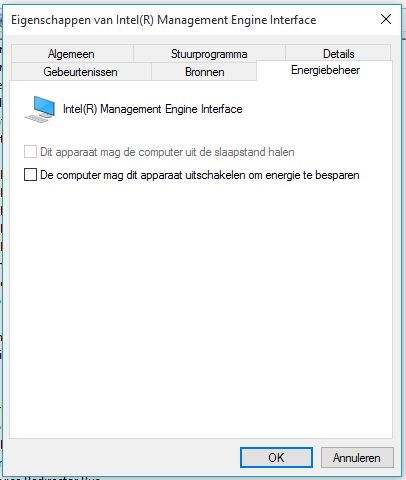
It looks like the sleeping mode problem on my Pavillion 17 is solved after uncheck the powerdown option in the Management Engine Interface (version 11.0.0.1155). I did a update from 8.1 to 10 and installed all microsoft and HP updates. It now without problems for two day.
08-17-2015 02:09 AM
HP Recommended
@DatEnvy: Thanks for posting the walkthrough, but FWIW on my device the roll back option was unavailable. I needed to uninstall, restart, pause Windows Update, download and install v9, block updates to the IME driver, and resume Windows Update in order to apply this fix.
Will post a step-by-step walkthrough of what I did in the next couple days if it continues to resolve the sleep/shut down issue!
Will post a step-by-step walkthrough of what I did in the next couple days if it continues to resolve the sleep/shut down issue!

Be alert for scammers posting fake support phone numbers and/or email addresses on the community.
If you think you have received a fake HP Support message, please report it to us by clicking on "Flag Post".
† The opinions expressed above are the personal opinions of the authors, not of HP. By using this site, you accept the Terms of Use and Rules of Participation.


Didn't find what you were looking for?
Ask the community
† The opinions expressed above are the personal opinions of the authors, not of HP. By using this site, you accept the <a href="https://www8.hp.com/us/en/terms-of-use.html" class="udrlinesmall">Terms of Use</a> and <a href="/t5/custom/page/page-id/hp.rulespage" class="udrlinesmall"> Rules of Participation</a>.