
-
×InformationNeed Windows 11 help?Check documents on compatibility, FAQs, upgrade information and available fixes.
Windows 11 Support Center. -
-
×InformationNeed Windows 11 help?Check documents on compatibility, FAQs, upgrade information and available fixes.
Windows 11 Support Center. -
- HP Community
- Notebooks
- Notebook Boot and Lockup
- Re: Windows 10 - Laptop won't go into sleep mode

Create an account on the HP Community to personalize your profile and ask a question
Your account also allows you to connect with HP support faster, access a personal dashboard to manage all of your devices in one place, view warranty information, case status and more.

It has been a while since anyone has replied. Simply ask a new question if you would like to start the discussion again.

08-19-2015 06:49 AM
 HP Recommended
@snk95 wrote:
I followed DanG82's solution and my laptop just correctly shutdown for the first time since I installed Windows 10. Thank you so much!
Yes. the IME issue is THE real solution. I never thought, and argued vehemently, that the revert to 8.1 and install from ISO/Media Creation Tool was the real solution. It simply made no sense in the bigger scheme of things. Though I did ultimately do it -- the real issue was the IME which would have come back again as soon as v. 11 got released and installed auto through Windows Update had I not found the utility to block it.
08-19-2015 09:49 AM
HP Recommended
I just went through the first few pages of this forum and shared these solutions in some of the other relevant threads... It's incredible how many people are experiencing these issues (the sleep/shutdown one in particular) and how uninformed or incorrect (or both) the responses from HP's support specialists are.
Hopefully they'll start to catch on as we share these solutions? Really just a shocking level of disconnect.

08-19-2015 03:12 PM
HP Recommended
I'd upgrade first and then use these steps to resolve any of the issues listed if they redevelop.
Using them pre-upgrade won't help since the upgrade process will overwrite a lot of your settings and drivers.
Good luck!
08-20-2015 02:46 AM
HP Recommended
@WFE1 wrote:It looks like the sleeping mode problem on my Pavillion 17 is solved after uncheck the powerdown option in the Management Engine Interface (version 11.0.0.1155). I did a update from 8.1 to 10 and installed all microsoft and HP updates. It now without problems for two day.
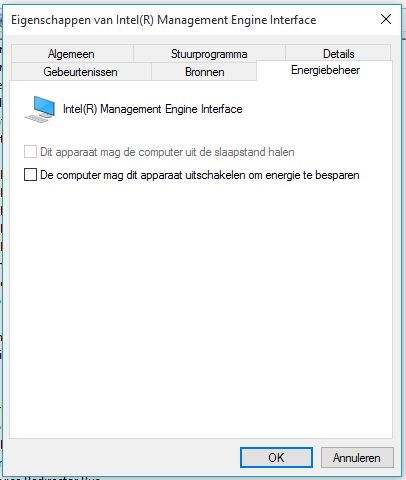
I've tried this as the least "invase" solution on my Pro x2 410 G1 and it works!
Thanks a lot!
08-20-2015 09:45 AM
HP Recommended
@cpj007 wrote:Never mind it just failed again. Worked for two days then quit.
How hard can this be?
Did you try following the steps I posted? They should work for your model!
08-20-2015 09:52 AM
HP Recommended
Well, we finally got an official acknowledgement from HP today... but the suggested "fix" is not an actual fix at all:

Be alert for scammers posting fake support phone numbers and/or email addresses on the community.
If you think you have received a fake HP Support message, please report it to us by clicking on "Flag Post".
† The opinions expressed above are the personal opinions of the authors, not of HP. By using this site, you accept the Terms of Use and Rules of Participation.


Didn't find what you were looking for?
Ask the community
† The opinions expressed above are the personal opinions of the authors, not of HP. By using this site, you accept the <a href="https://www8.hp.com/us/en/terms-of-use.html" class="udrlinesmall">Terms of Use</a> and <a href="/t5/custom/page/page-id/hp.rulespage" class="udrlinesmall"> Rules of Participation</a>.